
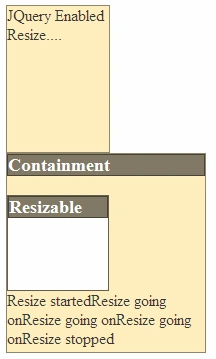
Rresizable interaction interaction will allows us to resize a DOM element by dragging it with mouse. You can specify constraints like maxheight, container etc on resizing an element. We can define callbacks on element's resize start, resizing and stop. Below script gives basic resizing feature:
<html>
<head>
<title>jQuery UI Resizable - Basic</title>
<link type="text/css" href="jquery-ui-1.7.2.custom.css" rel="stylesheet" />
<script type="text/javascript" src="jquery-1.3.2.min.js"></script>
<script type="text/javascript" src="ui.core.js"></script>
<script type="text/javascript" src="ui.resizable.js"></script>
<script type="text/javascript">
$(function() {
$('#resizeDiv').resizable({ maxHeight: 550,
maxWidth: 200,
minHeight: 150,
minWidth: 100, ghost: true, alsoResize: '#containerResize'
}); //Other Options: delay: ms, distance: in px
$('#containerResize').resizable({ containment: 'parent', aspectRatio: .6 });
}); </script>
</head>
<body>
<div id="resizeDiv" style="width: 100px; height: 150px" class="ui-widget-content">
JQuery Enabled Resize....
</div>
<div id="container" style="width: 200px; height: 200px" class="ui-widget-content">
<h3 class="ui-widget-header">
Containment</h3>
<div id="containerResize" style="width: 100px; height: 100px" class="ui-state-active">
<h3 class="ui-widget-header">
Resizable</h3>
</div>
</div>
</body>
</html>
We need below files to implement resizing:

Join the conversation! Your thoughts help the community grow.