

In order to generate an access token for a Microsoft resource, one needs to pass the "Resource" value in the token generation request.
Unfortunately, there is no documentation available mapping the Microsoft resources to the Resource URIs for different APIs.
Below are the details of the most common Microsoft APIs exposed on Microsoft Entra ID, along with the other details to generate an access token to those resources.
| Resource Name | Resource URI | Application ID |
| AAD Graph API | https://graph.windows.net/ | 00000002-0000-0000-c000-000000000000 |
| Office 365 Exchange Online | https://outlook-sdf.office.com/ | 00000002-0000-0ff1-ce00-000000000000 |
| Microsoft Graph | https://graph.microsoft.com | 00000003-0000-0000-c000-000000000000 |
| Skype for Business Online | https://api.skypeforbusiness.com/ | 00000004-0000-0ff1-ce00-000000000000 |
| Office 365 Yammer | https://api.yammer.com/ | 00000005-0000-0ff1-ce00-000000000000 |
| OneNote | https://onenote.com/ | 2d4d3d8e-2be3-4bef-9f87-7875a61c29de |
| Windows Azure Service Management API | https://management.core.windows.net/ | 797f4846-ba00-4fd7-ba43-dac1f8f63013 |
| Office 365 Management APIs | https://manage.office.com | c5393580-f805-4401-95e8-94b7a6ef2fc2 |
| Microsoft Teams Services | https://api.spaces.skype.com/ | cc15fd57-2c6c-4117-a88c-83b1d56b4bbe |
| Azure Storage Account | https://storage.azure.com/ | e406a681-f3d4-42a8-90b6-c2b029497af1 |
| Azure Analysis Service | https://*.asazure.windows.net | 4ac7d521-0382-477b-b0f8-7e1d95f85ca2 |
| Azure SQL Database | https://database.windows.net/ | 022907d3-0f1b-48f7-badc-1ba6abab6d66 |
| Azure Synapse Analytics | https://dev.azuresynapse.net/ | 1ac05c7e-12d2-4605-bf9d-549d7041c6b3 |
| Power BI | https://analysis.windows.net/powerbi/api | 00000009-0000-0000-c000-000000000000 |
| Common Azure Resources | https://management.azure.com | |
| Azure Key Vault | https://vault.azure.net | cfa8b339-82a2-471a-a3c9-0fc0be7a4093 |
To Identify for remaining resources, please follow the below steps :
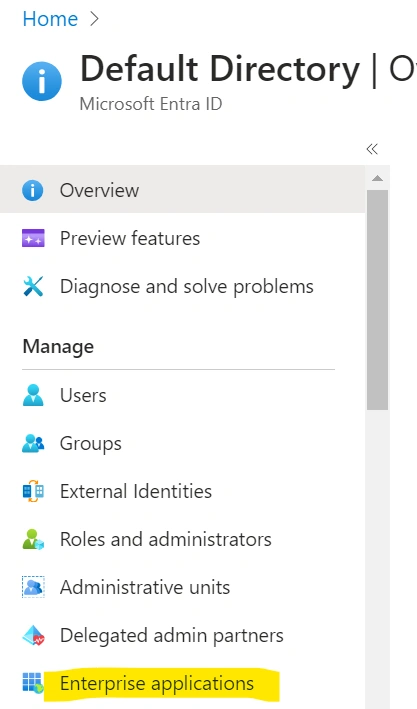
1. Login into Microsoft Entra ID: https://portal.azure.com/#view/Microsoft_AAD_IAM/ActiveDirectoryMenuBlade/~/Overview and click on Enterprise Applications.
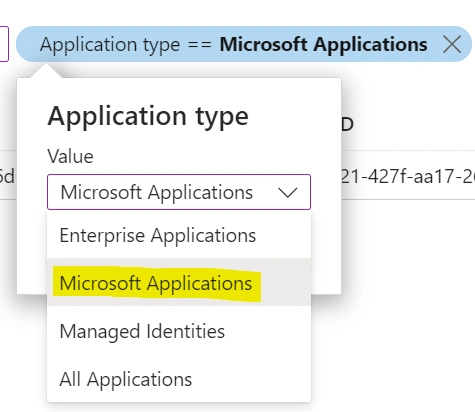
2. Filter on Application Type = "Microsoft Applications"
3. Search for your Microsoft Resource and get the Application ID and Resource URI details :

Join the conversation! Your thoughts help the community grow.