

A GridView control provides a Responsive Design and is easy with a fast and responsive development Bootstrap framework. 
So, let's proceed with the following procedure.
- Package Manager Console
PM > Install-Package Twitter.Bootstrap.Bootswatch.Cosmo
- Grid view Control and Data Binding
HeaderStyle-CssClass=" " ItemStyle-CssClass=" "
- Bootstrap Responsive Classes
Table table-striped table-bordered table-hover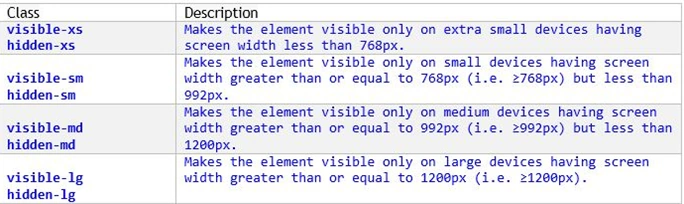
Create a new project using "File" -> "New" -> "Project..." then select Web then select "ASP.Net Web Forms Application". Name it “GridviewResponsive". 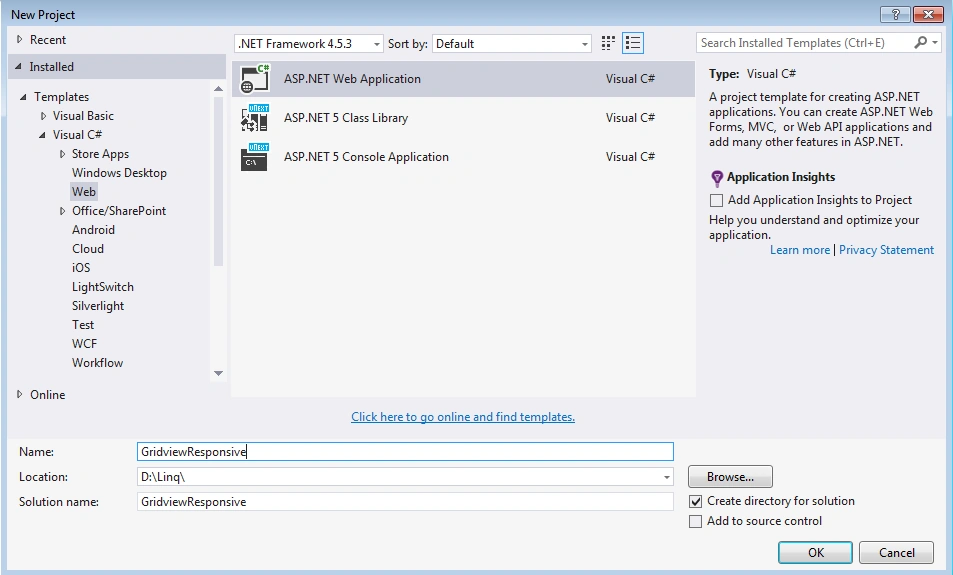
For the new ASP.NET Project select Empty template then select the Web Forms checkbox then click OK.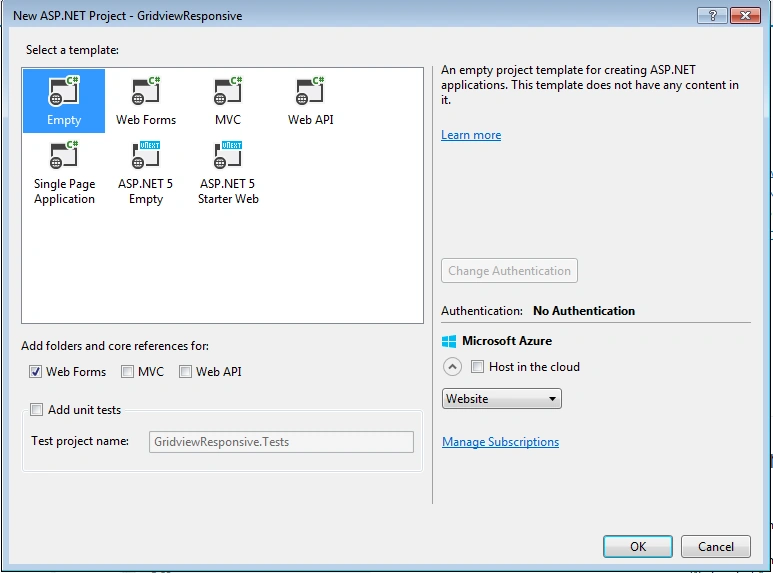
In the Design Source write the code as in the following.
Default.aspx
- <%@ Page Language="C#" AutoEventWireup="true" CodeBehind="Default.aspx.cs" Inherits="GridviewResponsive.Default" %>
- <!DOCTYPE html>
- <html xmlns="http://www.w3.org/1999/xhtml">
- <head>
- <title>Responsive GridView in ASP.NET</title>
- <meta charset="utf-8" />
- <meta name="viewport" content="width=device-width, initial-scale=1.0" />
- <link href="Content/bootstrap.cosmo.min.css" rel="stylesheet" />
- <link href="Content/StyleSheet.css" rel="stylesheet" />
- </head>
- <body>
- <form id="form1" runat="server">
- <br />
- <div id="mainContainer" class="container">
- <div class="shadowBox">
- <div class="page-container">
- <div class="container">
- <div class="jumbotron">
- <p class="text-danger">Responsive GridView in ASP.NET </p>
- <span class="text-info">Desktop Tablet Phone Different layout </span>
- </div>
- <div class="row">
- <div class="col-lg-12 ">
- <div class="table-responsive">
- <asp:GridView ID="grdCustomer" runat="server" Width="100%" CssClass="table table-striped table-bordered table-hover" AutoGenerateColumns="False" DataKeyNames="CustomerID" EmptyDataText="There are no data records to display.">
- <Columns>
- <asp:BoundField DataField="CustomerID" HeaderText="CustomerID" ReadOnly="True" SortExpression="CustomerID" />
- <asp:BoundField DataField="CompanyName" HeaderText="CompanyName" SortExpression="CompanyName" HeaderStyle-CssClass="visible-lg" ItemStyle-CssClass="visible-lg" />
- <asp:BoundField DataField="ContactName" HeaderText="ContactName" SortExpression="ContactName" ItemStyle-CssClass="visible-xs" HeaderStyle-CssClass="visible-xs" />
- <asp:BoundField DataField="ContactTitle" HeaderText="ContactTitle" SortExpression="ContactTitle" HeaderStyle-CssClass="visible-md" ItemStyle-CssClass="visible-md" />
- <asp:BoundField DataField="Address" HeaderText="Address" SortExpression="Address" ItemStyle-CssClass="hidden-xs" HeaderStyle-CssClass="hidden-xs" />
- <asp:BoundField DataField="City" HeaderText="City" SortExpression="City" ItemStyle-CssClass="hidden-xs" HeaderStyle-CssClass="hidden-xs" />
- <asp:BoundField DataField="Region" HeaderText="Region" SortExpression="Region" HeaderStyle-CssClass="visible-md" ItemStyle-CssClass="visible-md" />
- <asp:BoundField DataField="PostalCode" HeaderText="PostalCode" SortExpression="PostalCode" HeaderStyle-CssClass="visible-lg" ItemStyle-CssClass="visible-lg" />
- <asp:BoundField DataField="Country" HeaderText="Country" SortExpression="Country" HeaderStyle-CssClass="visible-md" ItemStyle-CssClass="visible-md" />
- <asp:BoundField DataField="Phone" HeaderText="Phone" SortExpression="Phone" HeaderStyle-CssClass="visible-lg" ItemStyle-CssClass="visible-lg" />
- </Columns>
- </asp:GridView>
- </div>
- </div>
- </div>
- </div>
- </div>
- </div>
- </div>
- </form>
- </body>
- </html>
Default.aspx.cs
- using System;
- using System.Collections.Generic;
- using System.Linq;
- using System.Web;
- using System.Web.UI;
- using System.Web.UI.WebControls;
- namespace GridviewResponsive
- {
- public partial class Default : System.Web.UI.Page
- {
- NorthwindDataContext dc = new NorthwindDataContext();
- protected void Page_Load(object sender, EventArgs e)
- {
- var qry = from s in dc.Customers
- select s;
- grdCustomer.DataSource = qry;
- grdCustomer.DataBind();
- }
- }
- }

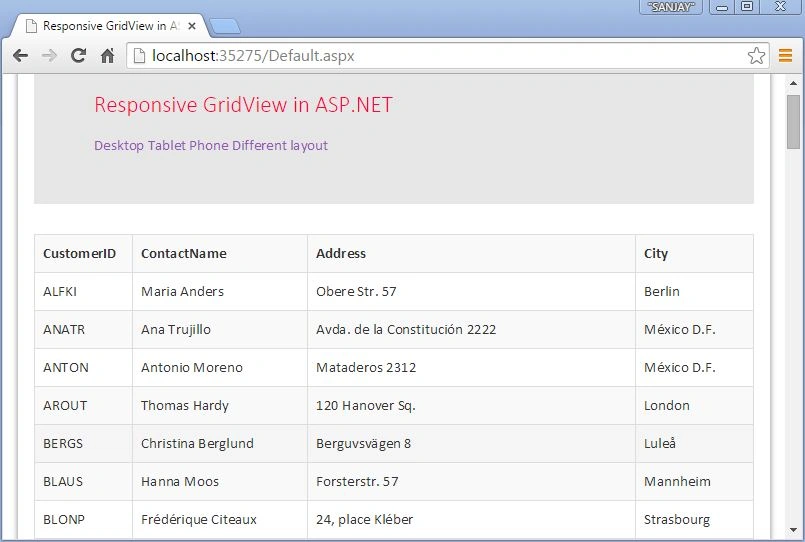
Now run the page, it will look like the following Tablet layout.
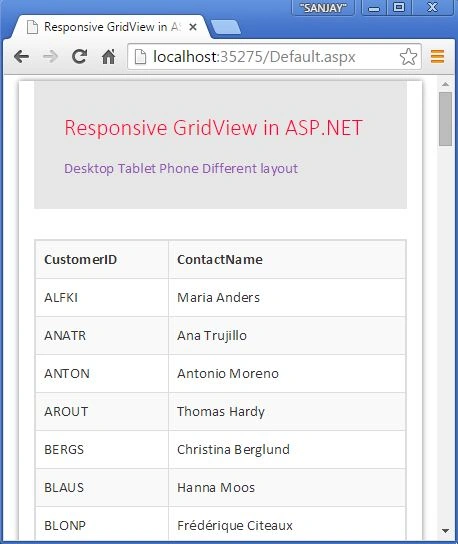
Now run the page, it will look like the following Phone layout.
I hope this article is useful. If you have any other questions then please provide your comments below.
ali mhPosted Apr 25, 2024, 12:02 PM
Okay, but where did the other fields go in Tablet and Mobile mode?
Sunil SawantPosted Sep 26, 2018, 2:05 AM
It's simply hiding columns depending upon size. There is no way to see what contains in the hidden columns .
ali ahmedPosted Aug 29, 2018, 2:59 PM
It is showing just 2 columns but in larger case it shows all columns then how it is fully responsive sir?
christine sarsonasPosted Jun 26, 2018, 5:01 AM
Unable to download the source code :(
Bhavesh JadavPosted Apr 13, 2018, 1:27 AM
Good explanation...............
Hiren KansaraPosted Feb 26, 2018, 8:49 AM
Thanks a lot . mind blowing
Ravi TejaPosted Feb 11, 2018, 6:29 AM
Yah, working perfect.Thanks.
PANKAJ KUMARPosted Oct 21, 2016, 8:25 AM
Hello Sanjay Kumar, Nice Article but I have a question regarding this, Let suppose last column of the grid contain a button to fire an event in that case how user will see and click that. Because there are only two column are showing. there will be the option for the scrolling the whole grid in mobile view or anything that I have to do? Please answer.
Michael ArroyoPosted Aug 22, 2015, 9:59 PM
Really Useful
anubha agrawalPosted Aug 21, 2015, 5:19 AM
nice article ...but when i add button than gridview is no more responsive
xmen romaPosted Aug 10, 2015, 4:51 AM
Very nice. Thank you very much. I like it.
Humayun Kabir MamunPosted Jul 1, 2015, 5:32 AM
Thanks Sanjay Kumar, it helps me a lot.
Altrin rejoPosted Jun 24, 2015, 2:05 AM
wonderfull thank u so much sir
Nasir AbbasPosted May 2, 2015, 10:45 AM
is it work with bootstrap 2.3.2 version?
Gowtham RajamanickamPosted Mar 21, 2015, 11:55 AM
good one...
NitinPosted Mar 20, 2015, 2:33 AM
nice one
Khargesh RajputPosted Mar 19, 2015, 11:41 PM
nice article sir
RakeshPosted Mar 19, 2015, 7:38 PM
Nice article..
Pankaj Kumar ChoudharyPosted Mar 19, 2015, 1:17 PM
Thanks Sanjay sir Really I was looking for this type of article for a long time... what will this concept work with datalist asp.net control