

In the world of enterprise AI, LLMs are inherently non-deterministic and flaky. Vector databases experience network partitions, LLM providers enforce strict rate limits, and users inevitably upload corrupted files. If your Multi-Agent LangGraph system relies on synchronous, in- memory execution, a single failure crashes the entire pipeline. In an event-driven architecture, a failure without proper handling results in infinite retry loops, draining your AWS bill and corrupting your state. To build a truly enterprise-grade AI system, you must master the triad of resilience: Retries, Dead Letter Queues (DLQs), and Poison-Message Handling.
In this article, we will explore how to implement these patterns end-to-end in an Enterprise Legal Contract Analysis RAG system using LangGraph and AWS SQS.
Part 1: The Theory of AI Resilience
Before writing code, we must distinguish between the three types of failures in an AI pipeline:
1. Transient Failures (The "Retry" Pattern)
What it is: Temporary issues. LLM API returns a
429 Too Many Requests, the Vector DB drops a connection, or a brief network blip occurs.The Solution: Exponential Backoff with Jitter. You retry the operation, waiting progressively longer each time, with a random jitter to prevent thundering herd problems.
Note: In LLM systems, we often handle these in-code (using libraries like
tenacity) rather than relying on SQS retries, because SQS visibility timeouts (minimum 0s, default 30s) are too slow for a 429 rate limit that clears in 2 seconds.
2. Systemic/Unknown Failures (The "DLQ" Pattern)
What it is: The system is fundamentally broken right now. The LLM provider is completely down, or the worker ran out of memory.
The Solution: Dead Letter Queues (DLQ). If a message fails processing
Ntimes (Max Receive Count), SQS automatically moves it to a DLQ. This stops the infinite loop, allowing engineers to investigate and replay the message later.
3. Poison Messages (The "Fail Fast" Pattern)
What it is: A message that will never succeed, no matter how many times you retry it. In AI, this happens when a user uploads a corrupted PDF, the payload has malformed JSON, or an LLM hallucinates a tool call with an invalid schema that crashes your parser.
The Solution: Poison-Message Handling. You must validate the payload before invoking the LangGraph. If it's poison, reject it immediately and route it to the DLQ. Do not waste 5 SQS retries on a poisoned message.
Part 2: The Use Case - Legal Contract RAG
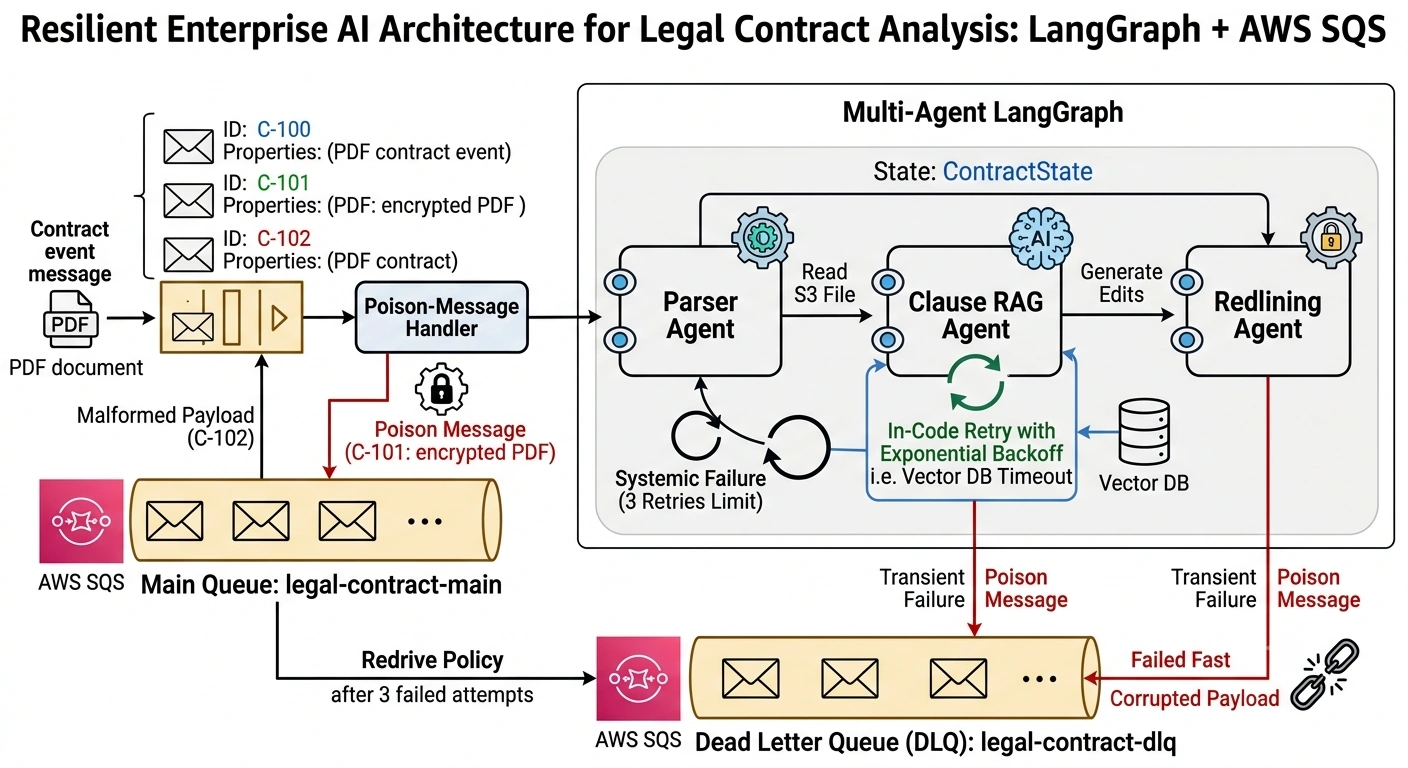
The Scenario: A corporate legal team uses an AI system to analyze incoming M&A contracts.
The pipeline consists of three LangGraph agents:
Parser Agent: Extracts text and metadata from the uploaded contract.
Clause RAG Agent: Retrieves similar clauses from the firm's historical Vector DB and identifies risk factors.
Redlining Agent: Generates suggested legal edits.
The Failure Scenarios:
Transient: The Vector DB times out during the Clause RAG phase.
Poison: The user uploads a password-protected, encrypted PDF. The Parser Agent will never be able to read it.
Systemic: OpenAI experiences a global outage.
Part 3: End-to-End Code Implementation
Prerequisites: boto3, langgraph, langchain, tenacity (for robust retries)
Step 1: Provisioning SQS and the DLQ
First, we create the Main Queue and the Dead Letter Queue, linking them via a Redrive Policy.
import boto3
import json
import time
from tenacity import retry, stop_after_attempt, wait_exponential, retry_if_exception_type
from langgraph.graph import StateGraph, END
from langchain_core.messages import HumanMessage, AIMessage
from typing import TypedDict, Annotated, Sequence
import operator

sqs = boto3.client('sqs')

# 1. Create the Dead Letter Queue (DLQ)
dlq = sqs.create_queue(QueueName='legal-contract-dlq')
dlq_arn = sqs.get_queue_attributes(
    QueueUrl=dlq['QueueUrl'], AttributeNames=['QueueArn'])['Attributes']['QueueArn']

# 2. Create the Main Queue with a Redrive Policy
# MaxReceiveCount=3 means after 3 failed processing attempts, it goes to the DLQ
main_queue = sqs.create_queue(
    QueueName='legal-contract-main',
    Attributes={
        'RedrivePolicy': json.dumps({
            'deadLetterTargetArn': dlq_arn,
            'maxReceiveCount': '3'
        }),
        'VisibilityTimeout': '60' # Give agents 60 seconds to process before returning to queue
    }
)
main_queue_url = main_queue['QueueUrl']

print("Infrastructure ready.")
Step 2: Defining the Multi-Agent LangGraph
We define our agents. Notice we use the @retry decorator from tenacity on the RAG/LLM calls to handle transient failures in-code.
# Custom Exception for Transient Errors
class TransientAIError(Exception): pass

# Custom Exception for Poison/Validation Errors
class PoisonMessageError(Exception): pass

# 1. Define State
class ContractState(TypedDict):
    messages: Annotated[Sequence[HumanMessage | AIMessage], operator.add]
    contract_id: str
    file_s3_uri: str
    extracted_text: str
    risk_clauses: list

# 2. Define Nodes
def parser_agent(state: ContractState):
    """Extracts text. Fails fatally if file is encrypted (Poison)."""
    print(f"[Parser] Reading {state['file_s3_uri']}...")

    # Simulate checking for an encrypted/corrupted file
    if "encrypted" in state['file_s3_uri']:
        raise PoisonMessageError("File is encrypted and cannot be parsed.")

    return {"extracted_text": "M&A Agreement between Corp A and Corp B...",
            "messages": [AIMessage(content="Parsed.")]}

@retry(
    stop=stop_after_attempt(3),
    wait=wait_exponential(multiplier=1, min=2, max=10),
    retry=retry_if_exception_type(TransientAIError),
    reraise=True
)
def clause_rag_agent(state: ContractState):
    """Queries Vector DB. Simulates transient network failures."""
    print("[RAG Agent] Querying Vector DB for historical clauses...")

    # Simulate a transient failure (e.g., Vector DB timeout)
    if not hasattr(clause_rag_agent, "retry_count"):
        clause_rag_agent.retry_count = 0

    clause_rag_agent.retry_count += 1
    if clause_rag_agent.retry_count < 2:
        print("  -> Transient Error: Vector DB Connection Timeout!")
        raise TransientAIError("Vector DB Timeout")

    print("  -> Vector DB connection successful.")
    return {"risk_clauses": ["Indemnification", "Limitation of Liability"],
            "messages": [AIMessage(content="RAG complete.")]}

def redlining_agent(state: ContractState):
    """Generates edits."""
    print("[Redlining Agent] Generating suggested edits via LLM...")
    return {"messages": [AIMessage(content="Redlines generated.")]}

# 3. Build Graph
workflow = StateGraph(ContractState)
workflow.add_node("parse", parser_agent)
workflow.add_node("rag", clause_rag_agent)
workflow.add_node("redline", redlining_agent)

workflow.set_entry_point("parse")
workflow.add_edge("parse", "rag")
workflow.add_edge("rag", "redline")
workflow.add_edge("redline", END)

app = workflow.compile()
Step 3: The Resilient SQS Consumer
This is the core of the architecture. It validates for poison messages, invokes the graph, and handles SQS message deletion or DLQ routing.
def process_contract_event(event):
    """The core worker logic"""
    for record in event.get('Records', []):
        body = json.loads(record['body'])
        receipt_handle = record['receiptHandle']

        # --- 1. POISON MESSAGE HANDLING (Fail Fast) ---
        # Validate payload schema before doing any expensive AI work
        if not body.get('contract_id') or not body.get('file_s3_uri'):
            print(f"[Consumer] POISON: Missing required fields. Routing to DLQ.")
            send_to_dlq(body, "Missing required fields")
            sqs.delete_message(QueueUrl=main_queue_url, ReceiptHandle=receipt_handle)
            continue

        # --- 2. EXECUTE LANGRAPH ---
        try:
            print(f"[Consumer] Processing contract {body['contract_id']}...")
            initial_state = {
                "messages": [HumanMessage(content="Analyze contract")],
                "contract_id": body['contract_id'],
                "file_s3_uri": body['file_s3_uri'],
                "extracted_text": "",
                "risk_clauses": []
            }

            # Invoke the graph.
            # Transient errors inside nodes will be retried by @tenacity.
            # Poison errors will bubble up here.
            final_state = app.invoke(initial_state)

            # --- 3. SUCCESS: Delete from Main Queue ---
            print(f"[Consumer] SUCCESS. Deleting message from main queue.")
            sqs.delete_message(QueueUrl=main_queue_url, ReceiptHandle=receipt_handle)

        except PoisonMessageError as e:
            # --- 4. POISON ERROR: Route to DLQ immediately ---
            print(f"[Consumer] POISON: {e}. Routing to DLQ.")
            send_to_dlq(body, str(e))
            sqs.delete_message(QueueUrl=main_queue_url, ReceiptHandle=receipt_handle)

        except Exception as e:
            # --- 5. SYSTEMIC/UNKNOWN ERROR: Do NOT delete. ---
            # SQS will make the message visible again after VisibilityTimeout.
            # After MaxReceiveCount (3), SQS automatically moves it to the DLQ.
            print(f"[Consumer] UNHANDLED ERROR: {e}. Leaving message in queue for SQS retry/DLQ.")
            # In a real app, you might change the message visibility timeout here
            # to implement custom backoff at the SQS level.

def send_to_dlq(payload, error_reason):
    """Helper to send a message to the DLQ with error context"""
    dlq_payload = {
        "original_payload": payload,
        "error_reason": error_reason,
        "failed_at": time.strftime("%Y-%m-%dT%H:%M:%SZ", time.gmtime())
    }
    sqs.send_message(
        QueueUrl=dlq['QueueUrl'],
        MessageBody=json.dumps(dlq_payload)
    )
Step 4: Simulating the Scenarios
Let's prove that our architecture handles all three failure modes correctly.
def simulate_sqs_record(payload, receipt_handle):
    return {"Records": [{"body": json.dumps(payload), "receiptHandle": receipt_handle}]}

if __name__ == "__main__":
    print("="*50)
    print("SCENARIO 1: Transient Failure (Vector DB Timeout)")
    print("="*50)
    # The RAG agent will fail once, tenacity will retry, and it will succeed.
    # The message is deleted from the main queue.
    payload1 = {"contract_id": "C-100", "file_s3_uri": "s3://contracts/normal.pdf"}
    process_contract_event(simulate_sqs_record(payload1, "handle_1"))

    print("\n" + "="*50)
    print("SCENARIO 2: Poison Message (Encrypted PDF)")
    print("="*50)
    # The Parser agent will raise PoisonMessageError.
    # It bypasses retries and goes straight to the DLQ.
    payload2 = {"contract_id": "C-101", "file_s3_uri": "s3://contracts/encrypted.pdf"}
    process_contract_event(simulate_sqs_record(payload2, "handle_2"))

    print("\n" + "="*50)
    print("SCENARIO 3: Malformed Payload (Missing Fields)")
    print("="*50)
    # Fails schema validation immediately. Goes to DLQ.
    payload3 = {"contract_id": "C-102"} # Missing file_s3_uri
    process_contract_event(simulate_sqs_record(payload3, "handle_3"))

    print("\n" + "="*50)
    print("SCENARIO 4: Systemic Failure (Simulating Max Receives)")
    print("="*50)
    # We simulate an unhandled error. In reality, SQS would retry this 3 times.
    # We'll just show the logic of what happens when it finally hits the DLQ.
    print("[Simulation] Message failed 3 times in SQS. SQS automatically moves it to DLQ.")
    print("[Simulation] Engineers can now query the DLQ, fix the systemic bug, and replay.")
Expected Output:
==================================================
SCENARIO 1: Transient Failure (Vector DB Timeout)
==================================================
[Consumer] Processing contract C-100...
[Parser] Reading s3://contracts/normal.pdf...
[RAG Agent] Querying Vector DB for historical clauses...
  -> Transient Error: Vector DB Connection Timeout!
[RAG Agent] Querying Vector DB for historical clauses...
  -> Vector DB connection successful.
[Redlining Agent] Generating suggested edits via LLM...
[Consumer] SUCCESS. Deleting message from main queue.

==================================================
SCENARIO 2: Poison Message (Encrypted PDF)
==================================================
[Consumer] Processing contract C-101...
[Parser] Reading s3://contracts/encrypted.pdf...
[Consumer] POISON: File is encrypted and cannot be parsed.. Routing to DLQ.

==================================================
SCENARIO 3: Malformed Payload (Missing Fields)
==================================================
[Consumer] POISON: Missing required fields. Routing to DLQ.

==================================================
SCENARIO 4: Systemic Failure (Simulating Max Receives)
==================================================
[Simulation] Message failed 3 times in SQS. SQS automatically moves it to DLQ.
[Simulation] Engineers can now query the DLQ, fix the systemic bug, and replay.
Part 4: Advanced Enterprise Patterns for DLQs
Moving a message to a DLQ is only half the battle. In an enterprise environment, you must operationalize the DLQ:
Automated DLQ Replay with Patching:
Don't just let DLQ messages sit there. Build a "Replay Worker" that reads from the DLQ. If the failure was due to a bad LLM prompt, the engineer updates the prompt in the code, and the Replay Worker pushes the DLQ messages back to the Main Queue.DLQ Alerting:
Use AWS CloudWatch Alarms on theApproximateNumberOfMessagesVisiblemetric of the DLQ. If the DLQ depth > 0, page the on-call engineer immediately. A growing DLQ means your AI pipeline is broken.Context Enrichment:
Notice insend_to_dlqwe included theerror_reasonandfailed_attimestamp. When an engineer inspects the DLQ, they shouldn't have to guess why it failed. Include the stack trace or the specific LangGraph node that failed in the DLQ payload.Integration with Idempotency:
If you are using the Idempotency pattern (from the previous article), ensure that when a message is moved to the DLQ, the Idempotency store is updated toFAILED. This prevents a replayed message from being blocked by an oldIN_PROGRESSlock.
Conclusion
Building a Multi-Agent LangGraph system is easy; keeping it running in production is hard. By combining in-code exponential retries for transient LLM/DB blips, strict schema validation to fail-fast on poison messages, and SQS Dead Letter Queues to catch systemic failures, you create an AI architecture that is self-healing and financially predictable. Never let a bad PDF or a temporary network blip take down your enterprise AI pipeline. Design for failure, and your system will thrive.
Join the conversation! Your thoughts help the community grow.