

SharePoint lists are designed to have multiple attachments added to a list item. Whenever an attachment is added to a list item it internally creates an attachment folder. If there is no attachment for a list item, it won’t have an attachment folder. The attachment folder for a particular item will be located at the URL:
https://SiteURL/sites/Playground/Lists/ListName/Attachments/1
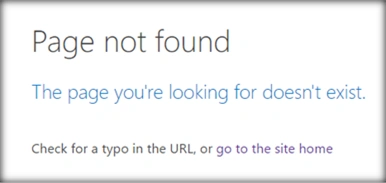
‘ListName’ is the name of the list. ‘Attachments’ is the folder for all the attachments within the list.’ 1’ is the folder name that is created with the name as List item ID. If there are no attachments for a list item, we would get the error, shown below, when the attachment folder is accessed.
Let’s see how we can read the attachments files and delete them using JavaScript Object Model.
Retrieve Attachment Files
- Add reference to jquery file,
- <script language="javascript" type="text/javascript" src="//ajax.googleapis.com/ajax/libs/jquery/1.8.1/jquery.min.js"></script>
- <script language="javascript" type="text/javascript">
- Within the document, call ready function SP.SOD.executeFunc, so as to load the on demand script SP.js . Call the main starting point function say: getListAttachments.
- SP.SOD.executeFunc('sp.js', 'SP.ClientContext', getListAttachments);
- Instantiate client context and get the Web instance. Once the Web object is retrieved, get the attachment folder object and the attachment files collection.
- var clientContext = new SP.ClientContext();
- var oWeb = clientContext.get_web();
- //Get the attachment folder for the list item and get the attachment collection
- var attachmentFolder=
- oWeb.getFolderByServerRelativeUrl('Lists/Custom/Attachments/1');
- attachmentFiles= attachmentFolder.get_files();
- Load the client context and execute the batch which will send the request to the Server and perform the entire JavaScript Object Model operations as a batch.
- clientContext.load(attachmentFiles);
- clientContext.executeQueryAsync(QuerySuccess, QueryFailure);
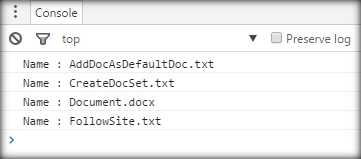
- In the success call back method, get the attachment file enumerator and loop through it.
Output- var attachmentEnumerator = attachmentFiles.getEnumerator();
- while (attachmentEnumerator.moveNext())
- {
- console.log(attachmentEnumerator.get_current().get_name());
- }
Full Code
- <script language="javascript" type="text/javascript" src="//ajax.googleapis.com/ajax/libs/jquery/1.8.1/jquery.min.js"></script>
- <script language="javascript" type="text/javascript">
- $(document).ready(function()
- {
- SP.SOD.executeFunc('sp.js', 'SP.ClientContext', getListAttachments);
- });
- var attachmentFiles;
- function getListAttachments()
- {
- //get client context and web
- var clientContext = new SP.ClientContext();
- var oWeb = clientContext.get_web();
- //Get the attachment folder for the list item and get the attachment collection
- var attachmentFolder = oWeb.getFolderByServerRelativeUrl('Lists/Custom/Attachments/1');
- attachmentFiles = attachmentFolder.get_files();
- //Load the client context and execute the batch
- clientContext.load(attachmentFiles);
- clientContext.executeQueryAsync(QuerySuccess, QueryFailure);
- }
- function QuerySuccess()
- {
- // get the attachment collection and loop through it
- var attachmentEnumerator = attachmentFiles.getEnumerator();
- while (attachmentEnumerator.moveNext())
- {
- console.log(attachmentEnumerator.get_current().get_name());
- }
- }
- function QueryFailure(sender, args)
- {
- console.log('Request failed - ' + args.get_message());
- }
- </script>
chandrakanth uttaraPosted Nov 17, 2020, 9:56 AM
DeleteAttachment2.deleteObject();
chandrakanth uttaraPosted Nov 17, 2020, 9:56 AM
Ex: deleteAttachment.deleteObject();
chandrakanth uttaraPosted Nov 17, 2020, 9:56 AM
For Deleting attachmets,is this logic can be applied to delete multiple list item attachments with single call.
Vignesh ManiPosted Jun 26, 2016, 4:45 PM
Nice one
Santhakumar MunuswamyPosted Jun 25, 2016, 12:22 AM
Thank you for nice article
Bhuvanesh MohankumarPosted Jun 24, 2016, 12:53 PM
Good one
Debasis SahaPosted Jun 24, 2016, 9:02 AM
Good One..
ruthvik deekondaPosted Jun 24, 2016, 1:28 AM
nice article :)
RajaPosted Jun 24, 2016, 12:06 AM
Good One....
Srikanth AgollaPosted Jun 24, 2016, 12:02 AM
Good one
Kuppurasu NagarajPosted Jun 23, 2016, 1:20 PM
Nice Sharing..
Prasanna MuraliPosted Jun 23, 2016, 12:01 PM
Nice one..