

Introduction:
AngularJS will help SharePoint developers to bind the data easily on SharePoint pages. With respect to angular context, the components will have the respective controllers defined. We will consider single app directives which will be initialized at the root level of the component.
Declare the html like below. Here, “listApp” is ng-app directive, which defines the application. Controller1 and controller2 are ng-controller directives which defines the controllers. Ng-repeat directive will instantiate template for item in the item collections. The template will hold the $scope object which will be referred in the script code.
- <div ng-app="listApp">
- <div id="App1" ng-controller="controller1">
- <h1>First List Items</h1>
- <div ng-repeat="item in items">
- <p>{{item.Title}}</p>
- </div>
- </div>
- <div id="App2" ng-controller="controller2">
- <h1>Second List Items</h1>
- <div ng-repeat="item in items">
- <p>{{item.Title}}</p>
- </div>
- </div>
- </div>
Then initialize the module. The below snippet helps you understand how app can be initialized using the module.
- var appVar = angular.module('listApp', []);
Then initialize both controllers using the respective controller names controller1 and controller2. The below code snippet helps you understand how the controller can be initialized with controller name and also calls the respective functions to retrieve the SharePoint list items. GetListItems is the function name with parameters $scope and list name. $scope holds the necessary properties for binding the list values.
- appVar.controller("controller1", function($scope){
- GetListItems($scope, "List1");
- });
- appVar.controller("controller2", function($scope){
- GetListItems($scope, "List2");
- });
Then we will use ajax calls to retrieve the items from SharePoint list using REST API. In this example, we are going to just retrieve the list item titles without any filters and bind it to the html elements. Remember to set headers to retrieve the list item values as JSON object. The retrieved JSON can directly bind to the html using $scope using $scope.items = data.d.results. The below code helps you understand in detail.
- function GetListItems($scope, listName){
- $.ajax({
- url: "/_api/web/lists/GetByTitle('"+listName+"')/items",
- method: "GET",
- async: false,
- headers: { "Accept": "application/json;odata=verbose" },
- success: function(data){
- $scope.items = data.d.results;
- },
- error: function(sender,args){
- console.log(args.get_message());
- }
- });
- }
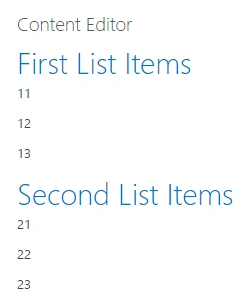
The below snapshot show the data from SharePoint list.
Summary:
Thus you have seen how to retrieve and bind the values to a SharePoint page from SharePoint list using AngularJS with single app and multiple controller directives.
Rakesh PatelPosted Dec 7, 2017, 12:46 AM
Nice post.. but What is we want 3-4 list item with single controller
Humayun Kabir MamunPosted Apr 10, 2016, 11:53 PM
Nice...
Rahul Kumar SaxenaPosted Apr 10, 2016, 11:05 AM
Good One
Vignesh ManiPosted Apr 10, 2016, 8:24 AM
Good
Gowtham RajamanickamPosted Apr 10, 2016, 8:03 AM
Very good one...