

In this article, I have explained how to retrieve the top site collections and subsites using Microsoft Graph API. In my previous article, I have already written about how to fetch access token to authorize your web application with Microsoft Graph. Use the below link to learn about Microsoft Graph,
- How To Fetch Access Token
- Getting User Properties From Office 365 Using Microsoft Graph API
- Send Email Using Microsoft Graph API From SharePoint Online
- Upload And Set Office 365 Profile Image Using Microsoft Graph API
Let's get started to retrieve SharePoint top site collections and subsites using Microsoft Graph API
Retrieve SharePoint Tenant Root Site
EndPoint - https://graph.microsoft.com/sites/root
It returns the root site properties id, webUrl, displayName, CreateddateTime, LastModified etc...
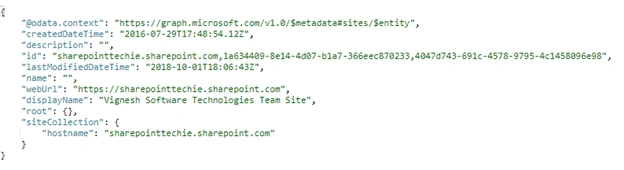
Retrieve Sharepoint Site Collection
EndPoint - https://graph.microsoft.com/v1.0/sites?search=*
Here we are using search equals to "*" to retrieve all the top level site collections from the SharePoint tenant host.
Code
- function requestToken() {
- $.ajax({
- "async": true,
- "crossDomain": true,
- "url": "https://cors-anywhere.herokuapp.com/https://login.microsoftonline.com/sharepointtechie.onmicrosoft.com/oauth2/v2.0/token", // Pass your tenant name instead of sharepointtechie
- "method": "POST",
- "headers": {
- "content-type": "application/x-www-form-urlencoded"
- },
- "data": {
- "grant_type": "client_credentials",
- "client_id ": "8baf0301-27df-44b1-b4fe-7911b9a918de", //Provide your app id
- "client_secret": "tZ76oVPN039WlWPoAp+1aICq66vs7oUtE4lhDQYwxGY=", //Provide your secret
- "scope ": "https://graph.microsoft.com/.default"
- },
- success: function(response) {
- console.log(response);
- token = response.access_token;
- console.log(token);
- getSiteInformation();
- },
- error: function(error) {
- console.log(JSON.stringify(error));
- }
- })
- }
Create a function "getSiteInformation" to initate the site collection request after successfully fetching the access token.
- function getSiteInformation(){
- $.ajax({
- "async": true,
- "crossDomain": true,
- "url": "https://graph.microsoft.com/v1.0/sites?search=*",
- "method": "GET",
- "headers": {
- "authorization": "Bearer" + token,
- "content-type": "application/json"
- },
- success: function(response) {
- console.log(response.value);
- },
- error: function(error) {
- console.log(JSON.stringify(error));
- }
- })
- }
After a successful response, it retrieves all 200 of my site collections from office 365 SharePoint.

Let's append it into a simple table to show the details of site collections
Final Result

Retrieve Subsite Using Microsoft Graph
EndPoint - https://graph.microsoft.com/v1.0/sites/{{site collection id}}/sites
Code
- function getSubsite() {
- $.ajax({
- method: 'GET',
- url: "https://graph.microsoft.com/v1.0/sites/sharepointtechie.sharepoint.com,1a634409-8e14-4d07-b1a7-366eec870233,4047d743-691c-4578-9795-4c1458096e98/sites",
- headers: {
- 'Authorization': 'Bearer ' + token,
- 'Content-Type': 'application/json'
- },
- }).success(function(response) {
- console.log(response.value);
- var data = response.value;
- for(var i=0; i<data.length; i++){
- console.log(data[i].displayName);
- var html = "<tr><td>" + data[i].displayName+ "</td><td>" + data[i].webUrl+ "</td><td>" + data[i].createdDateTime+ "</td>";
- $('.table tbody').append(html);
- }
- }).error(function(error) {});
- }
Response

Finally, we retrieved the subsites using Microsoft Graph API.
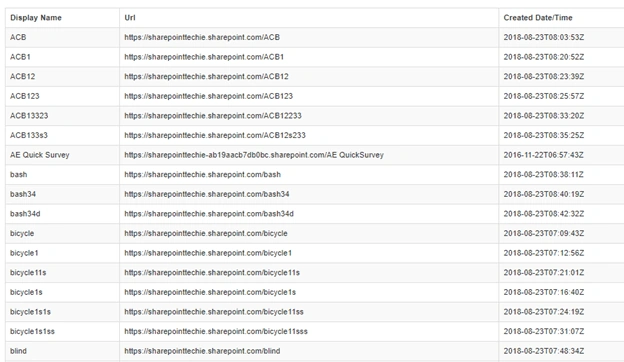
So, this article will help you to retrieve the Sharepoint top-level site collection and subsite of the site collections.
Rushi MehtaPosted Oct 23, 2018, 1:44 AM
Nice Article