

In a previous article, we learned How to configure Facebook as a Login Provider in ASP.NET Core Application.
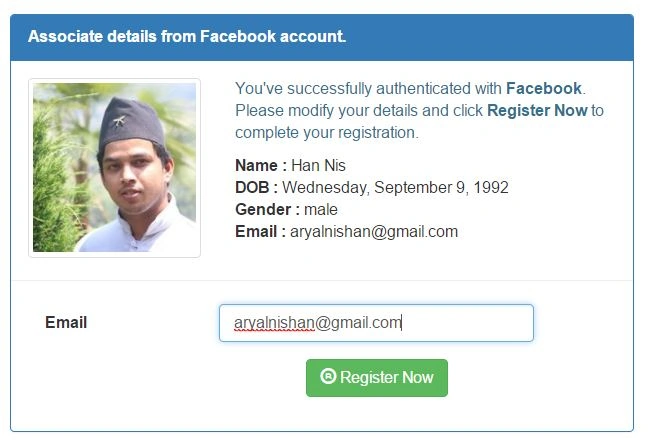
Now, in this article, we will discuss how can we retrieve logged-in user’s details, like Full name, Date of Birth, Gender, Email etc. from Facebook.
If you are trying to retrieve the Facebook User Details like Profile Picture, Email, Name, DOB and Gender, add the following lines in Configure method of the Startup class.
- app.UseFacebookAuthentication(new FacebookOptions() {
- AppId = "1X884XXXX138XXXX",
- AppSecret = "0XXc3645XXX1a3c2f8bXXXX86c242XX4",
- Scope = {
- "user_birthday", //Access the date and month of a person's birthday.
- "public_profile" //Provides access to a subset of items that are part of a person's public profile.
- //A person's public profile refers to the following properties on the user object by default:
- },
- Fields = {
- "birthday", //User's DOB
- "picture", //User Profile Image
- "name", //User Full Name
- "email", //User Email
- "gender", //user's Gender
- },
- });
Here, AppId and AppSecret are fed from Facebook App. If you are still confused, please refer to my previous article.
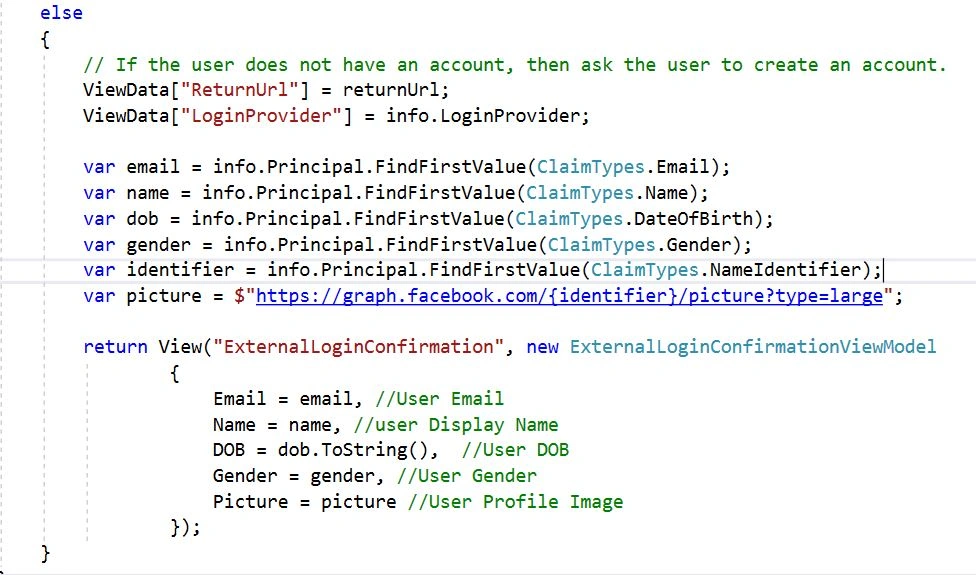
Now, the next step is to write some lines of code in ExternalLoginCallback method of AccountController to retrieve user details from Facebook,
The overall ExternalLoginCallback method looks like the following.
- // GET: /Account/ExternalLoginCallback
- [HttpGet]
- [AllowAnonymous]
- public async Task < IActionResult > ExternalLoginCallback(string returnUrl = null, string remoteError = null) {
- if (remoteError != null) {
- ModelState.AddModelError(string.Empty, $ "Error from external provider: {remoteError}");
- return View(nameof(Login));
- }
- var info = await _signInManager.GetExternalLoginInfoAsync();
- if (info == null) {
- return RedirectToAction(nameof(Login));
- }
- // Sign in the user with this external login provider if the user already has a login.
- var result = await _signInManager.ExternalLoginSignInAsync(info.LoginProvider, info.ProviderKey, isPersistent: false);
- if (result.Succeeded) {
- _logger.LogInformation(5, "User logged in with {Name} provider.", info.LoginProvider);
- return RedirectToLocal(returnUrl);
- }
- if (result.RequiresTwoFactor) {
- return RedirectToAction(nameof(SendCode), new {
- ReturnUrl = returnUrl
- });
- }
- if (result.IsLockedOut) {
- return View("Lockout");
- } else {
- // If the user does not have an account, then ask the user to create an account.
- ViewData["ReturnUrl"] = returnUrl;
- ViewData["LoginProvider"] = info.LoginProvider;
- var email = info.Principal.FindFirstValue(ClaimTypes.Email);
- var name = info.Principal.FindFirstValue(ClaimTypes.Name);
- var dob = info.Principal.FindFirstValue(ClaimTypes.DateOfBirth);
- var gender = info.Principal.FindFirstValue(ClaimTypes.Gender);
- var identifier = info.Principal.FindFirstValue(ClaimTypes.NameIdentifier);
- var picture = $ "https://graph.facebook.com/{identifier}/picture?type=large";
- return View("ExternalLoginConfirmation", new ExternalLoginConfirmationViewModel {
- Email = email, //User Email
- Name = name, //user Display Name
- DOB = dob.ToString(), //User DOB
- Gender = gender, //User Gender
- Picture = picture //User Profile Image
- });
- }
- }
Explanation
- Get external login information for Current login. [In our case, Facebook]
- var info = await _signInManager.GetExternalLoginInfoAsync();
- Sign in the user with this external login provider if the user already has a login.
- // Sign in the user with this external login provider if the user already has a login.
- var result = await _signInManager.ExternalLoginSignInAsync(info.LoginProvider, info.ProviderKey, isPersistent: false);
- if (result.Succeeded) {
- _logger.LogInformation(5, "User logged in with {Name} provider.", info.LoginProvider);
- return RedirectToLocal(returnUrl);
- }
Claudinei FerreiraPosted Apr 27, 2020, 3:48 AM
I’ve update to .Net Core 2.2 and work with success!!
Tridip BhattacharjeePosted Apr 23, 2018, 7:45 AM
How to do the same when working with asp.net mvc v5? would you please source code which i can download. thanks