

To further explore MVC, today I will share one of the interesting facts about MVC 3 to use multiple models in a single view.
I believe this is one of the interesting facts about MVC, that may be used on a regular basis. Because in today's world we generally don't keep data in a single place/model.
So let's go.
To move on I'd like to share a little bit about Model-View-Controller (MVC) with excerpts.
Controller
Controllers are the heart of MVC. A controller handles some of the main work of the application, such as:
- It handles the User Input.
- It handles the User Interaction.
- It reads the data from the View.
- Then it sends the data read to the Model.
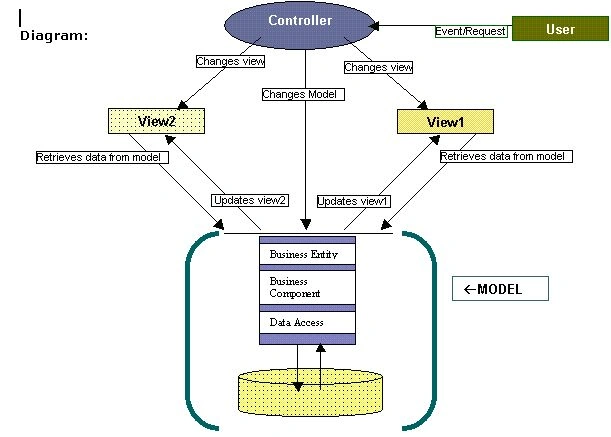
In a simpler manner you can say that it receives the request from the user and sends it to the Model, and then the Model retrieves the related data from the database and sends the result to the View. A controller can be associated with multiple view, in other words we can define multiple actions in the controller and show whichever view is associated with the action. It is similar to the Business Layer of a 3-tier architecture. It is the main part of the MVC architecture.
View
View is simply used to display the data; it is the Graphical Data Representation. "Model sends the output to the View then the View displays the data to the end user", so it works like a bridge between the Model and the End User. Often the views are created from the model data.
Model
A Model handles the logic for the application data; it implements the Data Domain logic. A Model is associated with Views and the Controller. It produces updated output on the view. Often model objects retrieve data from the database and store the data to the database. The Database Connection is part of the model and it provides the output requested by the user.
A typical diagram of MVC
Now we move ahead and discuss the code agenda of this article.
Step 1
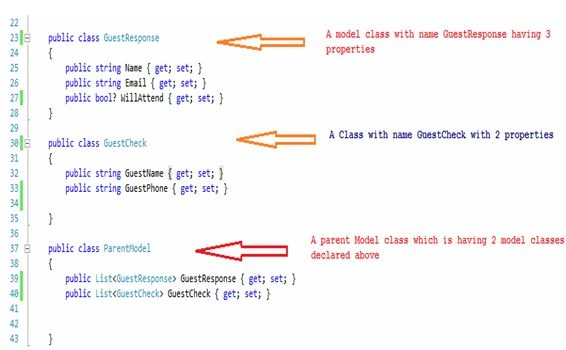
I've created a Model class named "GuestResponse" having the code snippet:
Step 2
Whenever we hit any URL in a browser it generally goes to a controller and the controller performs its action and returns its model to the view. I have HomeController for this purpose and the code shown in the following image:
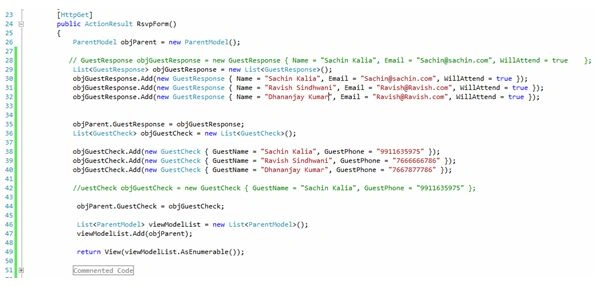
Let's discuss the code snippet in the image given above.
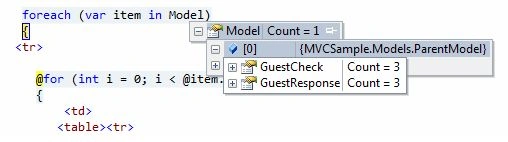
I first created an object of the ParentModel class like:
- ParentModel objParent = new ParentModel();
I then created an object of the GuestResponse model class, that is of a List type having some values, as in the following code snippet:
- List<GuestResponse> objGuestResponse = new List<GuestResponse>();
- objGuestResponse.Add(new GuestResponse { Name = "Sachin Kalia", Email = "[email protected]", WillAttend = true });
- objGuestResponse.Add(new GuestResponse { Name = "Ravish Sindhwani", Email = "[email protected]", WillAttend = true });
- objGuestResponse.Add(new GuestResponse { Name = "Dhananjay Kumar", Email = "[email protected]", WillAttend = true });

万春 吴Posted Oct 27, 2014, 1:01 AM
kidding
Vithal WadjePosted Jan 14, 2014, 1:18 PM
good effort
Sachin KaliaPosted Jan 14, 2014, 5:01 AM
Hi Rajesh..Kindly refer this link..it may help you .. http://www.codeproject.com/Articles/687061/Using-Multiple-Models-in-a-View-in-ASP-NET-MVC-4
Ali RasoulzadehPosted Jan 12, 2014, 11:35 PM
very good tanx