

Introduction
This article helps to get you started by explaining some key design considerations and providing a basic procedure. In this article, we will see about SharePoint Designer Workflow, when it is in suspended status, and how we can retrieve it programmatically. In the last section, you can find the links to complete Workflow examples.
Why we are using SharePoint designer Workflow?
We can design Workflows that add an Application logic to your site or an Application without writing a custom code.
Types of workflows
All SharePoint Workflows are associated with a SharePoint list/site. We have three different types of Workflows which can start and are given below.
- List Workflow
- Reusable Workflow
- Site Workflow
Before doing a deep dive on Workflows, first we will see about how to work on SharePoint Designer Workflows.
Create a SharePoint 2013 Designer Workflow steps
- Click Workflows section in the top navigation.
- We have three different Workflows. Select anyone -> List Workflowdrop-down in the New section of the ribbon.
- Choose the list with which we want to attach it.
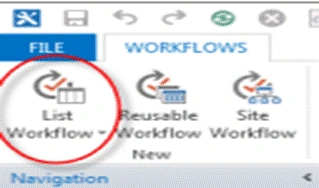
- Enter the basic details. Create List Workflow dialog box and then make sure that the platform type is set to SharePoint 2013 Workflow.
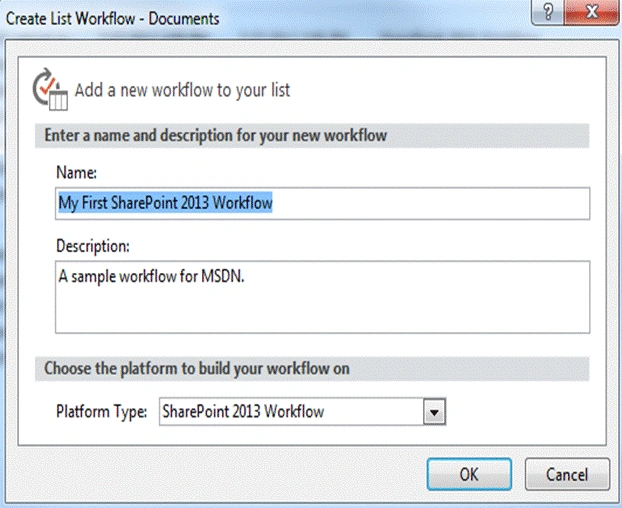
The procedure given above is used to create a List Workflow. A reusable Workflow or site Workflow can be created, using the same procedure with the modification given below.
Suspend/terminate Workflows automatically
Sometimes Workflows cannot start and it has been terminated/suspended automatically. We can see it in a Workflow settings page, see the status for the initiated Workflow, as suspended or canceled.
Example
This is the sample issue listed but many errors can occur, like the status given below.
The Workflow Information page displays an error message that resembles what is shown below.
See the error message given below.
RequestorId: ac01a77b-619a-dbd2-0000-000000000000.
Details
An unhandled exception occurred during the execution of the Workflow instance.
Exception details
- System.ApplicationException: HTTP 401 {
- "Transfer-Encoding": ["chunked"],
- "X-SharePointHealthScore": ["0"],
- "SPClientServiceRequestDuration": ["864"],
- "SPRequestGuid": ["ac01a77b-619a-dbd2-aa49-a4d2580be234"],
- "request-id": ["ac01a77b-619a-dbd2-aa49-a4d2580be234"],
- "X-FRAME-OPTIONS": ["SAMEORIGIN"],
- "MicrosoftSharePointTeamServices": ["15.0.0.4631"],
- "X-Content-Type-Options": ["nosniff"],
- "X-MS-InvokeApp": ["1; RequireReadOnly"],
- "Cache-Control": ["max-age=0, private"],
- "Date": ["Mon, 12 Jan 2015 20:03:16 GMT"],
- "Server": ["Microsoft-IIS\/8.5"],
- "WWW-Authenticate": ["NTLM"],
- "X-AspNet-Version": ["4.0.30319"],
- "X-Powered-By": ["ASP.NET"]
- }
- at Microsoft.Activities.Hosting.Runtime.Subroutine
- SubroutineChild.Execute(CodeActivityContext context) at System.Activities.CodeActivity.InternalExecute(ActivityInstance instance, ActivityExecutor executor, BookmarkManager bookmarkManager) at
- System.Activities.Runtime.ActivityExecutor.ExecuteActivityWorkItem.ExecuteBody(ActivityExecutor executor, BookmarkManager bookmarkManager, Location resultLocation)
Join the conversation! Your thoughts help the community grow.