

Visual studio Lightswitch is a Microsoft tool. Which is used for building business applications. If you want to make some notes using a rich text box in a LightSwitch application then you can.
Step by step solution for create the rich text box in Lightswitch
Step 1 : First of all open Visual studio Lightswitch then create new table.

Step 2 : Create table like NoteTaker_People.

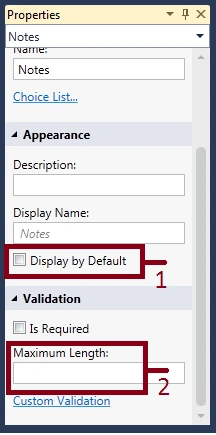
Step 3 : Go to notes property->Unmark display by default->Blank the maximum length.
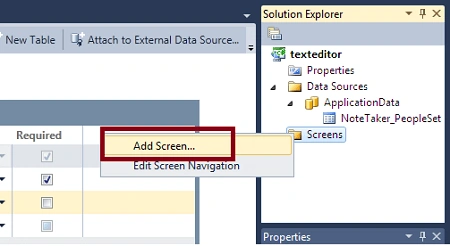
Step 4 : Now we add a list and details screen. Right click on screens->Add screen.
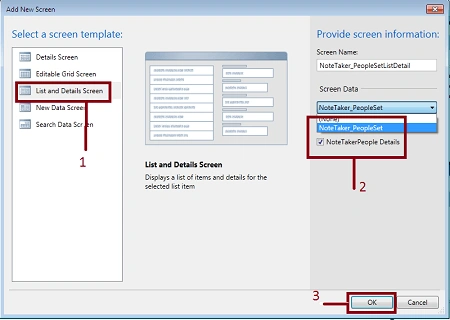
Step 5 : Select list and details screen->Select screen data (NoteTaker_People)->Mark the checkbox->Ok.
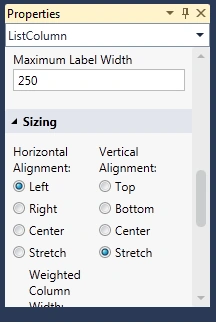
Step 6 : Go to ListColumn property and set the sizing i.e. left and stretch.
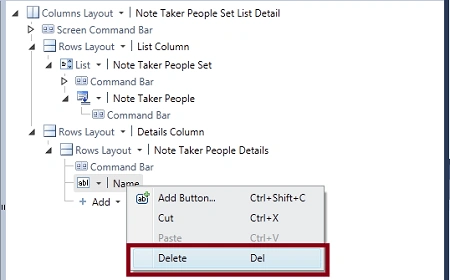
Step 7 : Right click on name in command bar->Delete.
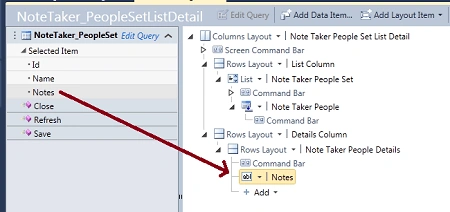
Step 8 : Move notes from screen to command bar.
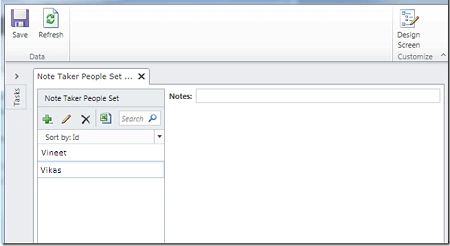
Step 9 : Run application (Press F5). Click on + sign and fill data. Now you can enter unlimited text in the notes.
Conclusion
As you know Visual Studio LightSwitch is a Microsoft tool which is used for building business applications. If you want to enter unlimited text into any property then you can. For this purpose you will fix the maximum length of any property like as notes.
Join the conversation! Your thoughts help the community grow.