

AI coding agents can now do much more than generate a few lines of code. They can inspect repositories, search files, explain existing code, create changes, run tests, and iterate on the results.
That makes one question increasingly relevant for development teams:
Should the coding agent run locally instead of sending source code to a cloud service?
Running an AI coding agent on local hardware can improve control over source code and network access, but it also introduces hardware, model, maintenance, and performance considerations.
The decision is not simply about whether a local model can generate code.
The real question is whether the local environment can provide enough model capability, memory, compute, and tooling for the work the agent needs to perform.
What Is a Local AI Coding Agent?
A local AI coding agent runs the model and supporting agent components on hardware controlled by the developer or organization.
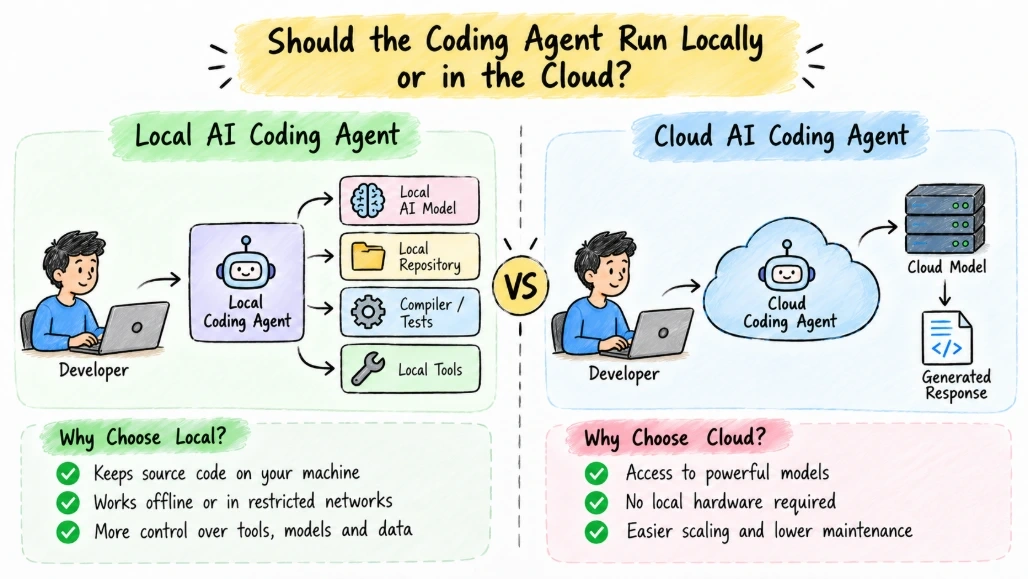
A simplified architecture looks like this:
Developer
    |
    v
Local Coding Agent
    |
    +----> Local AI Model
    |
    +----> Local Repository
    |
    +----> Compiler / Tests
    |
    +----> Local Tools
Unlike a cloud-based coding workflow:
Developer
    |
    v
Coding Agent
    |
    v
Cloud Model
    |
    v
Generated Response
the local architecture can keep source code and model inference within the local environment.
This can be useful when repository contents are sensitive or when network access is restricted.
Why Developers Consider Local AI
There are several practical reasons to consider running coding agents locally.
Code Privacy
A local agent can process source code without sending repository contents to an external model service.
This can be important for:
Proprietary source code
Internal applications
Security-sensitive projects
Customer-specific implementations
Offline development environments
However, "local" does not automatically mean private.
The complete toolchain should be examined, including telemetry, extensions, package managers, update mechanisms, and any external services used by the agent.
Offline Development
A local model can continue working when the development environment has limited or no internet connectivity.
For example:
Local Repository
      |
      v
Local Agent
      |
      v
Local Model
      |
      v
Compiler + Tests
This can be useful in restricted environments.
Greater Control
Organizations can choose:
Which model to run
Where the model runs
Which repositories it can access
Which tools the agent can execute
Which network connections are allowed
How data is retained
That level of control can be difficult to achieve with a fully managed external service.
Local Does Not Automatically Mean Better
A local model also has limitations.
A coding agent depends on more than the model itself.
A useful way to think about the system is:
AI Coding Agent
       |
       +-- Model
       +-- Context Window
       +-- Repository Index
       +-- Tool Execution
       +-- Compiler
       +-- Test Runner
       +-- File System
       +-- Memory
       +-- Compute
If any important part is constrained, the overall developer experience can suffer.
A powerful model running on inadequate hardware may be slower than a smaller workflow connected to a capable remote model.
Hardware Is the First Constraint
Local AI workloads can require substantial memory and compute resources.
The requirements depend heavily on the model, quantization, context length, concurrency, and inference engine.
A developer machine might have:
CPU
RAM
GPU
VRAM
SSD
Each affects the experience differently.
RAM
RAM becomes important when the model or supporting tools cannot fit comfortably in available memory.
If the system starts swapping heavily, performance can degrade significantly.
GPU and VRAM
GPU acceleration can improve local inference when the model and runtime support the available hardware.
VRAM is especially important because the model and its working data need to fit within available accelerator memory for efficient execution.
CPU
CPU-only inference can work for smaller models and lighter tasks, but generation speed may become a practical limitation for interactive development.
Storage
Local models can require substantial disk space.
You also need space for:
Model files
Repository indexes
Build artifacts
Container images
Package caches
Development tools
Model Size Changes the Hardware Equation
A larger model generally requires more resources.
A simplified comparison looks like this:
Model Approach | Hardware Requirement | Typical Trade-Off |
|---|---|---|
Small local model | Lower | Easier deployment, limited capability |
Medium local model | Moderate | Better capability, higher resource use |
Large local model | High | Greater resource requirements |
Quantized model | Reduced | Lower memory use with potential quality trade-offs |
Cloud model | Local hardware less important | Requires network and external service |
These are architectural categories rather than fixed performance guarantees.
Actual requirements depend on the specific model and runtime.
Coding Agents Need More Than Code Generation
A coding agent typically needs to perform multiple operations.
For example:
User Request
     |
     v
Inspect Repository
     |
     v
Find Relevant Files
     |
     v
Understand Dependencies
     |
     v
Modify Code
     |
     v
Run Tests
     |
     v
Inspect Failure
     |
     v
Fix Code
     |
     v
Run Tests Again
A local model must therefore work well with tool use and repository context, not just generate isolated code snippets.
This distinction matters when evaluating local models.
Repository Context Can Become the Bottleneck
Suppose a repository contains:
/src
/tests
/docs
/infrastructure
/config
The agent cannot normally place the entire repository into every model request.
Instead, the agent needs a strategy for finding relevant context.
A common architecture is:
Repository
    |
    v
Indexer
    |
    v
Search / Retrieval
    |
    v
Relevant Files
    |
    v
Local Model
The quality of repository retrieval can have a major effect on the agent's usefulness.
A capable model with poor repository context may still produce incorrect changes.
Local Coding Agents and C#
A local coding agent can work with a normal .NET development environment.
For example:
Repository
    |
    +--> dotnet restore
    |
    +--> dotnet build
    |
    +--> dotnet test
    |
    +--> Local AI Agent
The agent can generate a change and then use the local toolchain to validate it.
A simplified C# project workflow might be:
dotnet restore
dotnet build
dotnet test
The important point is that the compiler and test suite remain authoritative.
The model should not decide that code works simply because the generated code looks correct.
Let the Compiler Verify the Agent
Suppose the agent generates:
public async Task<User> GetUserAsync(int id)
{
    return await repository.FindAsync(id);
}
The agent can run:
dotnet buildIf compilation fails, the agent can inspect the error and make another change.
This creates a feedback loop:
Generate
   |
   v
Build
   |
   +---- Failed
   |       |
   |       v
   |     Fix
   |       |
   |       +----> Build
   |
   +---- Passed
           |
           v
         Test
This loop is often more important than simply having a large model.
When Local Hardware Makes Sense
Local execution can be particularly useful when several conditions apply.
Sensitive Source Code
If repository confidentiality is a major concern, local inference can reduce the need to transmit source code to external model services.
The organization should still verify that the entire local agent stack behaves as expected.
Restricted Networks
Some development environments have strict outbound network policies.
A local model can operate without depending on a continuous connection to a model provider.
Predictable Workloads
If developers primarily need:
Code explanation
Refactoring
Unit test generation
Documentation
Small feature changes
a suitably capable local model may be sufficient.
Repeated Usage
Teams that use coding agents heavily may consider local infrastructure when they want more direct control over capacity and deployment.
The economics depend on hardware costs, utilization, maintenance, model requirements, and the alternative service pricing.
When Cloud-Based Models May Be More Practical
Cloud execution can make more sense when developers need access to highly capable models without maintaining local infrastructure.
It can also be useful when:
Developers use multiple model providers
The workload changes frequently
Local hardware is limited
Large-context tasks are common
The organization does not want to maintain inference infrastructure
This is an architectural trade-off rather than a universal rule.
Local vs Cloud AI Coding
Factor | Local Agent | Cloud Agent |
|---|---|---|
Source code location | Can remain local | May be sent externally |
Internet dependency | Can be low | Usually required |
Hardware responsibility | Developer or organization | Provider |
Model updates | Managed locally | Usually provider-managed |
Scaling | Requires local infrastructure | Provider handles capacity |
Operational maintenance | Higher | Lower |
Data control | Greater direct control | Depends on provider policies |
Latency | Depends on hardware | Depends on network and service |
Model choice | Depends on local availability | Often broader |
The table describes architectural characteristics, not guarantees for every product.
Security Requires More Than Running Locally
A local coding agent may have access to:
Source Code
Secrets
Git Credentials
Environment Variables
SSH Keys
Build Tools
File System
That can make the agent itself a sensitive component.
Consider this architecture:
AI Agent
   |
   +--> Read Files
   +--> Write Files
   +--> Execute Commands
   +--> Access Git
   +--> Access Network
If the agent has unrestricted permissions, running it locally does not eliminate security risk.
The local agent should operate with the minimum permissions required.
Use a Restricted Development Environment
For higher-risk workflows, the agent can run inside an isolated environment.
For example:
Host Machine
     |
     v
Isolated Agent Environment
     |
     +--> Repository
     +--> Local Model
     +--> Compiler
     +--> Tests
The environment can restrict:
File-system access
Network access
Credential access
Process execution
Sensitive directories
Containers or virtual machines can be useful depending on the threat model.
Common Mistakes
Assuming Local Means Completely Private
Check telemetry and external connections across the complete toolchain.
Choosing a Model Based Only on Size
A larger model is not automatically more useful for a specific coding workflow.
Ignoring VRAM and RAM
Hardware constraints can determine whether a model is practical to run interactively.
Giving the Agent Full System Access
A local agent with unrestricted shell and file access can still create security problems.
Skipping Tests
Generated code should still pass the normal build and test process.
Ignoring Repository Retrieval
The agent needs relevant context to make useful changes.
Expecting Cloud-Level Scale From One Developer Machine
Local hardware has finite compute and memory.
Best Practices for Local AI Coding
Start With the Actual Workload
Identify what developers want the agent to do before choosing hardware or models.
Measure the Complete Workflow
Evaluate:
Context retrieval
+
Model generation
+
Tool execution
+
Build
+
Tests
rather than looking only at generation speed.
Keep Permissions Narrow
Give the agent access only to the repository and tools it needs.
Protect Secrets
Do not expose:
.env files
Production credentials
Private keys
Cloud tokens
unless there is a specific, controlled reason.
Keep the Compiler and Tests in Charge
The model proposes changes.
The development toolchain verifies them.
Keep an External Fallback When Appropriate
Some teams may use local models for sensitive or routine tasks while using cloud models for workloads that require capabilities unavailable locally.
That hybrid approach can also reduce unnecessary exposure of source code.
Advantages and Disadvantages
Advantages
Source code can remain within the local environment
Reduced dependency on external model services
More control over model and runtime configuration
Can work in restricted or offline environments
Greater control over file and network access
Useful for privacy-sensitive development workflows
Disadvantages
Requires suitable hardware
Model capability may be limited by local resources
Hardware and software maintenance become the developer's responsibility
Large models can require substantial memory or accelerator resources
Scaling to many developers can require additional infrastructure
Local security still requires careful permission management
Troubleshooting Local Coding Agents
If a local coding agent performs poorly, check:
Confirm the model fits within available memory.
Check GPU or accelerator utilization if applicable.
Monitor system RAM and CPU usage.
Verify that repository indexing is working correctly.
Check whether the agent is retrieving the relevant files.
Run the generated code through the normal compiler.
Run unit and integration tests.
Check whether the agent has unnecessary file or network permissions.
Review model context limits.
Check whether external services are being contacted unexpectedly.
Performance problems are not always caused by the model. Repository indexing, disk access, tool execution, memory pressure, and hardware configuration can all affect the overall workflow.
Summary of the Article
Running an AI coding agent on local hardware can make sense when developers need greater control over source code, network access, model execution, or development environments. It can be especially useful for sensitive repositories, restricted networks, and workloads where a suitable local model provides enough capability.
However, local execution introduces its own responsibilities. Developers must consider RAM, GPU or accelerator resources, model size, repository retrieval, tool execution, and security permissions. A local agent can still access sensitive files, execute commands, or communicate over the network if it is given those permissions.
The best way to evaluate a local AI coding setup is to test the complete development workflow rather than focusing only on model size or generation speed. The agent should work with the repository, compiler, tests, and development tools while operating inside an appropriately restricted environment.
For some workloads, local execution may be practical. For others, cloud-based models may provide capabilities that are difficult to reproduce locally. A hybrid architecture can also be useful when different workloads have different privacy, capability, and infrastructure requirements.
Join the conversation! Your thoughts help the community grow.