

Introduction
In this article, I will show you how to run a JavaScript code selectively. Sometimes the requirements are like we want to run a specific section of script on a specific day or at a specific time of the day. For example, let's consider the following situations:
- If you want to change the background of a website on some special days like Christmas.
- If you want a different look for your website at a specific time of the day.
In all of the preceding cases, this article will be very useful. So let's start our discussion by starting with the first example.
The Date Class
The Date object of JavaScript is very important to understand before we code the preceding situations. It is very big and it's not possible to cover it completely in this article.
We will discuss only those methods of this class that we will use in our script.
- getDate: Returns the day of the month (1-31) for the specified date depending on local time. It doesn't take any parameter.
- getDay: Returns the day of the week (0-6) for the specified date depending on local time. Always remember that count of days starts from 0 in JavaScript.
- getHours(): Returns the hour (0-23) on the specified date depending on local time. Always remember that the count of hours starts from 0.
- getMinutes(): Returns the minutes (0-59) on the specified date depending on local time. Always remember that the count of hours starts from 0.
- getMonth(): Returns the month (0-11) on the specified date depending on local time. Always remember that the count of hours starts from 0. So for December that is 12th month is represented by 11 in JavaScript.
- getSeconds(): Returns the seconds (0-59) on the specified date depending on local time.
Running script on special days
Use the following procedure to do it:
- First, we will detect the current date.
- Second, we will compare the current date with our goal day.
- Thirdly we will execute the script if the result of the second step is true.
Example
HTML
- <!DOCTYPE html>
- <html>
- <head>
- <linkhreflinkhref="http://code.jquery.com/ui/1.10.4/themes/smoothness/jquery-ui.min.css"rel="stylesheet"type="text/css"/>
- <scriptsrcscriptsrc="http://code.jquery.com/jquery-1.10.2.min.js"></script>
- <scriptsrcscriptsrc="http://code.jquery.com/ui/1.10.4/jquery-ui.min.js"></script>
- <metacharsetmetacharset=utf-8/>
- <title>JS Bin</title>
- </head>
- <body>
- <dividdivid="dlg"title="Congratulations"><p>Happy independence day!</p></div>
- </body>
- </html>
CSS
- #dlg{
- font-size:20pt;
- color:red;
- display:none;
- }
jQuery
- function test(){
- var d=new Date();
- if(d.getDate()==15&& d.getMonth()+1 == 8){//15th Aug
- // special script
- $("#dlg").dialog();
- }else{
- //rest of the script
- }
- }
- test();
Line number 2 creates an instance of date using the Date constructor. The Date constructor with zero arguments returns the current date of the system.
Line number 3 compares the day off today (using getDate) with 15 and today's month (using getMonth) with 8 (7+1 for Aug). This line checks whether today is 15th August or not.
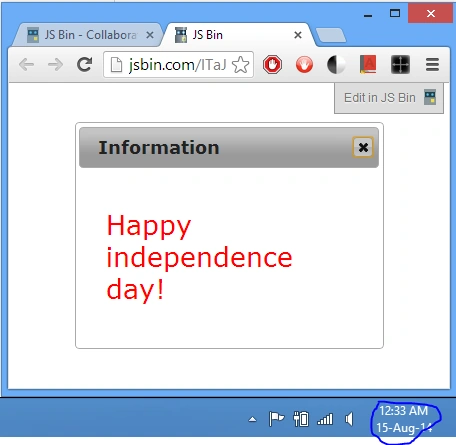
If line 3 evaluates to true then a happy independence message will be shown else the rest of the script is executed.
Output
The running script at a specific time of the day
Here we will execute our script at a specific time of the day. Let's say we want to alert the user for "Happy Hours" we can use it.
HTML
- <!DOCTYPE html>
- <html>
- <head>
- <linkhref="http://code.jquery.com/ui/1.10.4/themes/smoothness/jquery-ui.min.css"rel="stylesheet"type="text/css"/>
- <scriptsrc="http://code.jquery.com/jquery-1.10.2.min.js"></script>
- <scriptsrc="http://code.jquery.com/ui/1.10.4/jquery-ui.min.js"></script>
- <metacharset=utf-8/>
- <title>JS Bin</title>
- </head>
- <body>
- <divid="dlg"title="Congratulations"><p>Free !Sale! period is running!</p></div>
- </body>
- </html>
jQuery
- function test(){
- var date=new Date();
- if(date.getDay()==1&& date.getHours()+1 >=8 && date.getMinutes()+1 >=35)
- { //8-9AM
- $("#dlg").dialog();
- clearInterval(iId);
- }
- elseif(date.getDay()==1&& date.getHours()+1 == 9 && date.getMinutes()+1 <= 20)
- {
- $("#dlg").dialog();
- clearInterval(iId);
- }else
- {
- //nothing happens
- }
- }
Line number 2 creates a current date instance.
Line number 3 checks the time, whether it is between 8:35 AM and 9 AM (using getHours and getMinutes) and today is Monday (using getDay, 1 for Monday).
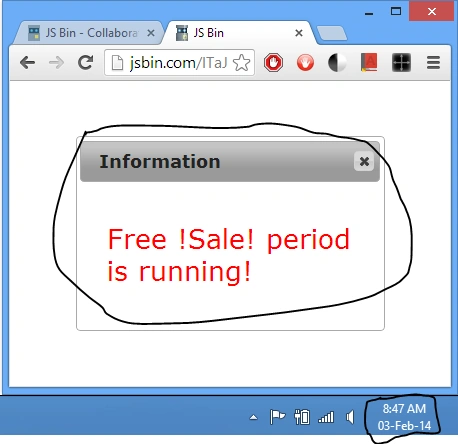
If line number 3 is true then a happy hour message is shown, else line number 8 is checked.
Line number 6 stops the checking of time as our goal to run the script is met.
Line number 8 checks whether the time is between 9:00 AM and 9:20 AM.
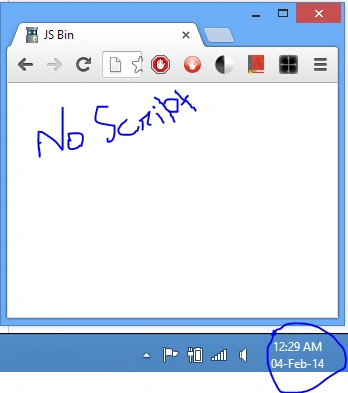
Output
Summary
That's all for this article. I hope you have enjoyed reading this article and learned something new from it. Don't forget to provide your valuable inputs for this article in the comments section. In case of any doubt feel free to ask in the comments.
Join the conversation! Your thoughts help the community grow.