
For my
work I have developed a small application calculator and now I've decided to
share with the community and to show the pattern design MVVM.
First I created the project and have set the folders to the pattern.
I have incorporated the necessary classes to use the pattern are:
DelegateCommand
ViewModelBase
After that incorporates a usercontrol to create the application view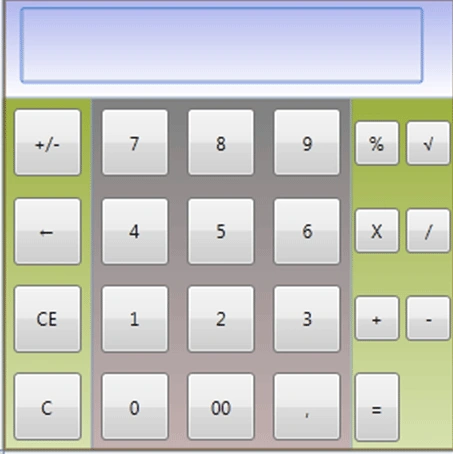
Public Class CalculatorVM
Inherits ViewModelBase
Private _NumberPress As ICommand
Private _OperatorPress As ICommand
Private _Display As String = "0.00"
Private _LastOperator As String
Private _FirstNumber As Double
Public Property DoubleZero As String
Public Property Zero As Byte
Public Property One As Byte
Public Property Two As Byte
Public Property Three As Byte
Public Property Four As Byte
Public Property Five As Byte
Public Property Six As Byte
Public Property Seven As Byte
Public Property Eight As Byte
Public Property Nine As Byte
Public Property LastNumber As Double
Public Property LastEspecial As String ' "," or "00"
Public Result As Double
Public
Property Display As
String
Get
Return _Display
End Get
Set(ByVal
value As String)
_Display = value
OnPropertyChanged("Display")
End Set
End Property
Public
Property LastOperator As
String
Get
Return _LastOperator
End Get
Set(ByVal
value As String)
_LastOperator = value
OnPropertyChanged("LastOperator")
End Set
End Property
Public
Property FirstNumber As
Double
Get
Return _FirstNumber
End Get
Set(ByVal
value As Double)
_FirstNumber = value
OnPropertyChanged("FirstNumber")
End Set
End Property
Public ReadOnly
Property NumberPress As
ICommand
Get
If _NumberPress
Is Nothing
Then
_NumberPress = New MVVM.RelayCommand(AddressOf
ExecuteNumberPress)
End If
Return _NumberPress
End Get
End Property
Public
ReadOnly Property OperatorPress
As ICommand
Get
If _OperatorPress
Is Nothing
Then
_OperatorPress = New
MVVM.RelayCommand(AddressOf
ExecuteOperatorPress)
End If
Return _OperatorPress
End Get
End
Property
Sub ExecuteNumberPress(ByVal
Param As Object)
Select Case
Param
Case Is
= ","
If Display.Contains(CStr(Param))
= False Then
LastEspecial = ","
Display = Display & LastEspecial
End If
Case
Is = "00"
LastEspecial = "00"
Display = Display & LastEspecial
Case Is
= "CE"
If
String.IsNullOrEmpty(LastOperator)
Then
FirstNumber = 0
Display = 0
Else
LastNumber = 0
End If
Case
Is = "C"
LastNumber = 0
FirstNumber = 0
Display = 0
LastOperator = String.Empty
Case Is
= "â†"
If Display.Length <= 1
OrElse CDbl(Display)
= 0 Then
Display = "0,00"
Else
Display = Left(Display, Display.Length - 1)
End If
Case
Is = "+/-"
If
CDbl(Display) <> 0 Then
Display = CDbl(Display)
* -1
End If
Case Else
If
String.IsNullOrEmpty(LastOperator)
Then
If
CDbl(Display) = 0
OrElse (FirstNumber = 0 And LastNumber =
0) Then
Display = CStr(Param)
Else
Display = Display & CStr(Param)
End
If
_FirstNumber = CDbl(Display)
Else
If LastNumber <> 0
Then
Display = Display & CStr(Param)
Else
Display = CStr(Param)
End
If
LastNumber = CDbl(Display)
End If
End
Select
End Sub
Private Sub
ExecuteOperatorPress(ByVal Param
As Object)
If String.IsNullOrEmpty(LastOperator)
Then
FirstNumber = CDbl(Display)
If CStr(Param)
<> "=" Then
LastOperator = CType(Param,
String)
End If
If LastOperator =
"√" Then
Calculate()
End If
Else
LastNumber = CDbl(Display)
If CStr(Param)
<> "=" Then
LastOperator = CType(Param,
String)
End If
Calculate()
End If
End Sub
Private Sub
Calculate()
Select Case
LastOperator
Case Is
= "%"
Result = FirstNumber * LastNumber / 100
Case Is
= "X"
Result = FirstNumber * LastNumber
Case Is
= "/"
Result = FirstNumber / LastNumber
Case Is
= "+"
Result = FirstNumber + LastNumber
Case Is
= "-"
Result = FirstNumber - LastNumber
Case Is
= "√"
Result = CDbl(Display)
Result = Math.Sqrt(Result)
End Select
Display = Result
LastOperator = String.Empty
FirstNumber = 0
LastNumber = 0
End
Sub
End
Class
And it links commands to the buttons on the view like this
<Button Content="-" Height="30" Width="30" Command="{Binding Path=OperatorPress}" CommandParameter="{Binding Path=Content, RelativeSource={RelativeSource Self}}"/>
And
<Button Width="45" Height="45" Content="CE" Command="{Binding Path=NumberPress}" CommandParameter="{Binding Path=Content, RelativeSource={RelativeSource Self}}"/>
After, we binds the keypress (this is new in wpf 4.0)
<KeyBinding
Key="NumPad0"
Command="{Binding
Path=NumberPress}"
CommandParameter="0"/>
<KeyBinding
Key="Decimal"
Command="{Binding
Path=NumberPress}"
CommandParameter=","/>
<KeyBinding Key="Add" Command="{Binding Path=OperatorPress}" CommandParameter="+"/>
Can download source code from here.
Join the conversation! Your thoughts help the community grow.