

What Is Gear Odd Image Out Game

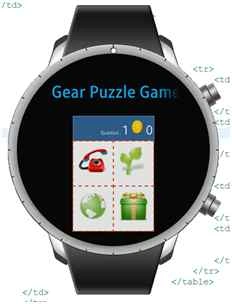
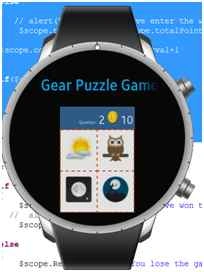
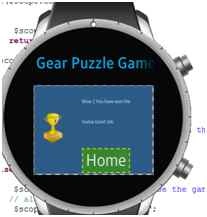
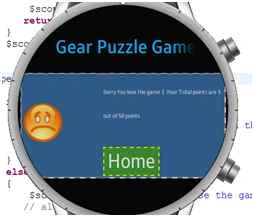
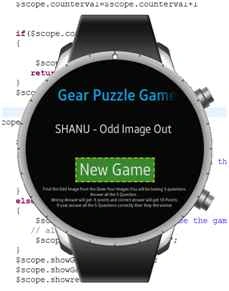
In this game app total 5 questions will be asked. In each question I will display 4 set of Images in that one Image will be different from the other three. User have to pick the odd image from the four images. If user picks the correct odd image from the question he will get 10 points. If he select the wrong answer, then he will get -5 points. After all the 5 questions has been answered by user the result will be calculated and if the users points are 50, then he wins the game and if the user get points less than 50, then he loses the game.
What you should know to create this Odd image Out App for Samsung Gear smartwatch?
You need to have basic knowledge of the following:
- TIZEN IDE Web project Development.
- AngularJS Development
1. Prerequisites need to install for developing the Samsung gear App
To start developing our first app for Samsung Gear we need the fallowing software to be installed.
- Tizen SDK (Tizen consists of set of tools for developing Tizen web and native applications. It contains IDE for developing our applications and Emulator to view our output).
- SDK Image
Note: If you are new to Samsung Gear App development using TIZEN IDE, then kindly view my previous article which explain in detail about how to install Tizen SDK and create your first hello world program using Tizen IDE.
- Introduction To Samsung Gear App Development - Part 1
- Group Messaging For Samsung Gear Using MVC Web API And AngularJS
AngularJS
We might be familiar with what is Model, View, View Model (MVVM) and what Model, View and Controller (MVC) are. AngularJS is a JavaScript framework that is purely based on HTML, CSS and JavaScript.
The AngularJS Model View Whatever (MVW) pattern is similar to the MVC and MVVM patterns. In our example I have used Model, View and Service. In the code part let's see how to install and create AngularJS in our MVC application.
If you are interested in reading more about AngularJS, then kindly go through the following link:
How I Have Developed TThis Odd Image out Game Gear App
First collect all the images needed to be displayed for the question. Each question carry 4 set of images and in that one image should be as different. So collect as much possible image to make more questions. I will display the questions randomly from the set of questions to avoid repeated question display. So first we need to make as much of possible questions for the users to not get bore of the game. I have downloaded all the free images from the Icon Finder, since we are creating app for Smartwatch. Here I have downloaded 48.
*48 size images.
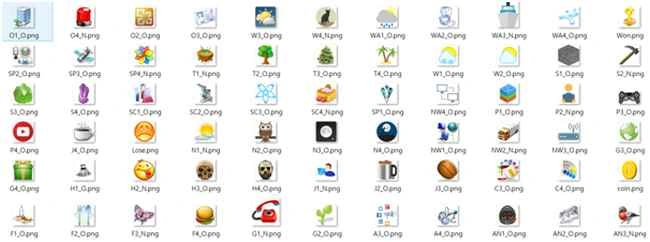
After downloading all the Images and giving the proper name to each Image and in Image name itself I have given as answer as O for Ok and N for Wrong Image. For the sample of this demo I have created total 15 Questions with 15 * 4 images total. You can add more questions to make the app more interesting.
Code Part
As I have already told if you are new to Tizen IDE development, kindly view my first article which explains in detail how to download, install and getting started with Tizen IDE to create your app for Samsung Gear.
Note: If you are new to Samsung Gear App development using TIZEN IDE, then kindly view my previous article which explain in detail about how to install Tizen SDK and create your first hello world program using Tizen IDE
Click - Start programs, then click Tizen IDE.
For the first time it will be to select your Workspace. You can browse and select folder to create all your project under the folder. Click OK to start your new project.

Once you have done click on File, New, then Tizen Web project.

Creating Our First Wearable UI Template
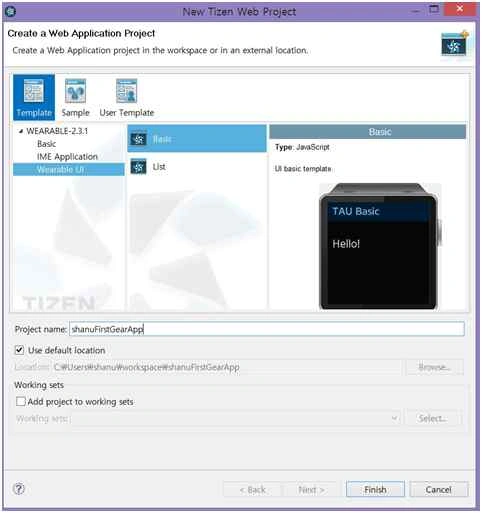
We can see a window like the following. Firstly, we start with Wearable UI Template. Select the Template and Wearable UI and click on Basic. Give the name for your project and click Finish.
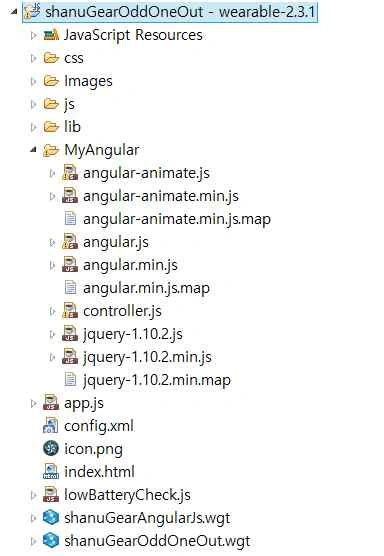
Once you have created you can see your project on the left side of Project Explorer. Create new folder inside your newly created project for adding all the AngularJS reference files. I have created the folder name as “MyAngular” and copied all AngularJS and jQuery related reference files to this folder and also created new JavaScript file as “controller.js” for AngularJS controller creation.
Steps To Create AngularJS controller.js File
Step 1
All our business logic will be written in AngularJS Controller.js file. As you can see in the project “MyAngular” folder I have created the “controller.js” file to write all our AngularJS code.
In the Controller.JS javascript file we will create for AngularJS Model and Contrller like the following.
Firstly, we add the reference and create Model for our AngularJS controller.
- /// <reference path="angular.js" />
- /// <reference path="angular.min.js" />
- /// <reference path="angular-animate.js" />
- /// <reference path="angular-animate.min.js" />
- var app;
- (function() {
- app = angular.module("RESTClientModule", ['ngAnimate']);
- })();
Step 2
Declaration of local variables in controller
Here I have commented for each variable so that user can easily understand it.
- app.controller("AngularJs_Controller", function($scope, $timeout, $rootScope, $window, $http) {
- //Global Variables
- //Conuter to increment the Question nos
- $scope.counterval = 0;
- $scope.questionCount = 0;
- //to Store Game Image details. Here for each question I have created the ID, four Image Names as Image1,image2 and etc, and the result for each questions.
- $scope.Images = [{
- "id": "1",
- "Image1": "A1_N.png",
- "Image2": "A2_O.png",
- "Image3": "A3_O.png",
- "Image4": "A4_O.png",
- "Result": "1"
- }, {
- "id": "2",
- "Image1": "AN1_O.png",
- "Image2": "AN2_O.png",
- "Image3": "AN3_N.png",
- "Image4": "AN4_O.png",
- "Result": "3"
- }, {
- "id": "3",
- "Image1": "C1_O.png",
- "Image2": "C2_N.png",
- "Image3": "C3_O.png",
- "Image4": "C4_O.png",
- "Result": "2"
- }, {
- "id": "4",
- "Image1": "F1_O.png",
- "Image2": "F2_O.png",
- "Image3": "F3_N.png",
- "Image4": "F4_O.png",
- "Result": "3"
- }, {
- "id": "5",
- "Image1": "G1_N.png",
- "Image2": "G2_O.png",
- "Image3": "G3_O.png",
- "Image4": "G4_O.png",
- "Result": "1"
- }, {
- "id": "6",
- "Image1": "H1_O.png",
- "Image2": "H2_N.png",
- "Image3": "H3_O.png",
- "Image4": "H4_O.png",
- "Result": "2"
- }, {
- "id": "7",
- "Image1": "J1_N.png",
- "Image2": "J2_O.png",
- "Image3": "J3_O.png",
- "Image4": "J4_O.png",
- "Result": "1"
- }, {
- "id": "9",
- "Image1": "S1_O.png",
- "Image2": "S2_N.png",
- "Image3": "S3_O.png",
- "Image4": "S4_O.png",
- "Result": "2"
- }, {
- "id": "9",
- "Image1": "N1_N.png",
- "Image2": "N2_O.png",
- "Image3": "N3_O.png",
- "Image4": "N4_O.png",
- "Result": "1"
- }, {
- "id": "10",
- "Image1": "NW1_O.png",
- "Image2": "NW2_N.png",
- "Image3": "NW3_O.png",
- "Image4": "NW4_O.png",
- "Result": "2"
- }, {
- "id": "11",
- "Image1": "O1_O.png",
- "Image2": "O2_O.png",
- "Image3": "O3_O.png",
- "Image4": "O4_N.png",
- "Result": "4"
- }, {
- "id": "12",
- "Image1": "P1_O.png",
- "Image2": "P2_N.png",
- "Image3": "P3_O.png",
- "Image4": "P4_O.png",
- "Result": "2"
- }, {
- "id": "13",
- "Image1": "SC1_O.png",
- "Image2": "SC2_O.png",
- "Image3": "SC3_O.png",
- "Image4": "SC4_N.png",
- "Result": "4"
- }, {
- "id": "14",
- "Image1": "T1_N.png",
- "Image2": "T2_O.png",
- "Image3": "T3_O.png",
- "Image4": "T4_O.png",
- "Result": "1"
- }, {
- "id": "15",
- "Image1": "WA1_O.png",
- "Image2": "WA2_O.png",
- "Image3": "WA3_N.png",
- "Image4": "WA4_O.png",
- "Result": "3"
- }
- ];
- //Show table Row. First I will display the New Game Table Row by default. When user clicks on new Game I will display Question Table Row.
- $scope.showGameStart = true;
- $scope.showGame = false;
- $scope.showresult = false;
- //Show and to calculate the Total points and final result.
- $scope.totalPoints = 0;
- $scope.Resuts = "";
- $scope.wonImage = "Won.png";



Santhakumar MunuswamyPosted Oct 18, 2015, 4:09 AM
Good article
Faizal HussainPosted Oct 12, 2015, 12:16 PM
Great Sir
Mohammed IbrahimPosted Oct 12, 2015, 12:12 PM
great
RakeshPosted Oct 12, 2015, 11:50 AM
Really Good Share sir
Sibeesh VenuPosted Oct 12, 2015, 3:14 AM
Nice Share
Mukesh KumarPosted Oct 12, 2015, 2:28 AM
Great ... It is something new to others..thanks
Akash VarshneyPosted Oct 12, 2015, 1:11 AM
Nice .. is there any simulator available for that
Nilesh JadavPosted Oct 12, 2015, 1:05 AM
This is really great !! Nice one sir !!
Rajeesh MenothPosted Oct 11, 2015, 9:10 AM
Great..!!!!