

The title says it all. So without wasting any time let’s quickly go through the theme of this article—How we are going to implement the desired functioning in SQL Server?
Getting Started
Step 1:
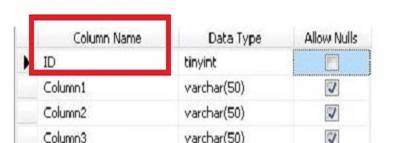
First of all let’s create a simple sample Table in SQL Server. In my case am going to name it ‘DemoTab’ having attribute ID.
(Just like that..)
Step 2:
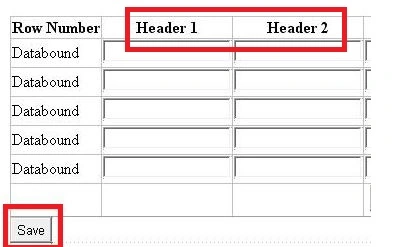
Now let’s proceed to ASPX source and add a Button for saving the data to the database.
(Just like that..)
Step 3:
Now, am going to create a method for saving the data to the database. But before that we need to establish the database connection. (Am not showing how to do that, but if you’re beginner in that case you can go through my article.
Just go to the web.config and paste below connection string there. Change some credentials such as per your SQL server.
- <connectionStrings>
- <add name="DBCon" connectionString="Data Source= ABHI-PC; Initial Catalog=DemoDB; Integrated Security=SSPI;" providerName="System.Data.SqlClient" />
- </connectionStrings>
As you can see we are done with establishing connection string. Now we can proceed to the next step which is creation of the method for saving the data to the database. For that just add the following namespaces as shown below:
- using System.Text;
- using System.Data.SqlClient;
- using System.Collections.Specialized;
Step 5:
Now let’s create the method for calling the connection strings.
- private string GetConnectionString()
- {
- // "DBCon" is the name of the Connection String
- return System.Configuration.ConfigurationManager.ConnectionStrings["DBCon"].ConnectionString;
- }
Now, am going to show the code for INSERT method. Take a look,
- // An Insert Method
- private void InsertRecords(StringCollection sc)
- {
- SqlConnection conn = new SqlConnection(GetConnectionString());
- StringBuilder sb = new StringBuilder(string.Empty);
- string[] splitItems = null;
- foreach(string item in sc)
- {
- const string sqlStatement = "INSERT INTO DemoTab (Column1,Column2,Column3,Column4,Column5) VALUES";
- if (item.Contains(","))
- {
- splitItems = item.Split(",".ToCharArray());
- sb.AppendFormat("{0}('{1}','{2}','{3}',’{4}’,’{5}’); ", sqlStatement, splitItems[0], splitItems[1], splitItems[2]);
- }
- }
- try {
- conn.Open();
- SqlCommand cmd = new SqlCommand(sb.ToString(), conn);
- cmd.CommandType = CommandType.Text;
- cmd.ExecuteNonQuery();
- Page.ClientScript.RegisterClientScriptBlock(typeof(Page), "Script", "alert('Records are Saved Successfuly!');", true);
- } catch (System.Data.SqlClient.SqlException ex) {
- string msg = "Insert Error:";
- msg += ex.Message;
- throw new Exception(msg);
- } finally {
- conn.Close();
- }
- }
This is the final step.
Now, am going to create a Button Click event. So that we can call the method “InsertRecords” after extracting the dynamic TextBox values.
Here’s a code..
- protected void Button1_Click(object sender, EventArgs e)
- {
- int rowIndex = 0;
- StringCollection sc = new StringCollection();
- if (ViewState["CurrentTable"] != null)
- {
- DataTable dtCurrentTable = (DataTable) ViewState["CurrentTable"];
- if (dtCurrentTable.Rows.Count > 0) {
- for (int i = 1; i <= dtCurrentTable.Rows.Count; i++) {
- TextBox box1 = (TextBox) Gridview1.Rows[rowIndex].Cells[1].FindControl("TextBox1");
- TextBox box2 = (TextBox) Gridview1.Rows[rowIndex].Cells[2].FindControl("TextBox2");
- TextBox box3 = (TextBox) Gridview1.Rows[rowIndex].Cells[3].FindControl("TextBox3");
- TextBox box4 = (TextBox) Gridview1.Rows[rowIndex].Cells[4].FindControl("TextBox4");
- TextBox box5 = (TextBox) Gridview1.Rows[rowIndex].Cells[5].FindControl("TextBox5");
- // Getting Values from TextBoxes
- sc.Add(box1.Text + "," + box2.Text + "," + box3.Text + “, ”+box4.Text + "," + box5.Text);
- rowIndex++;
- }
- // Call the method
- InsertRecords(sc);
- }
- }
- }
Just Run the code and it will directly take you here,
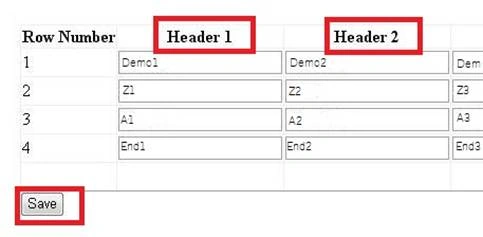
Now enter the values and enjoy.
honag lucPosted Jan 4, 2023, 10:07 AM
Hello, can you for example create 2 dynamic C# textboxes and then insert and update data to the database? login password such as
soham jainPosted Oct 31, 2018, 7:09 AM
What about Retrieving data??...can u help me with it
SubashPosted Sep 7, 2016, 7:25 AM
Very nice one
Abhishek JaiswalPosted Apr 23, 2016, 12:41 PM
Thank you guys! :)
Vignesh ManiPosted Apr 20, 2016, 4:09 PM
Good
Humayun Kabir MamunPosted Apr 19, 2016, 12:46 AM
Nice...