

When we create any application that we need to save images then we save the image in a folder and store the path of the image to the database as a string type. If you save an image to a folder, you might accidentally delete an image from that folder. If this happens then you will a get an error the next time the image is retrieved. It is very difficult to prevent this accident.
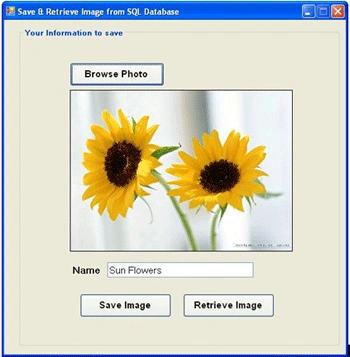
So, if you save an image into a database then you can enforce security by using the security settings of the database.
The application
Create a windows application in VB.NET 2005 and design it as shown in the above image. Then import namespaces as follows:
Imports System.Data.SqlClient
Imports System.IO
Create database
Create a SQL database as follows in Solution Explorer, click on project name and right-click on it then Add -> New item -> SQL Database; name it "Database1.mdf " then click ok. Click on database1 and create a table in it named "information" with the fields as in the following diagram:

Using the code
Actually the IMAGE field is just holding the reference to the page containing the binary data so we have to convert our image into bytes.
Imports System.Data.SqlClient
Imports System.IO
Public Class Form1
'path variable use for Get application running path
Dim path As String = (Microsoft.VisualBasic.Left(Application.StartupPath, Len(Application.StartupPath) - 9))
Dim con As New SqlConnection("Data Source=.\SQLEXPRESS;AttachDbFilename=" & path & "Database1.mdf;Integrated Security=True;User Instance=True")
Dim cmd As SqlCommand
Private Sub Button1_Click(ByVal sender As System.Object, ByVal e As System.EventArgs) Handles Button1.Click
If OpenFileDialog1.ShowDialog() = Windows.Forms.DialogResult.OK Then
PictureBox1.BackgroundImage = Image.FromFile(OpenFileDialog1.FileName)
Label1.Visible = True
TextBox1.Visible = True
Label1.Text = "Name"
TextBox1.Clear()
End If
End Sub
Private Sub Form1_Load(ByVal sender As System.Object, ByVal e As System.EventArgs) Handles MyBase.Load
'TODO: This line of code loads data into the 'Database1DataSet.Information' table. You can move, or remove it, as needed.
Me.InformationTableAdapter.Fill(Me.Database1DataSet.Information)
con.Open()
End Sub
Private Sub Button2_Click(ByVal sender As System.Object, ByVal e As System.EventArgs) Handles Button2.Click
If TextBox1.Text = "" Then
MsgBox("Fill the Name Field")
Else
Dim sql As String = "INSERT INTO Information VALUES(@name,@photo)"
Dim cmd As New SqlCommand(sql, con)
cmd.Parameters.AddWithValue("@name", TextBox1.Text)
Dim ms As New MemoryStream()
PictureBox1.BackgroundImage.Save(ms, PictureBox1.BackgroundImage.RawFormat)
Dim data As Byte() = ms.GetBuffer()
Dim p As New SqlParameter("@photo", SqlDbType.Image)
p.Value = data
cmd.Parameters.Add(p)
cmd.ExecuteNonQuery()
MessageBox.Show("Name & Image has been saved", "Save", MessageBoxButtons.OK)
Label1.Visible = False
TextBox1.Visible = False
End If
End Sub
Private Sub Button3_Click(ByVal sender As System.Object, ByVal e As System.EventArgs) Handles Button3.Click
GroupBox2.BringToFront()
GroupBox2.Visible = True
Label1.Visible = False
TextBox1.Visible = False
End Sub
Private Sub DataGridView1_CellMouseClick(ByVal sender As Object, ByVal e As System.Windows.Forms.DataGridViewCellMouseEventArgs) Handles DataGridView1.CellMouseClick
cmd = New SqlCommand("select photo from Information where name='" & DataGridView1.CurrentRow.Cells(0).Value() & "'", con)
Dim imageData As Byte() = DirectCast(cmd.ExecuteScalar(), Byte())
If Not imageData Is Nothing Then
Using ms As New MemoryStream(imageData, 0, imageData.Length)
ms.Write(imageData, 0, imageData.Length)
PictureBox1.BackgroundImage = Image.FromStream(ms, True)
End Using
End If
GroupBox2.SendToBack()
GroupBox2.Visible = False
Label1.Visible = True
Label1.Text = DataGridView1.CurrentRow.Cells(0).Value()
End Sub
End Class
Retrieving images from the Database
Retrieving images from the database is the exact reverse process of saving images to the database. The following code is used to retrieve:

The application uploads images from a database and displays them in a DataGridView. When you click on the DataGridView cell then an image is displayed in the picture box.
Private Sub DataGridView1_CellMouseClick(ByVal sender As Object, ByVal e As
System.Windows.Forms.DataGridViewCellMouseEventArgs) Handles DataGridView1.CellMouseClick
cmd = New SqlCommand("select photo from Information where name='" & DataGridView1.CurrentRow.Cells(0).Value() & "'", con)
Dim imageData As Byte() = DirectCast(cmd.ExecuteScalar(), Byte())
If Not imageData Is Nothing Then
Using ms As New MemoryStream(imageData, 0, imageData.Length)
ms.Write(imageData, 0, imageData.Length)
PictureBox1.BackgroundImage = Image.FromStream(ms, True)
End Using
End If
GroupBox2.SendToBack()
GroupBox2.Visible = False
Label1.Visible = True
Label1.Text = DataGridView1.CurrentRow.Cells(0).Value()
End Sub
Anshika MittalPosted Oct 15, 2012, 12:04 AM
Well written and explaned......
isha goelPosted Oct 14, 2012, 11:37 PM
Thanx for sharing this article article with us. I was searching for this concept last day.