

Introduction
Today, in this article let's play around with one of the interesting and most useful concepts in SharePoint 2010.
Question: What is a List Template?
In simple terms "It enables creation of a new copy or new template based on the existing list, where the person who wants to use the list can readily use them with columns and data as shown in existing list".
I think we are now good to go and implement this wonderful concept.
Step 1: Open SharePoint 2010 Central Administration and navigate to aspecific site.
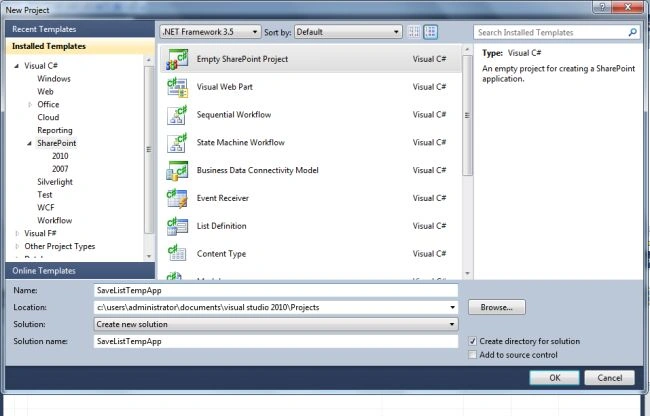
Step 2: Open up Visual Studio 2010 and create an empty SharePoint project:
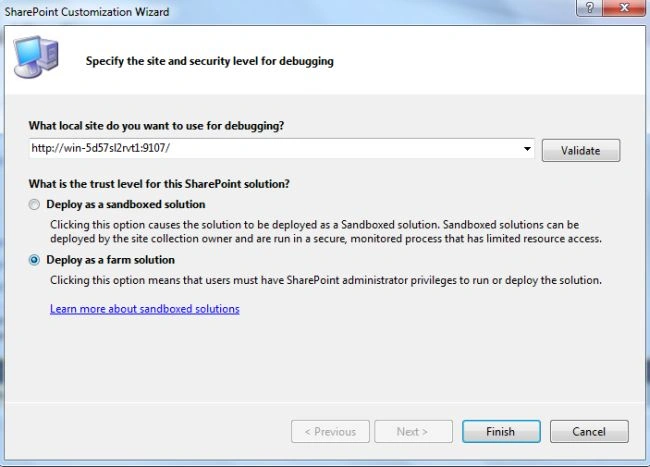
Step 3: Select "Deploy as a farm solution" and click on the "Finish" button. Now the empty project will be created:
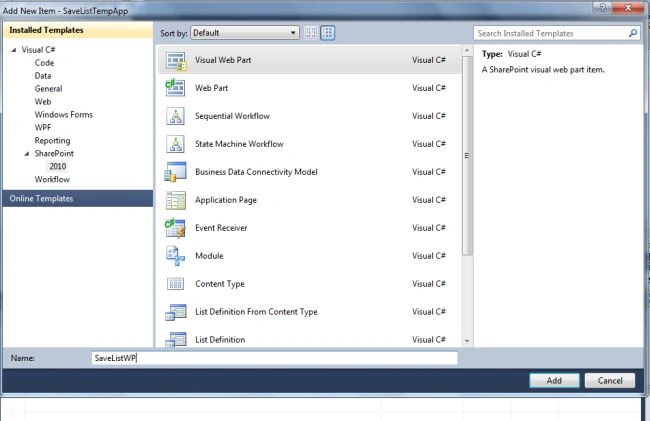
Step 4: Add a new visual webpart for that project.
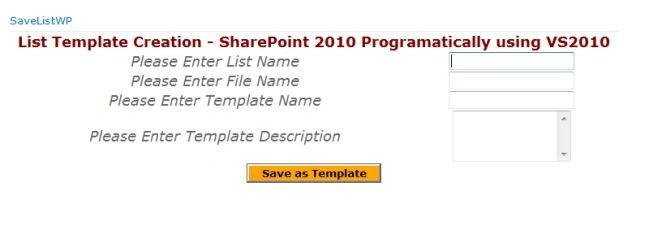
Step 5: The complete code of visualwebpart1usercontrol.ascx looks like this:
<%@ Assembly Name="$SharePoint.Project.AssemblyFullName$" %>
<%@ Assembly Name="Microsoft.Web.CommandUI, Version=14.0.0.0, Culture=neutral, PublicKeyToken=71e9bce111e9429c" %>
<%@ Register TagPrefix="SharePoint" Namespace="Microsoft.SharePoint.WebControls"
Assembly="Microsoft.SharePoint, Version=14.0.0.0, Culture=neutral, PublicKeyToken=71e9bce111e9429c" %>
<%@ Register TagPrefix="Utilities" Namespace="Microsoft.SharePoint.Utilities" Assembly="Microsoft.SharePoint, Version=14.0.0.0, Culture=neutral, PublicKeyToken=71e9bce111e9429c" %>
<%@ Register TagPrefix="asp" Namespace="System.Web.UI" Assembly="System.Web.Extensions, Version=3.5.0.0, Culture=neutral, PublicKeyToken=31bf3856ad364e35" %>
<%@ Import Namespace="Microsoft.SharePoint" %>
<%@ Register TagPrefix="WebPartPages" Namespace="Microsoft.SharePoint.WebPartPages"
Assembly="Microsoft.SharePoint, Version=14.0.0.0, Culture=neutral, PublicKeyToken=71e9bce111e9429c" %>
<%@ Control Language="C#" AutoEventWireup="true" CodeBehind="SaveListWPUserControl.ascx.cs"
Inherits="SaveListTempApp.SaveListWP.SaveListWPUserControl" %>
<div>
<center>
<table>
<tr>
<td colspan="2">
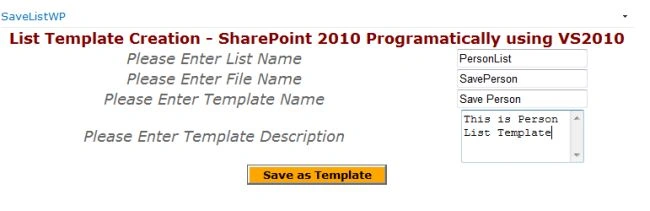
<asp:label id="Label1" runat="server" text="List Template Creation - SharePoint 2010 Programatically using VS2010"
font-bold="true" font-size="Large" font-names="Verdana" forecolor="Maroon"></asp:label>
</td>
</tr>
<tr>
<td>
<asp:label id="Label2" runat="server" text="Please Enter List Name" font-size="Large"
font-names="Verdana" font-italic="true"></asp:label>
</td>
<td>
<asp:textbox id="TextBox1" runat="server"></asp:textbox>
</td>
</tr>
<tr>
<td>
<asp:label id="Label3" runat="server" text="Please Enter File Name" font-size="Large"
font-names="Verdana" font-italic="true"></asp:label>
</td>
<td>
<asp:textbox id="TextBox2" runat="server"></asp:textbox>
</td>
</tr>
<tr>
<td>
<asp:label id="Label4" runat="server" text="Please Enter Template Name" font-size="Large"

nagaraju PattemeditedPosted Jul 19, 2012, 2:07 AMEdited Jul 19, 2012, 2:08 AM
Thanks for post and can you share Save as site Template