

Introduction
In cryptography, salt is randomly generated for each password. In a typical setting, the salt and the password are concatenated and processed with a cryptographic hash function, and the resulting output (but not the original password) is stored with the salt in a database. Hashing allows for later authentication while protecting the plain text password in the event that the authentication data store is compromised.
What’s the agenda
Here I will be showing simple registration form where the password will be stored in database using encrypted format and while login it will decrypt the password and allow the user to login.
Also in this encryption I will be generating random salt the same password will be different while storing in database using this encryption. Here I have used Entity Framework code-first approach and also ASP.NET MVC 4.
Also in this encryption I will be generating random salt the same password will be different while storing in database using this encryption. Here I have used Entity Framework code-first approach and also ASP.NET MVC 4.
Step 1: Creating database using code first approach.
Create new MVC empty project and also add another project with class library under Visual C#.
In this process I have created a class user with the following fields.
In this process I have created a class user with the following fields.
- public class User
- {
- [Key]
- public int RegistrationId
- {
- get;
- set;
- } //This will be primary key column with auto increment
- public string FirstName
- {
- get;
- set;
- }
- public string LastName
- {
- get;
- set;
- }
- public string UserName
- {
- get;
- set;
- }
- public string EmailId
- {
- get;
- set;
- }
- public string Password
- {
- get;
- set;
- }
- public string Gender
- {
- get;
- set;
- }
- public string VCode
- {
- get;
- set;
- }
- public DateTime CreateDate
- {
- get;
- set;
- }
- public DateTime ModifyDate
- {
- get;
- set;
- }
- public bool Status
- {
- get;
- set;
- }
- }
Create a class context as follows. Before creating this class install Entity Framework from NuGet Packages.
- public class CmsDbContext : DbContext
- {
- public DbSet<User> ObjRegisterUser { get; set; } // Here User is the class
- }
Step 2: Creating Helper class.
I have used Helper class instead of adding methods in the controllers.
- public static class Helper
- {
- public static string ToAbsoluteUrl(this string relativeUrl) //Use absolute URL instead of adding phycal path for CSS, JS and Images
- {
- if (string.IsNullOrEmpty(relativeUrl)) return relativeUrl;
- if (HttpContext.Current == null) return relativeUrl;
- if (relativeUrl.StartsWith("/")) relativeUrl = relativeUrl.Insert(0, "~");
- if (!relativeUrl.StartsWith("~/")) relativeUrl = relativeUrl.Insert(0, "~/");
- var url = HttpContext.Current.Request.Url;
- var port = url.Port != 80 ? (":" + url.Port) : String.Empty;
- return String.Format("{0}://{1}{2}{3}", url.Scheme, url.Host, port, VirtualPathUtility.ToAbsolute(relativeUrl));
- }
- public static string GeneratePassword(int length) //length of salt
- {
- const string allowedChars = "abcdefghijkmnopqrstuvwxyzABCDEFGHJKLMNOPQRSTUVWXYZ0123456789";
- var randNum = new Random();
- var chars = new char[length];
- var allowedCharCount = allowedChars.Length;
- for (var i = 0; i <= length - 1; i++)
- {
- chars[i] = allowedChars[Convert.ToInt32((allowedChars.Length) * randNum.NextDouble())];
- }
- return new string(chars);
- }
- public static string EncodePassword(string pass, string salt) //encrypt password
- {
- byte[] bytes = Encoding.Unicode.GetBytes(pass);
- byte[] src = Encoding.Unicode.GetBytes(salt);
- byte[] dst = new byte[src.Length + bytes.Length];
- System.Buffer.BlockCopy(src, 0, dst, 0, src.Length);
- System.Buffer.BlockCopy(bytes, 0, dst, src.Length, bytes.Length);
- HashAlgorithm algorithm = HashAlgorithm.Create("SHA1");
- byte[] inArray = algorithm.ComputeHash(dst);
- //return Convert.ToBase64String(inArray);
- return EncodePasswordMd5(Convert.ToBase64String(inArray));
- }
- public static string EncodePasswordMd5(string pass) //Encrypt using MD5
- {
- Byte[] originalBytes;
- Byte[] encodedBytes;
- MD5 md5;
- //Instantiate MD5CryptoServiceProvider, get bytes for original password and compute hash (encoded password)
- md5 = new MD5CryptoServiceProvider();
- originalBytes = ASCIIEncoding.Default.GetBytes(pass);
- encodedBytes = md5.ComputeHash(originalBytes);
- //Convert encoded bytes back to a 'readable' string
- return BitConverter.ToString(encodedBytes);
- }
- public static string base64Encode(string sData) // Encode
- {
- try
- {
- byte[] encData_byte = new byte[sData.Length];
- encData_byte = System.Text.Encoding.UTF8.GetBytes(sData);
- string encodedData = Convert.ToBase64String(encData_byte);
- return encodedData;
- }
- catch (Exception ex)
- {
- throw new Exception("Error in base64Encode" + ex.Message);
- }
- }
- public static string base64Decode(string sData) //Decode
- {
- try
- {
- var encoder = new System.Text.UTF8Encoding();
- System.Text.Decoder utf8Decode = encoder.GetDecoder();
- byte[] todecodeByte = Convert.FromBase64String(sData);
- int charCount = utf8Decode.GetCharCount(todecodeByte, 0, todecodeByte.Length);
- char[] decodedChar = new char[charCount];
- utf8Decode.GetChars(todecodeByte, 0, todecodeByte.Length, decodedChar, 0);
- string result = new String(decodedChar);
- return result;
- }
- catch (Exception ex)
- {
- throw new Exception("Error in base64Decode" + ex.Message);
- }
- }
- }
Step 3: Changing Web.Config File.
- <add name="CmsDbContext" connectionString="Data Source=(local);Initial Catalog=WebCMS;User ID=sa;Password=Admin@321;" providerName="System.Data.SqlClient" />
After this the database with name WebCMS and table as user with columns as per class parameters will be created after doing an Insert / Update / Delete operation.
Step 4: Registration Page Design
- <div class="panel panel-default mb0">
- <div class="panel-heading ui-draggable-handle">
- <h3 class="panel-title"><strong>New User </strong> Registration</h3> </div> @using (Html.BeginForm("Registration", "Admin", null, FormMethod.Post)) { @Html.AntiForgeryToken()
- <div class="panel-body">
- <div class="form-group pt20">
- <label class="col-md-3 col-xs-12 control-label align-right pt7">First Name</label>
- <div class="col-md-6 col-xs-12">
- <div class="input-group"> <span class="input-group-addon"><span class="fa fa-pencil"></span></span>
- <input type="text" class="form-control form-group" required="" name="FirstName"> @*Getting value by name and the name should be the name given in database column*@ </div> <span class="help-block">First Name field sample</span> </div>
- <div class="clearfix"></div>
- </div>
- <div class="form-group">
- <label class="col-md-3 col-xs-12 control-label align-right pt7">Last Name</label>
- <div class="col-md-6 col-xs-12">
- <div class="input-group"> <span class="input-group-addon"><span class="fa fa-pencil"></span></span>
- <input type="text" class="form-control form-group" required="" name="LastName"> @*Getting value by name and the name should be the name given in database column*@ </div> <span class="help-block">Last Name field sample</span> </div>
- <div class="clearfix"></div>
- </div>
- <div class="form-group">
- <label class="col-md-3 col-xs-12 control-label align-right pt7">User Name</label>
- <div class="col-md-6 col-xs-12">
- <div class="input-group"> <span class="input-group-addon"><span class="fa fa-pencil"></span></span>
- <input type="text" class="form-control form-group" required="" name="UserName"> @*Getting value by name and the name should be the name given in database column*@ </div> <span class="help-block">User Name field sample</span> </div>
- <div class="clearfix"></div>
- </div>
- <div class="form-group">
- <label class="col-md-3 col-xs-12 control-label align-right pt7">Email Id</label>
- <div class="col-md-6 col-xs-12">
- <div class="input-group"> <span class="input-group-addon"><span class="fa fa-pencil"></span></span>
- <input type="text" class="form-control form-group" required="" name="EmailId"> @*Getting value by name and the name should be the name given in database column*@ </div> <span class="help-block">Email-Id field sample</span> </div>
- <div class="clearfix"></div>
- </div>
- <div class="form-group">
- <label class="col-md-3 col-xs-12 control-label align-right pt7">Password</label>
- <div class="col-md-6 col-xs-12">
- <div class="input-group"> <span class="input-group-addon"><span class="fa fa-unlock-alt"></span></span>
- <input type="password" class="form-control" required="" name="Password"> </div> <span class="help-block">Password field sample</span> </div>
- <div class="clearfix"></div>
- </div>
- <div class="form-group">
- <label class="col-md-3 col-xs-12 control-label align-right pt7">Gender</label>
- <div class="col-md-6 col-xs-12">
- <label class="radio-inline">
- <input type="radio" checked="checked" value="Male" name="Gender">Male</label>
- <label class="radio-inline">
- <input type="radio" value="Female" name="Gender">Female</label>
- </div>
- <div class="clearfix"></div>
- </div>
- </div>
- <div class="panel-footer">
- <input type="reset" value="Clear Form" name="btnReset" class="btn btn-default" />
- <input type="submit" id="btnSubmit" name="btnSubmit" value="Submit" class="btn btn-primary pull-right" /> </div> }
- </div>
I have created a Controller for Registration with Name as Admin and added the following codes,
- public ActionResult Registration()
- {
- return View();
- }
- [ValidateAntiForgeryToken]
- [HttpPost]
- public ActionResult Registration(User objNewUser)
- {
- try
- {
- using(var context = new CmsDbContext())
- {
- var chkUser = (from s in context.ObjRegisterUser where s.UserName == objNewUser.UserName || s.EmailId == objNewUser.EmailId select s).FirstOrDefault();
- if (chkUser == null)
- {
- var keyNew = Helper.GeneratePassword(10);
- var password = Helper.EncodePassword(objNewUser.Password, keyNew);
- objNewUser.Password = password;
- objNewUser.CreateDate = DateTime.Now;
- objNewUser.ModifyDate = DateTime.Now;
- objNewUser.VCode = keyNew;
- context.ObjRegisterUser.Add(objNewUser);
- context.SaveChanges();
- ModelState.Clear();
- return RedirectToAction("LogIn", "Login");
- }
- ViewBag.ErrorMessage = "User Allredy Exixts!!!!!!!!!!";
- return View();
- }
- }
- catch (Exception e)
- {
- ViewBag.ErrorMessage = "Some exception occured" + e;
- return View();
- }
- }
After this step the registration page will look like the following,
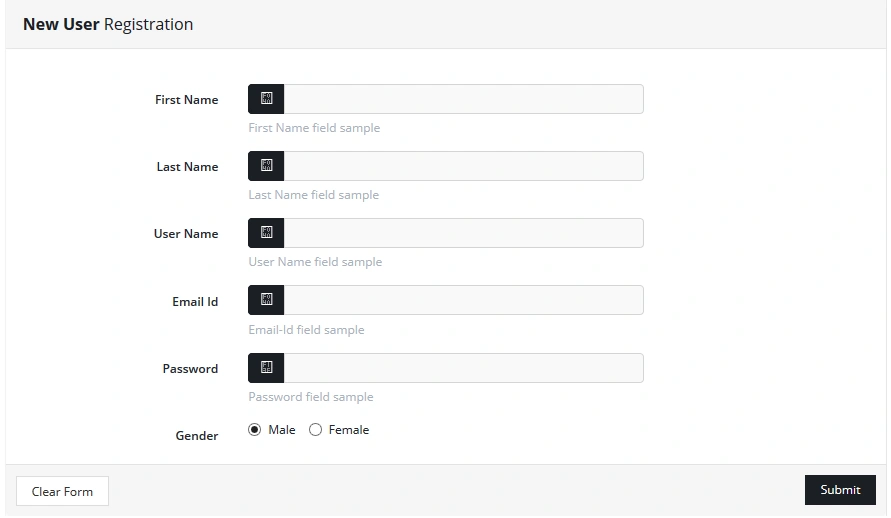
After this you can check your database and see the password column. Also give the same password and see the password column you will find different password in your database table,
Step 5: Login Page Design
- <div class="form-horizontal"> @using (Html.BeginForm("LogIn", "Login", null, FormMethod.Post)) { @Html.AntiForgeryToken()
- <div class="form-group">
- <div class="col-md-12">
- <input type="text" class="form-control" required="" placeholder="E-mail" name="UserName" /> </div>
- </div>
- <div class="form-group">
- <div class="col-md-12">
- <input type="password" class="form-control" required="" placeholder="Password" name="Password" /> </div>
- </div>
- <div class="form-group">
- <div class="col-md-6"> <a href="#" class="btn btn-link btn-block">Forgot your password?</a> </div>
- <div class="col-md-6">
- <button class="btn btn-info btn-block">Log In</button>
- </div>
- </div>
- <div class="login-subtitle"> Don't have an account [email protected]("Create an account", "Registration", "Admin") </div> }
- </div>
I have created a controller for Login with Name Login and added the following code,
- public ActionResult Login()
- {
- return View();
- }
- [ValidateAntiForgeryToken]
- [HttpPost]
- public ActionResult LogIn(string userName, string password)
- {
- try
- {
- using(var context = new CmsDbContext())
- {
- var getUser = (from s in context.ObjRegisterUser where s.UserName == userName || s.EmailId == userName select s).FirstOrDefault();
- if (getUser != null)
- {
- var hashCode = getUser.VCode;
- //Password Hasing Process Call Helper Class Method
- var encodingPasswordString = Helper.EncodePassword(password, hashCode);
- //Check Login Detail User Name Or Password
- var query = (from s in context.ObjRegisterUser where(s.UserName == userName || s.EmailId == userName) && s.Password.Equals(encodingPasswordString) select s).FirstOrDefault();
- if (query != null)
- {
- //RedirectToAction("Details/" + id.ToString(), "FullTimeEmployees");
- //return View("../Admin/Registration"); url not change in browser
- return RedirectToAction("Index", "Admin");
- }
- ViewBag.ErrorMessage = "Invallid User Name or Password";
- return View();
- }
- ViewBag.ErrorMessage = "Invallid User Name or Password";
- return View();
- }
- }
- catch (Exception e)
- {
- ViewBag.ErrorMessage = " Error!!! contact [email protected]";
- return View();
- }
- }
After this step you will see the Login Page as in the following,
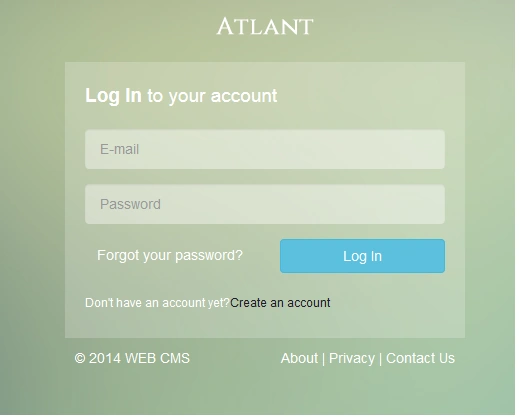
Give proper user name, password and then you can login. Also you can download attached code from the attachment.
Give proper user name, password and then you can login. Also you can download attached code from the attachment.
Rajesh GamiPosted Dec 24, 2020, 6:25 AM
For password decode (Decrypt) refer this link : https://forums.asp.net/t/2094369.aspx?How+to+decrypt+PasswordHash+to+readable+password+in+Asp+Net+5+Mvc+6
Susmita BudhePosted Dec 22, 2020, 4:54 AM
How to decode password?
raheel surgiconPosted Oct 13, 2019, 11:34 PM
How to decode password?
Nova AndrianaPosted Jul 5, 2018, 1:22 AM
Nice bro! but i can see for function logout ?
Asim KhanPosted Apr 30, 2018, 4:16 AM
Could you please tell me how to decrypt the password
Nurul ShafiqahPosted Dec 19, 2017, 8:04 PM
Thanks for your tutorial. It works! But why is it after changing password of 50 users it gives error "An exception of type 'System.IndexOutOfRangeException' occurred in projectName.dll but was not handled in user code. Additional information: Index was outside the bounds of the array." Why is this happening? I had to stop and re-run the project for it to work once again, but the second time it is only able to change password of 44 users. I'm worried if this happen worse when user uses it later on.
Amjad AslamPosted Jul 26, 2017, 12:09 AM
Really like your tutorial. your tutorial solved my problem
SubashPosted Aug 1, 2016, 5:36 AM
NIce
Kuppurasu NagarajPosted Apr 11, 2016, 1:49 PM
Nice Sharing
AliPosted Apr 1, 2016, 7:25 AM
I am getting an error on .Request.Url the line is var url = HttpContext.Current.Request.Url; please help me to fix this. Thank You very much in Advance.
Sonu ChaudharyPosted Mar 7, 2016, 11:53 AM
good one artical
chandanPosted Feb 16, 2016, 8:06 AM
Thanks for this code it will help me a lot...
chandanPosted Feb 16, 2016, 8:06 AM
thanks for this code it will help me a lot.
Sabyasachi MishraPosted Dec 13, 2015, 11:57 PM
Thanks Everyone :)
Ankur MistryPosted Dec 12, 2015, 7:34 AM
nice article, good work.
Sibeesh VenuPosted Dec 11, 2015, 7:05 AM
Nice Share
Gowtham KPosted Dec 11, 2015, 3:18 AM
Great Work
Saineshwar BageriPosted Dec 11, 2015, 12:56 AM
good one
Humayun Kabir MamunPosted Dec 11, 2015, 12:32 AM
Nice...
Anu VPosted Dec 10, 2015, 11:44 PM
Thank ji..
Raja TPosted Dec 10, 2015, 11:15 PM
Thanks for shairng