

Introduction
This article describes a simple approach to storing, retrieving, and
redisplaying web pages. Such might be useful if you need to store exact copies
of confirmation pages (e.g., following a sales transaction) or something along
those lines.
The example provided is in the form of a simple application that simulates a
sales oriented web site; the example uses an SQL Server database and LINQ to
SQL. Pages are stored and retrieved from the database for redisplay in a web
browser.
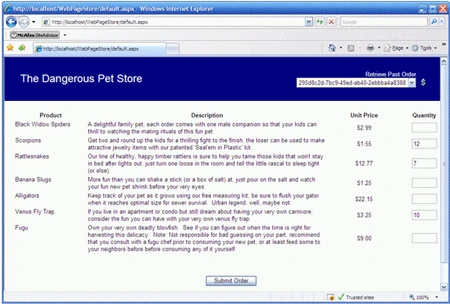
Figure 1: Demo Website
Getting Started:
In order to get started, unzip the included project and save it to your hard
drive. Open the web application and examine the contents in the solution
explorer.
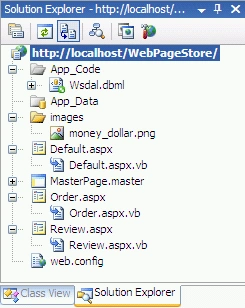
Figure 2: Solution Explorer
The solution contains a single web application project called "WebPageStore".
This web application contains three web pages (default, order, and review) along
with a single master page; all code behind is in VB. The default web page is
used to display a simulation or an ordering system, the order web page is used
to display a simulation of an order confirmation, and the review page is used to
display retrieved web pages.
The app code folder contains a DBML file supporting the LINQ to SQL interface to
the database.
The bulk of the code is there just to provide a simple framework for creating
something to save and restore for redisplay. The relevant parts of the code used
to actually store and recall the order page will be pointed out in the following
sections.
Code: Default.aspx
The default page is used to create an order so that we have something to save to
the database. It is a nonsense web page that badly simulates an online ordering
system for a fake company called, "Dangerous Pets". The purpose of the page is
to allow the user to review product descriptions and enter a count for the
number of items that the user wishes to order at the given price.
This information is used to generate an order confirmation and it is the order
confirmation that is persisted to the database.
There is nothing particularly interesting about the page's markup; it contains
little more than a table used to display a fictitious catalog of scary pets
available for sale. You may open the page from the attached demonstration
project if you'd like to review its content; it won't include it here as it is
not important to the issue of this article.
Code: Default.vb
The code behind for the default page it equally uninspiring; it contains only a
single button click event handler used to complete a phony order by pushing any
order values captured from the default page into session variables and then
redirecting the user to the order page.
Protected Sub
btnSubmitOrder_Click(ByVal sender
As Object, _
ByVal e As
System.EventArgs) Handles btnSubmitOrder.Click
' alligators
If (Not
String.IsNullOrEmpty(txtAlligators.Text))
Then
Session("Alligators") =
txtAlligators.Text
End If
' Banana Slugs
If (Not
String.IsNullOrEmpty(txtBananaSlugs.Text))
Then
Session("BananaSlugs") =
txtBananaSlugs.Text
End If
' Black Widows
If (Not
String.IsNullOrEmpty(txtBlackWidows.Text))
Then
Session("BlackWidows") =
txtBlackWidows.Text
End If
' Fugu
If (Not
String.IsNullOrEmpty(txtFugu.Text))
Then
Session("Fugu") =
txtFugu.Text
End If
' Rattlesnakes
If (Not
String.IsNullOrEmpty(txtRattlesnakes.Text))
Then
Session("Rattlesnakes") =
txtRattlesnakes.Text
End If
' Scorpions
If (Not
String.IsNullOrEmpty(txtScorpions.Text))
Then
Session("Scorpions") =
txtScorpions.Text
End If
' Venus Fly Traps
If (Not
String.IsNullOrEmpty(txtVenusFlyTraps.Text))
Then
Session("VenusFlyTraps") =
txtVenusFlyTraps.Text
End If
Response.Redirect("Order.aspx")
End Sub
End Class
Code: Order.aspx
The order page is used to display a phony order confirmation page. There is
nothing particularly interesting about it; it merely displays the counts for
each item ordered along with a price total. Again, you can review the content of
the page from the attached project.
Code: Order.vb
The form class contains the code used to save the page to an SQL Server
database. This class begins with the declaration of some variables used to
display the order information on the order page:
Partial Class
Order
Inherits System.Web.UI.Page
' Variable Declarations
' counts for products
Protected alligatorCount
As Integer
Protected bananaSlugCount As
Integer
Protected blackWidowsCount As
Integer
Protected fuguCount As
Integer
Protected rattlesnakeCount As
Integer
Protected scorpionCount As
Integer
Protected venusFlyTrapsCount As
Integer
' subtotals for each quantity of
' ordered items
Protected alligatorAmount
As Double
Protected bananaSlugAmount As
Double
Protected blackWidowsAmount As
Double
Protected fuguAmount As
Double
Protected rattlesnakeAmount As
Double
Protected scorpionAmount As
Double
Protected venusFlyTrapsAmount As
Double
' sums for both quantity and amount
Protected totalCount
As Integer
Protected totalAmount As
Double
Following the variable declarations, the page load event handler first populates
all of the variables with the counts, subtotals for each item, and final total
for the order.
''' <summary>
''' On page load, sum up all the quantities,
subtotals
''' and totals for display and place each
''' calculation into the session. If the user
''' buys a product, save the page to an sql server
''' database.
''' </summary>
''' <param
name="sender"></param>
''' <param
name="e"></param>
'''
<remarks></remarks>
Protected
Sub Page_Load(ByVal sender
As Object, _
ByVal e As
System.EventArgs) Handles
Me.Load
' Alligator count and total
Try
alligatorCount = Convert.ToInt32(Session("Alligators"))
Catch ex As
Exception
alligatorCount = 0
End Try
' Total
alligatorAmount = alligatorCount * 22.15
' Banana Slug count and total
Try
bananaSlugCount = Convert.ToInt32(Session("BananaSlugs"))
Catch ex As
Exception
bananaSlugCount = 0
End Try
' Total
bananaSlugAmount = bananaSlugCount * 1.25
' Black Widows
Try
blackWidowsCount = Convert.ToInt32(Session("BlackWidows"))
Catch ex As
Exception
blackWidowsCount = 0
End Try
' Total
blackWidowsAmount = blackWidowsCount * 2.99
' Fugu
Try
fuguCount = Convert.ToInt32(Session("Fugu"))
Catch ex As
Exception
fuguCount = 0
End Try
' Total
fuguAmount = fuguCount * 9.0
' Rattlesnake
Try
rattlesnakeCount = Convert.ToInt32(Session("Rattlesnakes"))
Catch ex As
Exception
rattlesnakeCount = 0
End Try
' Total
rattlesnakeAmount = rattlesnakeCount * 12.77
' Scorpions
Try
scorpionCount = Convert.ToInt32(Session("Scorpions"))
Catch ex As
Exception
scorpionCount = 0
End Try
' Total
scorpionAmount = scorpionCount * 1.55
' Venus Fly Traps
Try
venusFlyTrapsCount = Convert.ToInt32(Session("VenusFlyTraps"))
Catch ex As
Exception
venusFlyTrapsCount = 0
End Try
' Total
venusFlyTrapsAmount = venusFlyTrapsCount * 3.25
' the total count of all products ordered
totalCount = alligatorCount + bananaSlugCount _
+ blackWidowsCount + fuguCount + rattlesnakeCount + _
scorpionCount + venusFlyTrapsCount
totalAmount = alligatorAmount + bananaSlugAmount + _
blackWidowsAmount + fuguAmount + rattlesnakeAmount + _
scorpionAmount + venusFlyTrapsAmount
After setting the variables, the next part of the load event handler checks to
see if anything was ordered and then building a record; in this case the record
only requires an ID (as a GUID) and the content containing the page's HTML.
The Page.RenderControl method is used to populate the html text writer with the
page content; this is then converted to a byte array which is subsequently
stored in the database along with the order ID using LINQ to SQL.
' if the user orders at least one product, save
' the order to the database.
If totalCount > 1
Then
' save html to database
Try
' create ID for the record
Dim savedConfirmId
As Guid
savedConfirmId = Guid.NewGuid
' get the html converted to a byte array
Dim stringWriter
As New
System.IO.StringWriter()
Dim htmlWriter As
New
System.Web.UI.HtmlTextWriter(stringWriter)
Page.RenderControl(htmlWriter)
htmlWriter.Flush()
Dim str As
String = stringWriter.ToString()
Dim bArr As
Byte() =
System.Text.Encoding.UTF8.GetBytes(str)
' Create a new saved order object (LINQ to SQL)
' and populate the ID and content fields
Dim so As
New saved_order
so.ID = Guid.NewGuid
so.Content = bArr
' Get an instance of the data context and
' try to submit the new order for storage
Dim context
As New WsdalDataContext
context.saved_orders.InsertOnSubmit(so)
context.SubmitChanges()
Catch ex As Exception
' if any errors occur, display them
Response.Write(ex.ToString())
End Try
End If
End Sub
Code: Review.aspx
The form class contains a single literal control used to display an order
retrieved from the database. You can review the page content in the attached
project if so desired.
Code: Review.vb
This form class is used to display a stored order confirmation page; the
execution is straightforward in the example; the order ID is passed in the query
string and used in a LINQ to SQL call to recover the page content associated
with the order ID from the database.
The content, stored as a byte array, is converted to a string which is then
passed to the literal control used to display the stored page. The entire class
is as follows:
Imports
System.Data.Linq
Partial
Class Review
Inherits System.Web.UI.Page
''' <summary>
''' Get the query string (containing the
order ID), retrieve the
''' matching record, and display the content in a literal control
''' contained on the review page
''' </summary>
''' <param
name="sender"></param>
''' <param
name="e"></param>
'''
<remarks></remarks>
Protected
Sub Page_Load(ByVal sender
As Object, _
ByVal e As
System.EventArgs) Handles
Me.Load
' get the order id from the query string
Dim strId As
String = Request.QueryString("orderId")
Dim context As
New WsdalDataContext
' Retrieve the page content from the database
(binary)
Dim pageContent = (From
a In context.GetTable(Of
saved_order)() _
Where a.ID.ToString() = strId _
Select a.Content).First()
' display the order confirmation after converting
' the binary back to a string containing the original HTML
Dim htmlPageContent
As String =
_
ConvertBinaryToString(pageContent.ToArray())
' display the retrieved page in a literal cotnrol
litPage.Text = htmlPageContent
End Sub
''' <summary>
''' Convert the byte array into a string;
used
''' here to put the html back into a usable format
''' </summary>
''' <param
name="input"></param>
'''
<returns></returns>
'''
<remarks></remarks>
Public
Function ConvertBinaryToString(ByVal
input() As Byte)
As String
Dim enc As
New System.Text.ASCIIEncoding()
Dim str As
String = enc.GetString(input)
Return str
End Function
End
Class
Code: MasterPage.master
The master page contains a simple banner along with a drop down list used to
display existing order IDs. A button adjacent to the drop down list is used to
redirect the page to the review page and to format the query string containing
the order ID used by the review page to recover and display the stored order
page.
You may review the markup from the attached project.
Code: MasterPage.master.vb
The code behind for the master page contains the code used to generate a list of
orders which are used to populate a drop down list. That list is used to define
which order to recover and redisplay.
An image button's click event handler is used to redirect the user to the review
page; the currently selected order from the drop down list is used to format a
query string which is in turn used in the review page to determine which order
to recover and display. The code is annotated and easy to follow:
Partial
Class MasterPage
Inherits System.Web.UI.MasterPage
''' <summary>
''' Update the list of stored orders each
time
''' the page is loaded
''' </summary>
''' <param
name="sender"></param>
''' <param
name="e"></param>
'''
<remarks></remarks>
Protected
Sub Page_Load(ByVal sender
As Object, _
ByVal e As
System.EventArgs) Handles
Me.Load
If Not
Page.IsPostBack Then
UpdateList()
End If
End Sub
''' <summary>
''' Redirect to the order review page passing
the
''' order ID in the query string
''' </summary>
''' <param
name="sender"></param>
''' <param
name="e"></param>
'''
<remarks></remarks>
Protected
Sub imgRetrieveOrder_Click(ByVal sender
As Object, _
ByVal e As
System.Web.UI.ImageClickEventArgs) Handles
imgRetrieveOrder.Click()
Try
Response.Redirect("Review.aspx?orderId="
& _
ddlOrderList.SelectedItem.Text)
Catch ex As
Exception
Response.Write(ex.Message)
End Try
End Sub
''' <summary>
''' Use LINQ to SQL Data Context to refresh
''' the list of stored orders whenever this
''' method is called
''' </summary>
'''
<remarks></remarks>
Protected
Sub UpdateList()
Dim context As
New WsdalDataContext()
Dim orders = (From
a In context.GetTable(Of
saved_order)() _
Select a.ID).ToList()
ddlOrderList.Items.Clear()
ddlOrderList.DataSource = orders
ddlOrderList.DataMember = ID
ddlOrderList.DataBind()
End Sub
End
Class
Code: Wsdal.dbml
The DBML maintains a connection to the WebStore database; the visual designer
contains only the saved orders table. You can review this in the project if
you'd like but that is all there is to it.
Database
The database used for this demonstration contains only a single table containing
only two fields, ID and content. If you decide to run the demonstration project,
create a database called "WebStore " and a single table (saved_orders) with the
following fields and update the project connection string to point to that
database.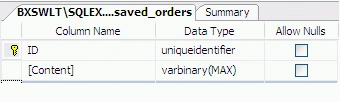
Figure 3. Saved Orders Table
Summary
The article addresses a simple process for capturing a displayed webpage and
persisting that page to a database. Further, the article addresses the recovery
and redisplay of web pages stored in this manner. This approach might be useful
to anyone that wants to store an exact copy of a page as it was displayed to a
user, for example, an order confirmation.
Join the conversation! Your thoughts help the community grow.