

Introduction
This article explains the scaffolding of asynchronous Web API 2 Controllers. For this we need Visual Studio 2013. For scaffolding the controller we need to select the "Web API 2 Controller with actions, using Entity Framework". For scaffolding asynchronous Web API controllers use the "use async controller actions" check box that is for scaffolding an asycnchronous Controler in Web API 2.
Now we will explain scaffolding. Scaffolding is just used for automatically generating code in a web application. Visual Studio 2013 has a preinstalled code generator for the Web API. Scaffolding generates the code including the data model class.
- Use the following procedure to create a Web API application using Visual Studio 2013.
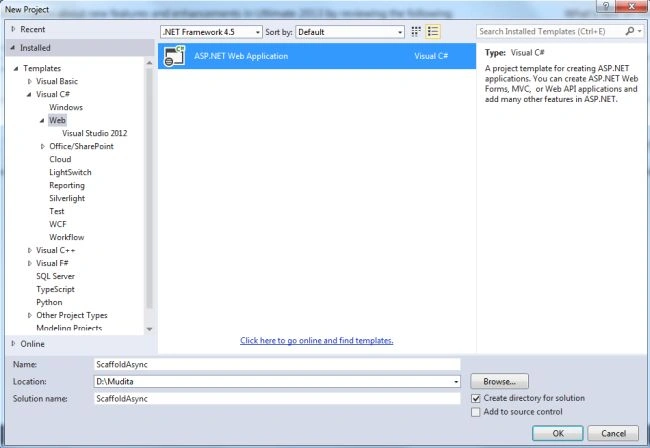
- Start Visual Studio 2013.
- Select "Installed" -> "Web".
- From the Template window select "ASP.NET Web Application".
- Click the "OK" button.
- From the ASP.NET Project Window select "Web API".
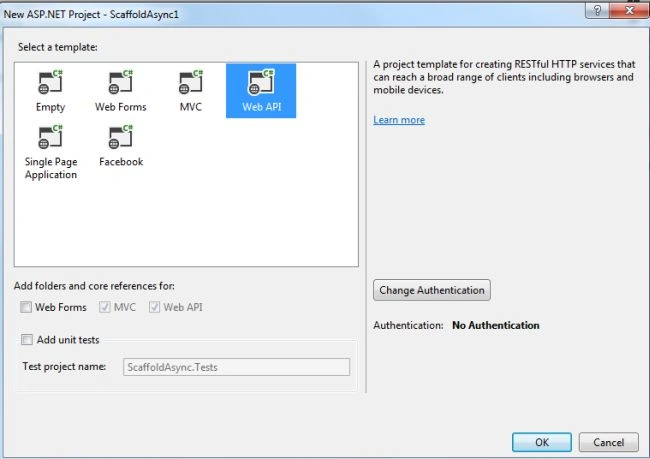
- Click on the "OK" button.
- Now we add the Scaffolding Item to the Web API.
- In the "Solution Explorer".
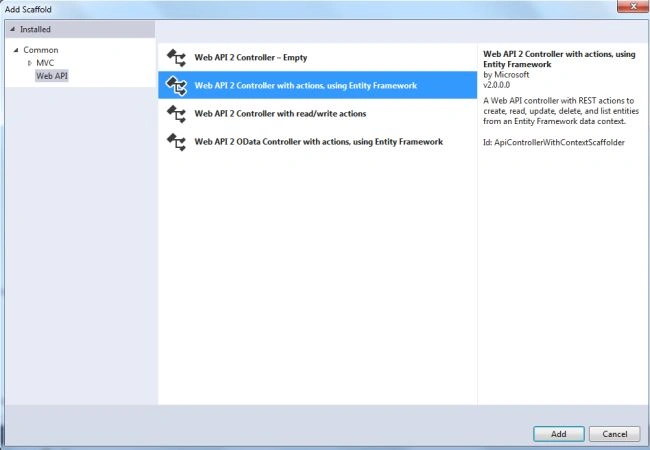
- Right-click on the "Controller" -> "Add" -> "New Scaffold Item".

- Open the Scaffold Window to select the type of scaffold, here we select "Web API".
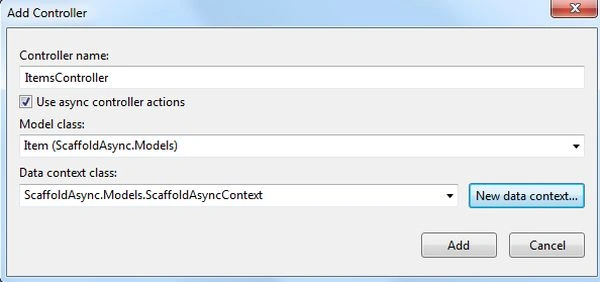
- From "Add Controller" enter the name of the Controller as "ItemsController" and select the check box "Use async controller actions".
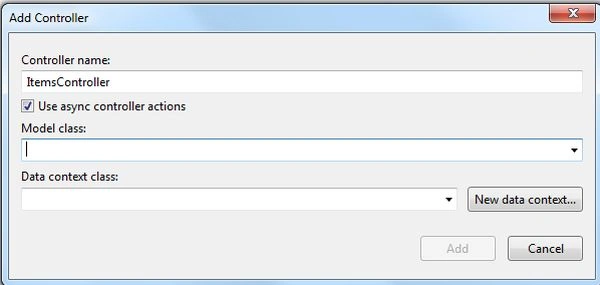
- Now select the "Model class" and "New Data Context".
- After clicking on the "OK" button see the Solution Explorer; there are two files, the first is "ItemsController.cs" in the Controller Folder and the other is "ScaffoldAsyncContext.cs" in the Model Folder.
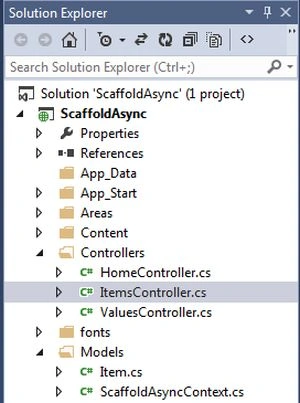
- Now we open the ItemsController.cs class. We can see that there is some auto-generated code that is inherited from the Model class "Item".
See the following code:
- using System;
- using System.Collections.Generic;
- using System.Data;
- using System.Data.Entity;
- using System.Data.Entity.Infrastructure;
- using System.Linq;
- using System.Net;
- using System.Net.Http;
- using System.Threading.Tasks;
- using System.Web.Http;
- using System.Web.Http.Description;
- using ScaffoldAsync.Models;
- namespace ScaffoldAsync.Controllers
- {
- public class ItemsController : ApiController
- {
- private ScaffoldAsyncContext db = new ScaffoldAsyncContext();
- // GET api/Default1
- public IQueryable<Item> GetItems()
- {
- return db.Items;
- }
- // GET api/Default1/5
- [ResponseType(typeof(Item))]
- public async Task<IHttpActionResult> GetItem(int id)
- {
- Item item = await db.Items.FindAsync(id);
- if (item == null)
- {
- return NotFound();
- }
- return Ok(item);
- }
- // PUT api/Default1/5
- public async Task<IHttpActionResult> PutItem(int id, Item item)
- {
- if (!ModelState.IsValid)
- {
- return BadRequest(ModelState);
- }
- if (id != item.ID)
- {
- return BadRequest();
- }
- db.Entry(item).State = EntityState.Modified;
- try
- {
- await db.SaveChangesAsync();
- }
- catch (DbUpdateConcurrencyException)
- {
- if (!ItemExists(id))
- {
- return NotFound();
- }
- else
- {
- throw;
- }
- }
- return StatusCode(HttpStatusCode.NoContent);
- }
- // POST api/Default1
- [ResponseType(typeof(Item))]
- public async Task<IHttpActionResult> PostItem(Item item)
- {
- if (!ModelState.IsValid)
- {
- return BadRequest(ModelState);
- }
- db.Items.Add(item);
- await db.SaveChangesAsync();
- return CreatedAtRoute("DefaultApi", new { id = item.ID }, item);
- }
- // DELETE api/Default1/5
- [ResponseType(typeof(Item))]
- public async Task<IHttpActionResult> DeleteItem(int id)
- {
- Item item = await db.Items.FindAsync(id);
- if (item == null)
- {
- return NotFound();
- }
- db.Items.Remove(item);
- await db.SaveChangesAsync();
- return Ok(item);
- }
- protected override void Dispose(bool disposing)
- {
- if (disposing)
- {
- db.Dispose();
- }
- base.Dispose(disposing);
- }
- private bool ItemExists(int id)
- {
- return db.Items.Count(e => e.ID == id) > 0;
- }
- }
- }
We can see in the code above that all the methods are automatically created. There is nothing we need to code ourselves.
Jesse ButlerPosted Sep 17, 2022, 1:39 AM
So why are the "GetItems" and "ItemExists" methods not async? They make calls to the DbContext, which potentially makes calls to the database. Also "GetItem" is async, but not "GetItems".