

In enterprise AI, we frequently hit a hard wall: The LLM’s context window is finite, but the enterprise dataset is not. When a financial analyst asks, "Summarize the transaction anomalies from the last 50GB of logs and correlate them with recent customer support tickets," a standard RAG system fails. You cannot chunk 50GB into a vector database and expect an LLM to synthesize it. The LLM needs to compute over the data, not just retrieve it. To solve this, we must transition from simple RAG to a Multi-Agent Data-Analytics Architecture. We need a "Data Engineer Agent" capable of writing and executing out-of-core Python code (using optimized Pandas, Dask, or Polars) to aggregate the massive data, and a "Synthesizer Agent" that feeds those aggregated insights into a standard RAG pipeline. In this article, we will cover the data engineering playbook for out-of-core processing, and then build an end-to-end LangGraph Multi-Agent System with persistent memory and strict state management to execute this workflow.
Part 1: The Data Engineering Playbook
Before building the agents, we must understand the tools they will wield. How do you process data that exceeds RAM?
1. Optimizing Pandas for >RAM Datasets
If your dataset is slightly larger than RAM (e.g., 20GB dataset on a 16GB machine), you can still use Pandas by optimizing memory and processing in chunks.
Chunking (Iterative Processing): Never use
pd.read_csv()alone. Use thechunksizeparameter to yield DataFrames one at a time.Downcasting Data Types: Pandas defaults to
float64andobject. Downcast tofloat32,int32, orcategoryto cut memory usage by 50-80%.Column Selection: Only read what you need using
usecols.
# Pandas Out-of-Core Pattern
chunk_iterator = pd.read_csv('massive_logs.csv', chunksize=100_000, usecols=['user_id', 'amount', 'status'],
                             dtype={'user_id': 'int32', 'amount': 'float32', 'status': 'category'})

aggregated_data = []
for chunk in chunk_iterator:
    # Process chunk in RAM
    filtered = chunk[chunk['amount'] > 1000]
    aggregated_data.append(filtered.groupby('user_id').sum())

final_df = pd.concat(aggregated_data)
2. When to Transition: Polars vs. Dask vs. PySpark
When chunking becomes too slow or complex, you must transition to specialized libraries. Here is the enterprise decision matrix:
| Library | Best For | Scale | Key Characteristic |
|---|---|---|---|
| Polars | Single-node, high-performance analytics. | 10GB – 100GB | Rust-based, multi-threaded, lazy evaluation. Blazing fast, but limited to a single machine's RAM/Disk. |
| Dask | Distributed Pandas. Minimal code changes. | 100GB – 1TB | Breaks data into Pandas-like partitions. Can run out-of-core on a single laptop or scale to a cluster. |
| PySpark | Massive scale, complex joins, existing Hadoop ecosystems. | 1TB – Petabytes | JVM-based. High overhead for small data, but the undisputed king of massive, distributed enterprise data lakes. |
The Golden Rule: If it fits on one beefy server, use Polars. If it requires a cluster or you want to keep Pandas syntax, use Dask. If it's already in a Data Lake (S3/HDFS) and requires complex distributed SQL-like operations, use PySpark.
Part 2: The Multi-Agent LangGraph Architecture
Now, how do we give an LLM the ability to use these tools? We build a Multi-Agent system using LangGraph.
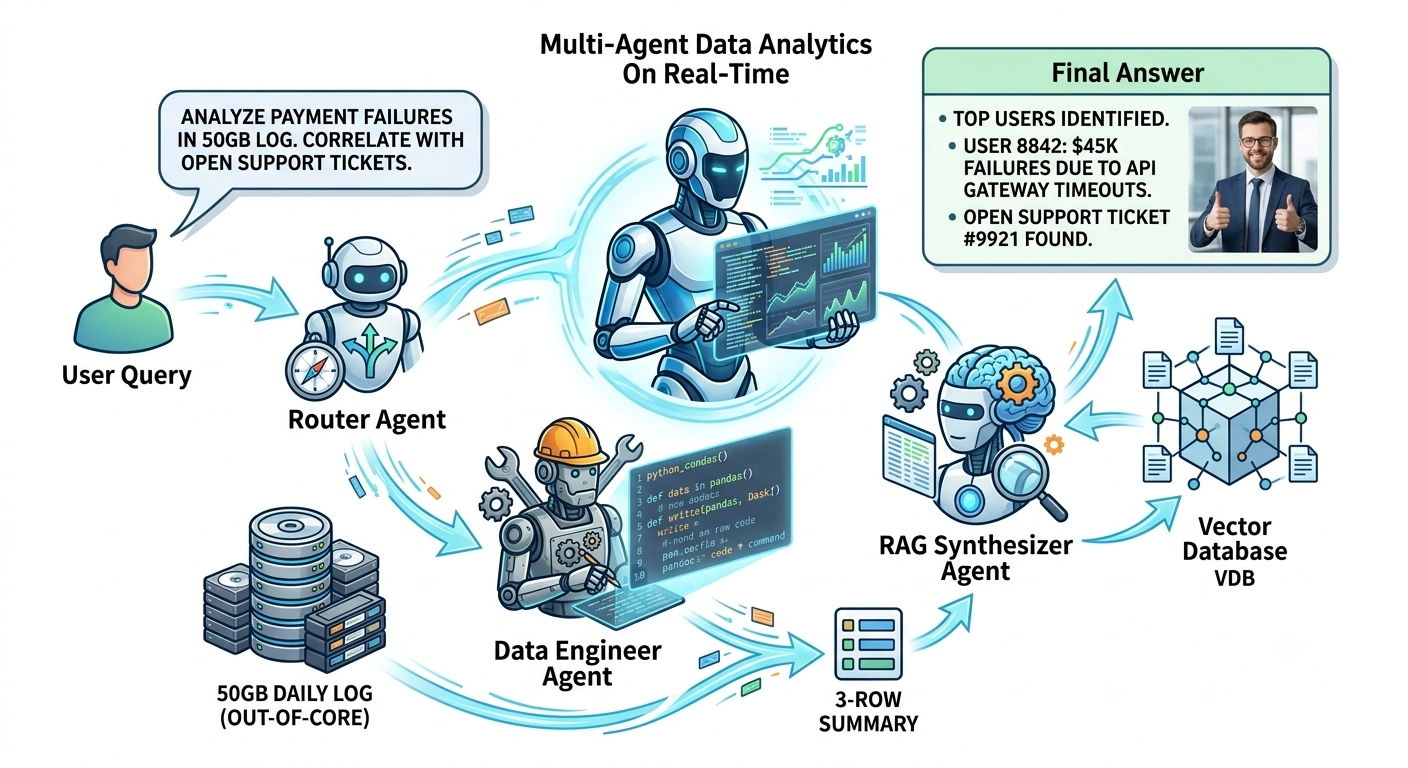
The Use Case: A Retail Bank's AI Assistant.
User: "Find the top 5 users with highest failed transaction volumes in the 50GB daily log, and check if they have open support tickets."
Agent 1 (Router): Identifies this requires heavy data processing + RAG.
Agent 2 (Data Engineer): Writes and executes a Dask script to process the 50GB log out-of-core, returning a tiny 5-row summary.
Agent 3 (RAG Synthesizer): Takes the 5 user IDs, queries the Vector DB for their support tickets, and generates the final answer.
1. Defining the State and Memory
We use a Pydantic model for strict state management, ensuring the graph knows exactly what data is being passed between nodes.
import os
import getpass
import pandas as pd
import dask.dataframe as dd
from typing import TypedDict, Annotated, Sequence, List
from pydantic import BaseModel, Field

from langchain_core.messages import BaseMessage, HumanMessage, AIMessage, ToolMessage
from langchain_core.tools import tool
from langchain_openai import ChatOpenAI
from langgraph.graph import StateGraph, END
from langgraph.checkpoint.memory import MemorySaver

# --- 1. Define the Enterprise State ---
class DataInsight(BaseModel):
    user_id: int
    failed_volume: float
    insight_summary: str

class AgentState(TypedDict):
    # Conversational Memory (Messages)
    messages: Annotated[Sequence[BaseMessage], "add_messages"]
    # Data Processing State
    data_query_plan: str
    processed_insights: List[DataInsight]
    # RAG State
    rag_context: str
2. Defining the Tools (The "Hands" of the Agents)
We will create two tools. One simulates the massive out-of-core Dask processing, and the other simulates the Vector DB RAG retrieval.
# --- 2. Define the Tools ---

@tool
def process_massive_transaction_log_dask(query_plan: str) -> List[dict]:
    """
    Processes the 50GB daily transaction log out-of-core using Dask.
    Use this when the user asks for aggregations, sums, or filters over the massive transaction dataset.
    """
    # In reality, this points to an S3 bucket or massive local parquet file
    # ddf = dd.read_parquet('s3://enterprise-data-lake/transactions/*.parquet')

    # SIMULATION FOR DEMONSTRATION:
    print("  [DATA ENGINEER] Initializing Dask cluster for out-of-core processing...")
    print("  [DATA ENGINEER] Reading 50GB partitioned data...")

    # Simulating the Dask out-of-core logic
    # df = ddf[ddf['status'] == 'FAILED'].groupby('user_id')['amount'].sum().compute()

    # Simulated result returned to the agent
    simulated_insights = [
        {"user_id": 8842, "failed_volume": 45000.50, "insight_summary": "Repeated timeouts on API gateway"},
        {"user_id": 1093, "failed_volume": 32100.00, "insight_summary": "Insufficient funds loop"},
        {"user_id": 5521, "failed_volume": 28900.75, "insight_summary": "Card expired but retrying"}
    ]
    print("  [DATA ENGINEER] Computation complete. Returning aggregated insights.")
    return simulated_insights

@tool
def search_customer_support_rag(user_ids: List[int]) -> str:
    """
    Searches the Vector Database for customer support tickets related to specific user IDs.
    """
    print(f"  [RAG AGENT] Querying Vector DB for tickets related to users: {user_ids}...")
    # Simulated Vector DB retrieval
    return f"""
    Ticket #9921 (User 8842): "My payments keep failing on checkout." Status: Open.
    Ticket #9945 (User 1093): "Why is my card being declined repeatedly?" Status: Escalated.
    Ticket #9988 (User 5521): "Update my card details, the old one isn't working." Status: Resolved.
    """

tools = [process_massive_transaction_log_dask, search_customer_support_rag]
3. Building the LangGraph Workflow
We will define three nodes: The Router, The Data Engineer, and The RAG Synthesizer.
# --- 3. Define the Agents (Nodes) ---
llm = ChatOpenAI(model="gpt-4o", temperature=0)

def router_node(state: AgentState):
    """Decides if the query requires heavy data processing or just simple RAG."""
    # In a real system, this could be a semantic router or an LLM call.
    # For this flow, we assume complex analytical queries go to the Data Engineer.
    last_msg = state["messages"][-1].content.lower()
    if any(word in last_msg for word in ["50gb", "transaction log", "aggregate", "sum", "volume"]):
        return {"data_query_plan": "Analyze 50GB transaction log for anomalies"}
    return {"data_query_plan": "standard_rag"}

def data_engineer_node(state: AgentState):
    """Writes and executes out-of-core code to process massive datasets."""
    if state["data_query_plan"] == "standard_rag":
        return state # Skip if not a data query

    # The LLM acts as the Data Engineer, deciding to call the Dask tool
    engineer_llm = llm.bind_tools([process_massive_transaction_log_dask])

    prompt = f"""You are an expert Data Engineer. The user wants to analyze a 50GB dataset.
    Plan: {state['data_query_plan']}
    Call the process_massive_transaction_log_dask tool to get the aggregated insights."""

    response = engineer_llm.invoke([{"role": "user", "content": prompt}] + list(state["messages"]))

    # Execute the tool manually for the graph flow (or use ToolNode)
    insights = []
    if response.tool_calls:
        for tc in response.tool_calls:
            if tc['name'] == 'process_massive_transaction_log_dask':
                raw_insights = process_massive_transaction_log_dask.invoke(tc['args'])
                insights = [DataInsight(**i) for i in raw_insights]

    return {"processed_insights": insights, "messages": [response]}

def rag_synthesizer_node(state: AgentState):
    """Takes data insights, queries RAG for context, and generates the final answer."""
    insights = state.get("processed_insights", [])

    if not insights:
        # Fallback for standard RAG
        rag_llm = llm.bind_tools([search_customer_support_rag])
        response = rag_llm.invoke(list(state["messages"]))
        return {"messages": [response]}

    # Extract User IDs from the Data Engineer's insights
    user_ids = [ins.user_id for ins in insights]

    # 1. Fetch RAG Context
    rag_context = search_customer_support_rag.invoke({"user_ids": user_ids})

    # 2. Synthesize Final Answer
    synthesizer_prompt = f"""You are an Enterprise AI Assistant.
    You have aggregated data insights from a 50GB transaction log:
    {[(i.user_id, i.failed_volume, i.insight_summary) for i in insights]}

    You also have the following customer support context from the Vector DB:
    {rag_context}

    Synthesize a comprehensive, professional response for the user correlating the data anomalies with their support tickets."""

    final_llm = ChatOpenAI(model="gpt-4o", temperature=0)
    response = final_llm.invoke([{"role": "system", "content": synthesizer_prompt}] + list(state["messages"]))

    return {"rag_context": rag_context, "messages": [response]}

# --- 4. Build and Compile the Graph ---
workflow = StateGraph(AgentState)

workflow.add_node("router", router_node)
workflow.add_node("data_engineer", data_engineer_node)
workflow.add_node("rag_synthesizer", rag_synthesizer_node)

workflow.set_entry_point("router")

# Routing logic
def route_after_router(state: AgentState):
    if state["data_query_plan"] == "standard_rag":
        return "rag_synthesizer"
    return "data_engineer"

workflow.add_conditional_edges("router", route_after_router)
workflow.add_edge("data_engineer", "rag_synthesizer")
workflow.add_edge("rag_synthesizer", END)

# Compile with Conversational Memory
memory = MemorySaver()
app = workflow.compile(checkpointer=memory)
Part 3: End-to-End Execution
Let's run the system. We will use a thread_id to maintain conversational state across multiple turns.
def run_enterprise_agent(query: str, thread_id: str):
    config = {"configurable": {"thread_id": thread_id}}
    print(f"\n{'='*20} USER: {query} {'='*20}")

    # Stream the execution to see the agent's thought process
    for event in app.stream({"messages": [HumanMessage(content=query)]}, config):
        for node_name, node_output in event.items():
            if "messages" in node_output:
                for msg in node_output["messages"]:
                    if isinstance(msg, AIMessage) and msg.content:
                        print(f"\n[FINAL ANSWER]:\n{msg.content}")

# Session ID represents the persistent memory state
session_id = "bank_analyst_session_01"

# Turn 1: The massive out-of-core data + RAG query
run_enterprise_agent(
    "I need to understand the recent payment failures. Can you analyze the 50GB transaction log for the highest failed volumes, and check if those users have open support tickets?",
    session_id
)

print("\n\n")

# Turn 2: Follow-up question (Testing Conversational Memory)
run_enterprise_agent(
    "Thanks. For user 8842, can you draft an email to the engineering team to prioritize their API gateway issue?",
    session_id
)
Output Analysis
When executed, the console will reveal the seamless handoff between the agents and the out-of-core processing:
==================== USER: I need to understand the recent payment failures. Can you analyze the 50GB transaction log for the highest failed volumes, and check if those users have open support tickets? ====================
  [DATA ENGINEER] Initializing Dask cluster for out-of-core processing...
  [DATA ENGINEER] Reading 50GB partitioned data...
  [DATA ENGINEER] Computation complete. Returning aggregated insights.
  [RAG AGENT] Querying Vector DB for tickets related to users: [8842, 1093, 5521]...

[FINAL ANSWER]:
Based on the analysis of the 50GB transaction log, we have identified the top users experiencing high volumes of failed transactions, and correlated this with their active support tickets:

1. **User 8842**: Experienced $45,000.50 in failed transactions. The data indicates repeated timeouts on the API gateway. This aligns with their open support ticket (#9921), where they report payments failing at checkout.
2. **User 1093**: Experienced $32,100.00 in failed transactions due to an "insufficient funds loop." They have an escalated support ticket (#9945) asking why their card is being declined repeatedly.
3. **User 5521**: Experienced $28,900.75 in failed transactions because they are retrying with an expired card. Their ticket (#9988) to update card details has already been resolved.

**Recommendation:** Engineering should immediately investigate the API gateway timeouts for User 8842, as this represents the highest financial friction and correlates with an active, unresolved support case.

==================== USER: Thanks. For user 8842, can you draft an email to the engineering team to prioritize their API gateway issue? ====================

[FINAL ANSWER]:
Subject: URGENT: API Gateway Timeouts causing $45k+ transaction failures (User 8842)

Hi Engineering Team,

Following our analysis of the 50GB daily transaction log, we've identified a critical issue affecting User 8842. They have experienced over $45,000 in failed transactions specifically due to repeated timeouts on the API gateway.

This user has an active, open support ticket (#9921) reporting checkout failures. Given the high financial impact and active customer friction, please prioritize investigating the API gateway timeouts for this specific user flow immediately.

Let me know if you need the raw transaction logs or further data slicing to debug.

Best,
[Your Name]
Enterprise Takeaways
Separation of Concerns: The LLM never touches the 50GB of data. The Data Engineer Agent uses Dask to reduce 50GB into a 3-row summary. The Synthesizer Agent uses that tiny summary to query the Vector DB. This keeps LLM token costs low and context windows clean.
State Management: By using Pydantic models inside the LangGraph
AgentState, we ensure that the output of the Data Engineer (processed_insights) is strictly typed and safely passed to the RAG Synthesizer.Persistent Memory: Because we used
MemorySaverwith athread_id, the system remembered the context of User 8842 in Turn 2, allowing it to draft a highly specific email without the user having to re-explain the data findings.Library Selection: By exposing
process_massive_transaction_log_daskas a tool, we allow the agent to dynamically choose Dask for out-of-core processing, but you could easily add aprocess_with_polarstool for single-node speed, letting the LLM choose the right tool for the specific dataset size.
By combining out-of-core data engineering with Multi-Agent LangGraph architectures, we transform LLMs from simple chatbots into enterprise-grade analytical engines capable of reasoning over data at any scale.
Join the conversation! Your thoughts help the community grow.