

Introduction
In this article I describe schemas in SQL Server 2012. A schema is like a container that contains database objects like tables, views etc. So let us learn about schemas, creation of schemas, how to alter schemas and how to drop schemas.
SQL Schema
A schema is like a namespace in C# that contains database objects. All objects within a schema must have a unique name. And the name of the schema should also be unique in the database. When we create a table, view or other object then by default it goes in the dbo schema.
Syntax
create schema schema_name
go
<schema element>
{table defenation, view defenation etc}
Example
- create schema ss1
- go
- create table ss1.emp(empId int,empname varchar(15))
- go
- insert into ss1.emp values(1,'d')
- go
- select * from ss1.emp
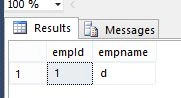
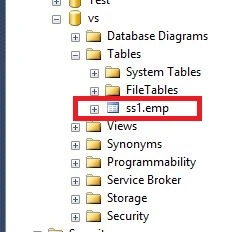
Creation of table in schema
- create table ss1.emp2(empAdd varchar(15))
Output
Creation of view in schema
- create view ss1.v
- as select * from ss1.emp
- select * from ss1.v
Alter SQL Schema
First of all we are creating a schema and then we alter that schema
Output
- create schema ss2
- go
- alter schema ss2 transfer ss1.emp
- go
- select * from ss2.emp
Dropping a SQL Schema
- drop table ss2.emp
- go
- drop schema ss2
Summary
In this article, I described schemas in SQL Server. I hope this article has helped you to understand this topic. Please share if you know more about this. Your feedback and constructive contributions are welcome.
Sathish kannaPosted Mar 12, 2018, 3:26 PM
Thanks for very nice definition for schema , example very nice, valga valamudan
Rajeev JhaPosted Mar 9, 2015, 12:41 PM
Nicely said but I have a question if I have more than one table's can I use same schema to perform different operations in table. Ex:-
vasantha meenaPosted Jan 22, 2015, 4:05 AM
Nice one.. Keep going..
Deepak MiddhaPosted Dec 5, 2012, 4:13 AM
Thanks Dharmendra, we can't make two tables with same name in a schema there should be some difference between the name of table...
Dharmendra VishwakarmaPosted Dec 5, 2012, 4:03 AM
Nice article Deepak, Can we make two table with same name in a Schema??