

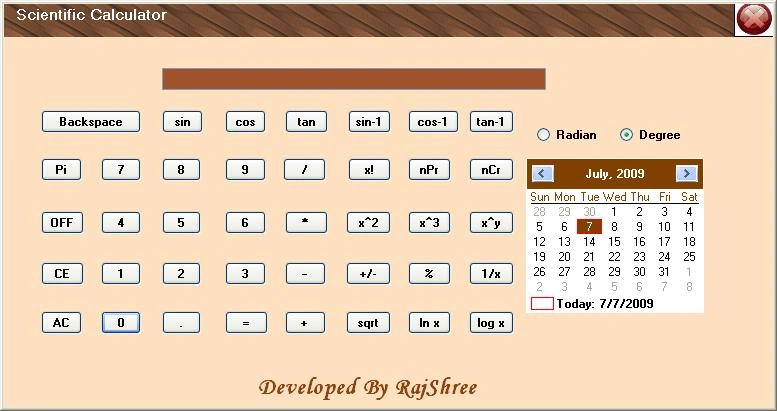
This is a Windows Forms application developed on C#. Download the attached project and run it in Visual Studio.
Here is what the code looks like:
using System;
using System.Collections.Generic;
using System.ComponentModel;
using System.Data;
using System.Drawing;
using System.Text;
using System.Windows.Forms;
namespace calculator {
  public partial class Form1: Form {
    public string no1, constfun;
    // public int no2;
    public bool inputstatus;

    public Form1() {
      InitializeComponent();
      no1 = "";
      textBox1.ReadOnly = true; //read only mode of textbox
      textBox1.RightToLeft = RightToLeft.Yes;
      radioButton1.Checked = true;

    }
    //putting value of button text into text box and a variable inputstatus to textbox
    #region putting value
    private void button1_Click(object sender, EventArgs e) {
      if (inputstatus == true) {
        textBox1.Text += button1.Text;
      } else {
        textBox1.Text = button1.Text;
        inputstatus = true;
      }
    }
    private void button6_Click(object sender, EventArgs e) {
      if (inputstatus == true) {
        textBox1.Text += button6.Text;
      } else {
        textBox1.Text = button6.Text;
        inputstatus = true;
      }

    }
    private void button7_Click(object sender, EventArgs e) {
      if (inputstatus == true) {
        textBox1.Text += button7.Text;
      } else {
        textBox1.Text = button7.Text;
        inputstatus = true;
      }

    }
    private void button8_Click(object sender, EventArgs e) {
      if (inputstatus == true) {
        textBox1.Text += button8.Text;
      } else {
        textBox1.Text = button8.Text;
        inputstatus = true;
      }
    }
    private void button11_Click(object sender, EventArgs e) {
      if (inputstatus == true) {
        textBox1.Text += button11.Text;
      } else {
        textBox1.Text = button11.Text;
        inputstatus = true;
      }
    }
    private void button12_Click(object sender, EventArgs e) {
      if (inputstatus == true) {
        textBox1.Text += button12.Text;
      } else {
        textBox1.Text = button12.Text;
        inputstatus = true;
      }
    }
    private void button13_Click(object sender, EventArgs e) {
      if (inputstatus == true) {
        textBox1.Text += button13.Text;
      } else {
        textBox1.Text = button13.Text;
        inputstatus = true;
      }
    }
    private void button16_Click(object sender, EventArgs e) {
      if (inputstatus == true) {
        textBox1.Text += button16.Text;
      } else {
        textBox1.Text = button16.Text;
        inputstatus = true;
      }
    }
    private void button17_Click(object sender, EventArgs e) {
      if (inputstatus == true) {
        textBox1.Text += button17.Text;
      } else {
        textBox1.Text = button17.Text;
        inputstatus = true;
      }
    }
    //when 9 is pressed
    private void button18_Click(object sender, EventArgs e) {
      if (inputstatus == true) {
        textBox1.Text += button18.Text;
      } else {
        textBox1.Text = button18.Text;
        inputstatus = true;
      }
    }
    //. button
    private void button2_Click(object sender, EventArgs e) {
      if (inputstatus == true) {
        textBox1.Text += button2.Text;
      } else {
        textBox1.Text = button2.Text;
        inputstatus = true;
      }
    }
    #endregion putting vaules
    //Add Operator
    private void button3_Click(object sender, EventArgs e) {
      no1 = textBox1.Text;
      textBox1.Text = "";
      constfun = "+"; //used in switch case to check what want to do add

    }
    //subtract
    private void button9_Click(object sender, EventArgs e) {
      no1 = textBox1.Text;
      textBox1.Text = "";
      constfun = "-"; //want to subtract

    }
    //multiply
    private void button10_Click(object sender, EventArgs e) {
      no1 = textBox1.Text;
      textBox1.Text = "";
      constfun = "*"; //want to multiply
    }
    //divide
    private void button15_Click(object sender, EventArgs e) {
      no1 = textBox1.Text;
      textBox1.Text = "";
      constfun = "/";

    }
    //a user defined fun
    private void funcal() {
      switch (constfun) {
      case "+":
        textBox1.Text = Convert.ToString(Convert.ToInt32(no1) + Convert.ToInt32(textBox1.Text)); //ading values of textbox

        break;
      case "-":
        textBox1.Text = Convert.ToString(Convert.ToInt32(no1) - Convert.ToInt32(textBox1.Text));

        break;
      case "*":
        textBox1.Text = Convert.ToString(Convert.ToInt32(no1) * Convert.ToInt32(textBox1.Text));
        break;
      case "/":
        if (textBox1.Text == "0") {
          textBox1.Text = "infinity";
        } else {
          textBox1.Text = Convert.ToString(Convert.ToInt32(no1) / Convert.ToInt32(textBox1.Text));
        }
        break;
      case "x^y":
        textBox1.Text = Convert.ToString(System.Math.Pow(Convert.ToDouble(no1), Convert.ToDouble(textBox1.Text)));
        break;
      case "mod":
        textBox1.Text = Convert.ToString(Convert.ToDouble(no1) % Convert.ToDouble(textBox1.Text));
        break;
      case "nPr":
        int varn, var2, var3; //variable declaration
        varn = factorial(Convert.ToInt32(no1)); //calling factorial function
        var2 = factorial(Convert.ToInt32(no1) - Convert.ToInt32(textBox1.Text));
        textBox1.Text = Convert.ToString(varn / var2); //storing or showing result of factorial variables
        break;
      case "nCr":
        varn = factorial(Convert.ToInt32(no1));
        var2 = factorial(Convert.ToInt32(no1) - Convert.ToInt32(textBox1.Text));
        var3 = factorial(Convert.ToInt32(textBox1.Text));
        textBox1.Text = Convert.ToString(varn / (var3 * var2));
        break;

      }
    }

    //a user defined function to calculate factorial
    private int factorial(int x) {
      int i = 1; //initialization values of i to 1
      for (int s = 1; s <= x; s++) {
        i = i * s;
      }
      return i;
    }

    //when = button is pressed
    private void button5_Click(object sender, EventArgs e) {

      funcal(); //calling of function
      inputstatus = false;
    }

    //when AC is pressed to power on
    private void button14_Click(object sender, EventArgs e) {
      textBox1.Enabled = true;
      textBox1.Text = "0";

    }

    //calculating x raise to power 2
    private void button19_Click(object sender, EventArgs e) {
      textBox1.Text = Convert.ToString(Convert.ToInt32(textBox1.Text) * Convert.ToInt32(textBox1.Text));
      inputstatus = false;
    }
    //calculating x raise to power 3
    private void button20_Click(object sender, EventArgs e) {
      textBox1.Text = Convert.ToString(Convert.ToInt32(textBox1.Text) * Convert.ToInt32(textBox1.Text) * Convert.ToInt32(textBox1.Text));
      inputstatus = false;
    }
    //calculating squareroot
    private void button21_Click(object sender, EventArgs e) {
      textBox1.Text = Convert.ToString(System.Math.Sqrt(Convert.ToDouble(textBox1.Text)));
      inputstatus = false;
    }

    //x raise to power y
    private void button22_Click(object sender, EventArgs e) {
      no1 = textBox1.Text;
      textBox1.Text = "";
      constfun = "x^y";
    }

    //when CE button is pressed
    private void button23_Click(object sender, EventArgs e) {
      textBox1.Text = String.Empty;
      inputstatus = true;
    }
    //To set Pi value
    private void button4_Click(object sender, EventArgs e) {
      textBox1.Text = "3.141592654";
    }
    //sin function
    private void button24_Click(object sender, EventArgs e) {
      //if radian is selected
      if (radioButton3.Checked == true) {
        textBox1.Text = Convert.ToString(System.Math.Sin(Convert.ToDouble(textBox1.Text)));
        inputstatus = false;
      }
      //if degree is selected
      else {
        textBox1.Text = Convert.ToString(System.Math.Sin((Convert.ToDouble(System.Math.PI) / 180) * (Convert.ToDouble(textBox1.Text))));
        inputstatus = false;
      }
    }

    //cos function
    private void button25_Click(object sender, EventArgs e) {
      //radian selected
      if (radioButton3.Checked == true) {
        textBox1.Text = Convert.ToString(System.Math.Cos(Convert.ToDouble(textBox1.Text)));
        inputstatus = false;
      }
      //degree selected
      else {
        textBox1.Text = Convert.ToString(System.Math.Cos((Convert.ToDouble(System.Math.PI) / 180) * (Convert.ToDouble(textBox1.Text))));
        inputstatus = false;
      }
    }

    //tan function
    private void button26_Click(object sender, EventArgs e) {

      //radian selected
      if (radioButton3.Checked == true) {
        textBox1.Text = Convert.ToString(System.Math.Tan(Convert.ToDouble(textBox1.Text)));
        inputstatus = false;
      }
      //degree selected
      else {
        textBox1.Text = Convert.ToString(System.Math.Tan((Convert.ToDouble(System.Math.PI) / 180) * (Convert.ToDouble(textBox1.Text))));
        inputstatus = false;
      }

    }

    //calculationg 1/x
    private void button27_Click(object sender, EventArgs e) {
      textBox1.Text = Convert.ToString(Convert.ToDouble(1.0 / Convert.ToDouble(textBox1.Text)));
      inputstatus = false;

    }

    //calculting x!
    private void button28_Click(object sender, EventArgs e) {
      int var1 = 1;
      for (int i = 1; i <= Convert.ToInt16(textBox1.Text); i++) {
        var1 = var1 * i;
      }
      textBox1.Text = Convert.ToString(var1);
      inputstatus = false;
    }
    //calculationg log10
    private void button29_Click(object sender, EventArgs e) {
      textBox1.Text = Convert.ToString(System.Math.Log10(Convert.ToDouble(textBox1.Text)));
      inputstatus = false;
    }

    //calculation natural log
    private void button30_Click(object sender, EventArgs e) {
      textBox1.Text = Convert.ToString(System.Math.Log(Convert.ToDouble(textBox1.Text)));
      inputstatus = false;
    }

    //backspace key is presseed
    private void button31_Click(object sender, EventArgs e) {
      no1 = textBox1.Text;
      int n = no1.Length;
      textBox1.Text = (no1.Substring(0, n - 1)); //removing values one by one onclick of backspace button
    }
    //when mod operator(%) is presseed
    private void button32_Click(object sender, EventArgs e) {
      no1 = textBox1.Text;
      textBox1.Text = "";
      constfun = "mod"; //explaned earlier to calculate mod in fncalc()
    }
    //coding for +/- key
    private void button33_Click(object sender, EventArgs e) {
      textBox1.Text = Convert.ToString(-Convert.ToInt32(textBox1.Text));
      inputstatus = false;
    }

    //Sin inverese fun
    private void button35_Click(object sender, EventArgs e) {
      if (radioButton3.Checked == true) {
        textBox1.Text = Convert.ToString(System.Math.Asin(Convert.ToDouble(textBox1.Text)));
        inputstatus = false;
      } else {
        textBox1.Text = Convert.ToString(System.Math.Asin((Convert.ToDouble(System.Math.PI) / 180) * (Convert.ToDouble(textBox1.Text))));
        inputstatus = false;
      }
    }
    //cos inverese fun
    private void button34_Click(object sender, EventArgs e) {
      if (radioButton3.Checked == true) {
        textBox1.Text = Convert.ToString(System.Math.Acos(Convert.ToDouble(textBox1.Text)));
        inputstatus = false;
      } else {
        textBox1.Text = Convert.ToString(System.Math.Acos((Convert.ToDouble(System.Math.PI) / 180) * (Convert.ToDouble(textBox1.Text))));
        inputstatus = false;
      }
    }
    //tan inverese fun
    private void button36_Click(object sender, EventArgs e) {
      if (radioButton3.Checked == true) {
        textBox1.Text = Convert.ToString(System.Math.Atan(Convert.ToDouble(textBox1.Text)));
        inputstatus = false;
      } else {
        textBox1.Text = Convert.ToString(System.Math.Atan((Convert.ToDouble(System.Math.PI) / 180) * (Convert.ToDouble(textBox1.Text))));
        inputstatus = false;
      }
    }

    private void radioButton3_CheckedChanged(object sender, EventArgs e) {
    }
    //permutation
    private void button37_Click(object sender, EventArgs e) {
      no1 = textBox1.Text;
      textBox1.Text = "";
      constfun = "nPr";
    }
    //combination
    private void button38_Click(object sender, EventArgs e) {
      no1 = textBox1.Text;
      textBox1.Text = "";
      constfun = "nCr";

    }
    private void Form1_Load(object sender, EventArgs e) {}
    private void monthCalendar1_DateChanged(object sender, DateRangeEventArgs e) {}

    //coding for off button
    private void button39_Click(object sender, EventArgs e) {
      textBox1.Enabled = false;
      textBox1.Text = "";
      inputstatus = false;
    }
    private void radioButton1_CheckedChanged(object sender, EventArgs e) {}
    private void userControl11_Load(object sender, EventArgs e) {
      Application.Exit();
    }
    private void userControl11_Load_1(object sender, EventArgs e) {}
    private void userControl11_Load_2(object sender, EventArgs e) {}

  }
}
//control1 coding
//control is created for custom menubar
//custom user control
using System;
using System.Collections.Generic;
using System.ComponentModel;
using System.Drawing;
using System.Data;
using System.Text;
using System.Windows.Forms;
namespace control1
{
    public partial class UserControl1 : UserControl
    {
        public UserControl1()
        {
            InitializeComponent();
        }
        private void button1_Click(object sender, EventArgs e)
        {
            Application.Exit();//applcation exit on click of close button
        }
    }
}
Madhu sudhanPosted Feb 28, 2018, 4:51 AM
The following butons are not working in visual studio 2008sin ac tan inverse sin inverse backspace .
Thích NhíchPosted Oct 1, 2015, 5:30 AM
http://chosang.vn
ALLAH Rakha ShaibPosted Jan 3, 2014, 3:04 PM
still it contains exceptions , soon I will share exception free efficient version..:) Nice App...
soumya dasPosted Mar 8, 2013, 10:29 AM
cool...
mariam hameedPosted Apr 24, 2012, 4:19 AM
Dear rajShree, i have visual studio2010 express.this code is not ruuning there. will this code only run in vs 2005? waiting for reply eagerly.
Hong MakaraPosted Jan 14, 2011, 2:44 AM
Thank you for this calculator and i want you to post other project because now I study it.
mananPosted Jun 1, 2010, 1:33 PM
yup..Nice Work BUt the Cal is not movable..there is no option for minimize.......
anurag chatterjeePosted May 23, 2010, 7:43 AM
hi rajashree the prog. hv a lot of bugs, try to debug it..... bugs: 1) multiple dots can be inputted. 2) we can'nt calculate multiple number of arithematic operation at a time. 3) use exception(error handling) to remove multiple bugs... i hope u can code a fab. calculator ..... thanx
vighnu p pPosted Mar 16, 2010, 3:27 PM
the value i get when i use the inverse funtion in this project with the ones in real calculators are entirely different. Apparently your inverse functions seems incorrect
Chrystler OrbienPosted Jan 31, 2010, 9:48 PM
thank you so much RAJSHREE for sharing this code,, its help me a lot to answer my scientific calculator assignment on visual c#.. thanks again..
jaya kumarPosted Dec 22, 2009, 11:39 PM
very usful for this
techmaniac jainPosted Oct 24, 2009, 1:51 AM
nice programe thanx
Nikhil KumareditedPosted Jul 7, 2009, 10:58 AMEdited Jul 7, 2009, 11:00 AM
rajshree nice programming but poor gui, you have created a .dll control thats why it's not moveble and there is no option for minimize... try to over come ... Nikhil Kumar