

Introduction:
In this article I will show you how to make a screen saver by using c# windows form. It is not perfect screen sever as windows gives us but yes, it is little bit like that.
Steps:
1) Add a form in your application and make it form border style none. Set transparency key as form background color so it will make your form transparent.
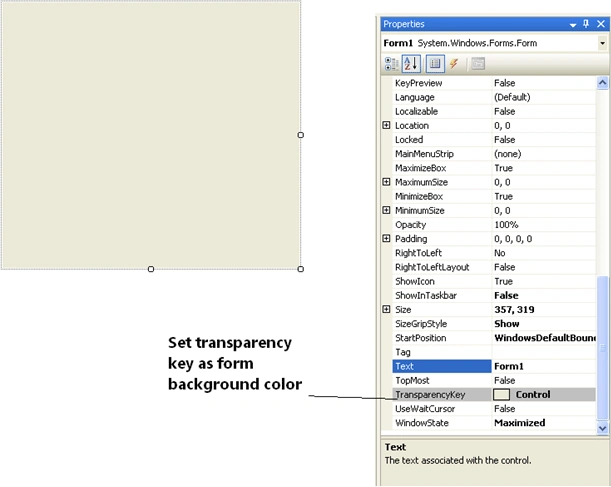
2) Put a timer control on your form and set it's interval as you want to display picture per millisecond on the computer screen.
3) Code behind
int x, y;
private void timer1_Tick(object sender, EventArgs e)
private void timer1_Tick(object sender, EventArgs e)
{
/*
* here x & y are the
variables and below two line will put
desktop's different
* screen location in it.
*/
x = Convert.ToInt32((Microsoft.VisualBasic.VBMath.Rnd())
* (this.ClientSize.Width));
y =Convert.ToInt32((Microsoft.VisualBasic.VBMath.Rnd())*this.ClientSize.Height));
/*
* screenStart() is the
function which works to display image at the different screen
* location of the
desktop
*/
screenStart();
}
//This is the function which is called in the time1_Tick even
private void
screenStart()
{
//Picturebox is created
dyanamically
PictureBox
pbox = new PictureBox();
//and then after
it will display at different location
pbox.Location = new
Point(x, y);
pbox.Height = 100;
pbox.Width = 100;
//picture is set
to the picturebox from the Resources.
pbox.Image = global::screensever.Properties.Resources.thank_you_blue_rose;
pbox.SizeMode = System.Windows.Forms.PictureBoxSizeMode.StretchImage;
//and at last
control will added to the form
Controls.Add(pbox);
}
//This the Form1_Keyup even from where you will exit from the
application while its running.
private void
Form1_KeyUp(object sender, KeyEventArgs e)
{
if (Keys.Escape == e.KeyCode)
{
this.Close();
}
}
vikram kadamPosted Feb 1, 2011, 1:37 PM
i think u will show all step in your how to create your forms
Prachi DeoupadhyePosted Dec 5, 2010, 2:01 AM
Nicee
Priyank PatelPosted Oct 4, 2010, 4:32 AM
thankx
JureeditedPosted Sep 27, 2010, 4:24 PMEdited Sep 27, 2010, 5:07 PM
Nice idea. You could add this: this.MouseDown += (object o, MouseEventArgs e) => this.Close(); Cursor.Hide();
Mahesh ChandPosted Sep 26, 2010, 10:24 PM
Good start.