

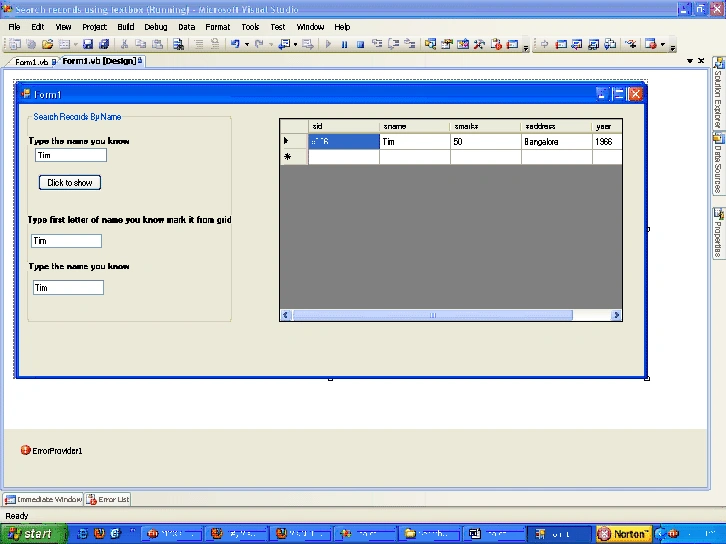
In this article we will search records from database using textbox and show respective data in the datagridview in three different ways.
1. Enter the know data in the textbox and click the search button to display respective data from the datagridview.
2. Enter the first letter of the unknown data in the textbox and all data relating data to that letter will be shown in the datagridview, so that we can able to search our own data.
3. Enter the know data in the textbox and find its all related data in the datagridview
- Imports System.Data
- Imports System.Data.OleDb
- Public Class Form1
- Dim ConnectionString As String = System.Configuration.ConfigurationSettings.AppSettings("dsn")
- Dim con As OleDbConnection = New OleDbConnection(ConnectionString)
- Dim com As OleDbCommand
- Dim oledbda As OleDbDataAdapter
- Dim ds As DataSet
- Dim dt As DataTable
- Dim str As String
- Private Sub Button1_Click(ByVal sender As System.Object, ByVal e As System.EventArgs)Handles Button1.Click
- If TextBox1.Text = "" Then
- ErrorProvider1.SetError(TextBox1, "please provide name")
- Else
- Try
- con.Open()
- str = "select * from student where sname ='" & TextBox1.Text & "'"
- com = New OleDbCommand(str, con)
- oledbda = New OleDbDataAdapter(com)
- ds = New DataSet
- oledbda.Fill(ds, "student")
- con.Close()
- DataGridView1.DataSource = ds
- DataGridView1.DataMember = "student"
- Catch ex As Exception
- MsgBox(ex.Message)
- End Try
- End If
- TextBox1.Clear()
- DataGridView1.Visible = True
- End Sub
- Private Sub TextBox2_TextChanged(ByVal sender As System.Object, ByVal e AsSystem.EventArgs)
- Handles TextBox2.TextChanged
- If TextBox2.Text = "" And TextBox2.Text.Length = 0 Then
- DataGridView1.Visible = False
- Else
- Try
- con.Open()
- str = "select * from student where sname like '" & TextBox2.Text & "%'"
- com = New OleDbCommand(str, con)
- oledbda = New OleDbDataAdapter(com)
- ds = New DataSet
- oledbda.Fill(ds, "student")
- con.Close()
- DataGridView1.DataSource = ds
- DataGridView1.DataMember = "student"
- DataGridView1.Visible = True
- Catch ex As Exception
- MsgBox(ex.Message)
- End Try
- End If
- End Sub
- Private Sub TextBox3_TextChanged(ByVal sender As System.Object, ByVal e AsSystem.EventArgs)
- Handles TextBox3.TextChanged
- Try
- con.Open()
- str = "select * from student where sname ='" & TextBox3.Text & "'"
- com = New OleDbCommand(str, con)
- oledbda = New OleDbDataAdapter(com)
- ds = New DataSet
- oledbda.Fill(ds, "student")
- con.Close()
- DataGridView1.DataSource = ds
- DataGridView1.DataMember = "student"
- DataGridView1.Visible = True
- Catch ex As Exception
- MsgBox(ex.Message)
- End Try
- End Sub
- Private Sub Form1_Load(ByVal sender As System.Object, ByVal e As System.EventArgs) HandlesMyBase.Load
- DataGridView1.Visible = False
- End Sub
- End Class
Output
Join the conversation! Your thoughts help the community grow.