

In this article we will be seeing about Searchable columns in SharePoint 2010.
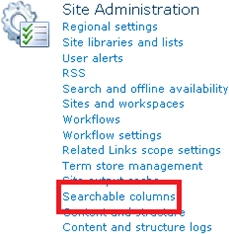
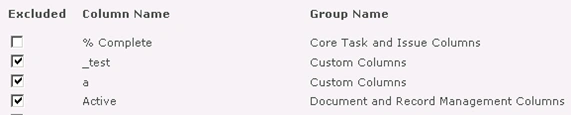
You can exclude site columns from search and indexing. Go to Site Actions =>
Site Settings => Site Administration => Searchable Columns.
Using C# exclude columns:
using
(SPSite site = new
SPSite("http://servername:1111/"))
{
using (SPWeb
web = site.RootWeb)
{
SPField field = web.Fields["_test"];
field.NoCrawl = true;
field.Update();
}
}
Using powershell exclude
columns:
$site=Get-SPSite "http://servername:1111/"
$web=$site.RootWeb
$field=$web.Fields["_test"]
$field.NoCrawl=$true
$field.Update()
ranjani rPosted Jul 20, 2011, 5:23 AM
Hi Vijay, $field.NoCrawl throws me error . It says Property 'NoCrawl' cannot be found on this object,make sure it exists.