

Introduction
This article describes the procedure for searching data in an existing table. We find the record from the table using a SQL query. We create a database "Demo" and table "info" in SQL Server 2012.
The following is the procedure for creating this application.
Step 1
First we create a table and insert some data into the table.
- Start SQL Server 2012.
- Select "New Query".
- Create a new database and table.
Use these commands:
- create database Demo // create the database
- use Demo // use database and create table in the "Demo" database
- create table info (ID int IDENTITY PRIMARY KEY,Name varchar(50),Appointment varchar(50),Technology varchar(50), Task varchar(MAX) )// create a new table
- Insert into info values ('A.P godse','Software Develpoer','.NET, Database','Computer Graphics') // Insert record in the table
- Insert into info values ('yashwant Kanitker','Programmer','.NET, PHP, JSON','Let us C')
- Insert into info values ('E balaguruswami','Programmer', '.NET, Javascript','Object Oriented System')
- Insert into info values ('R.S, Aggrawal','Software Developer',' Web API, MVC4','Design Analysis and Algorithm')
Step 2
Now create a Web API application.
-
Start Visual Studio 2012.
-
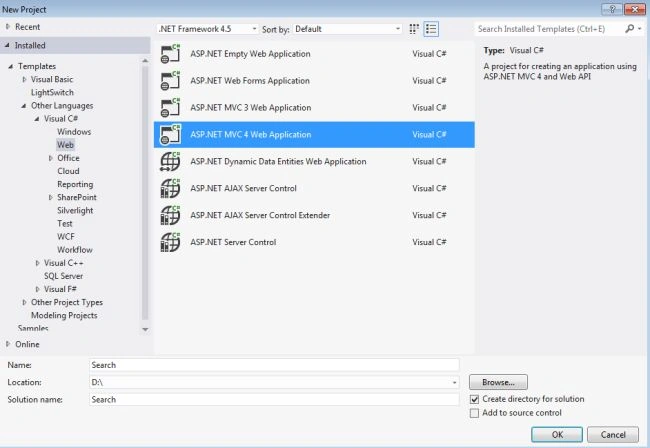
From the start window select "New Project".
-
In the Template Window select "Installed" -> "Visual C#" -> "Web".
-
Select "ASP.NET MVC 4 Web Application" and click on "OK".
-
From the "MVC4 Project" window select "Web API".

Step 3
Create a Model class.
-
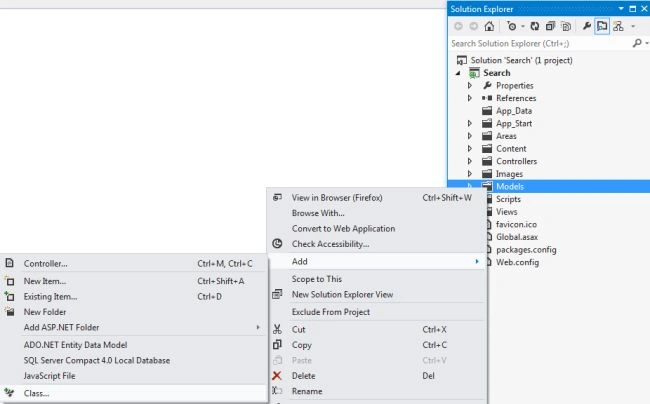
In the "Solution Explorer".
-
Right-click on the "Model folder".
-
Select "Add" -> "Class".
-
In the Template window select "Installed" -> "Visual C#" -> "Class"

-
Click on the "OK" button.
The code of this class:
- using System;
- using System.Collections.Generic;
- using System.Configuration;
- using System.Data.SqlClient;
- using System.Linq;
- using System.Text;
- using System.Web;
- namespace Search.Models
- {
- public class Detail
- {
- public int bID { get; set; }
- public string bName { get; set; }
- public string bAppointment { get; set; }
- public string bTechnology { get; set; }
- public string bTask { get; set; }
- }
- public class ShowDetail
- {
- public List<Detail> Search(List<string> Information)
- {
- StringBuilder Buildsql = new StringBuilder();
- Buildsql.Append("select * from [info] where ");
- foreach (string value in Information)
- {
- Buildsql.AppendFormat("([Name] like '%{0}%' or [Appointment] like '%{0}%' or[Technology] like '%{0}%' or[Task] like '%{0}%') and ", value);
- }
- string datasql = Buildsql.ToString(0, Buildsql.Length - 5);
- return QueryList(datasql);
- }
- protected List<Detail> QueryList(string text)
- {
- List<Detail> lst = new List<Detail>();
- SqlCommand cmd = GenerateSqlCommand(text);
- using (cmd.Connection)
- {
- SqlDataReader reader = cmd.ExecuteReader();
- if (reader.HasRows)
- {
- while (reader.Read())
- {
- lst.Add(ReadValue(reader));
- }
- }
- }
- return lst;
- }
- protected SqlCommand GenerateSqlCommand(string cmdText)
- {
- SqlConnection con = new SqlConnection(ConfigurationManager.ConnectionStrings["dbConnection"].ConnectionString);
- SqlCommand cmd = new SqlCommand(cmdText, con);
- cmd.Connection.Open();
- return cmd;
- }
- protected Detail ReadValue(SqlDataReader reader)
- {
- Detail dt = new Detail();
- dt.bID = (int)reader["ID"];
- dt.bName = (string)reader["Name"];
- dt.bAppointment = (string)reader["Appointment"];
- dt.bTechnology = (string)reader["Technology"];
- dt.bTask = (string)reader["Task"];
- return dt;
- }
- }
- }
Step 4
Open the "HomeController.cs".
-
In the "Solution Explorer".
-
Select "Controller"->"HomeController".
Change the code as in the following:
- using System;
- using System.Collections.Generic;
- using System.Linq;
- using System.Web;
- using System.Web.Mvc;
- using Search.Models;
- namespace Search.Controllers
- {
- public class HomeController : Controller
- {
- protected List<string> Information = new List<string>();
- public ActionResult Index()
- {
- ViewBag.Message = false;
- return View();
- }
- [HttpPost]
- public ActionResult Index(string item)
- {
- if (item.Length > 0)
- {
- string[] store = item.Trim().Split(new string[] { " " }, StringSplitOptions.RemoveEmptyEntries);
- this.Information = store.ToList();
- ShowDetail access = new ShowDetail();
- List<Detail> collection = access.Search(this.Information);
- return View(collection);
- }
- else
- {
- ViewBag.Message = true;
- return View();
- }
- }
- }
- }
Step 5
Open the "index.cshtml" file.
-
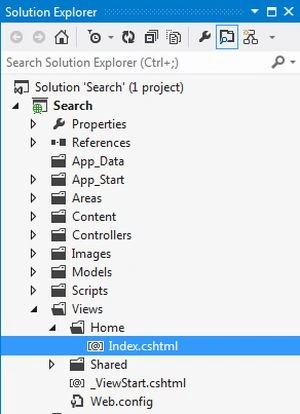
In the "Solution Explorer".
-
Select "View" -> "Home" -> "index.cshtml".
Write this code:
- @model IEnumerable
- <Search.Models.Detail>@{ Layout = null; }
- <!DOCTYPE html>
- <html>
- <head>
- <meta name="viewport" content="width=device-width" />
- <title>Index</title>
- <style type="text/css">
- table, td, th {
- border: 1px solid green;
- }
- th {
- background-color: Pink;
- color: white;
- }
- </style>
- </head>
- <body>
- <div style="background-color: lightblue; height: 100px; padding-top: 10px;"> <span style="text-align: center;">
- <h1> Search functionality in ASP.NET Web API</h1>
- </span>
- </div>
- <div>
- <table style="margin-left: 35%; margin-top: 10px; border: none;">
- <tr>@using (Html.BeginForm()) {
- <td style="border: none;">
- <label id="lblName">Secect Technology</label>
- </td>
- <td style="border: none;">@Html.TextBox("item")</td>
- <td style="border: none;">
- <input id="btnSearch" type="submit" value="Search" />
- </td>}</tr>
- </table>
- </div>
- <div>@if (ViewBag.Message == true) {
- <label id="lblMessage" title="Please enter keyword" style="color:purple;">Select Technology For search....!</label>} else { if (Model != null) { if (Model.Count() != 0) {
- <table style="border: 2px solid LightGray;">
- <tr>
- <th>Name</th>
- <th>Appointment</th>
- <th>Technology</th>
- <th>Task</th>
- </tr>@foreach (var value in Model) {
- <tr>
- <td>@value.bName</td>
- <td>@value.bAppointment</td>
- <td>@value.bTechnology</td>
- <td>@value.bTask</td>
- </tr>}</table>} else {
- <label id="lblErrorMsg" title="Record not fount...!" style="color:blue;">This record does not exist in the table...!</label>} } }</div>
- </body>
- </html>
Step 5
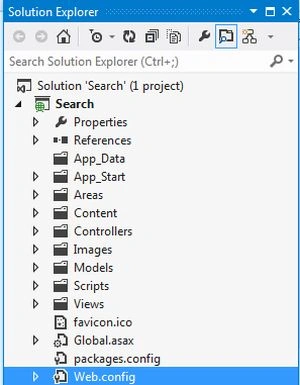
Open the "Web.config" file and write the connection string. This file exists in the "Solution Explorer".
- <connectionStrings>
- <add name="dbConnection" providerName="System.Data.SqlClient" connectionString="Data Source=.;Initial Catalog=Demo ; User id= sa; Password=wintellect"/>
- </connectionStrings>
Step 6
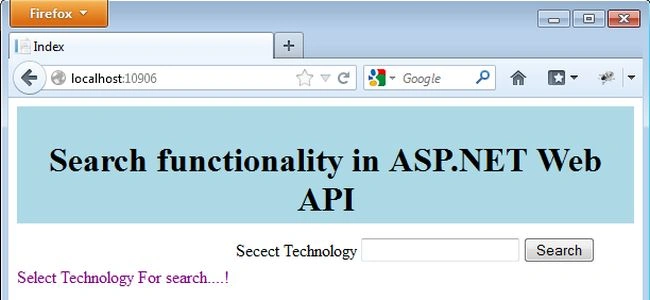
To execute the file press F5.

Enter the technology and click on the "search" button.

Here we select ".Net", all the records are displayed that have .Net technology. If we select a technology that does not exist in the table then it displays a message.

Without selecting any technology, if we click on the "Search" button then a message is displayed.
Misbah ShakeelPosted Feb 1, 2023, 5:58 AM
What if we search technology in postman ?