Introduction
In this article, I am describing searching in the manner of the Google Search style. I am
searching student records by matching character of student name. I am performing
this operation in a Window Forms Application.
At first we should have a database with some records to be searched. I
have database tables "student" and "student_detail". I am showing the
records of database table so that it become easy to understand.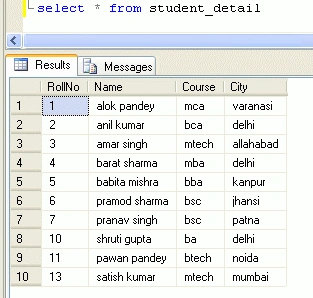
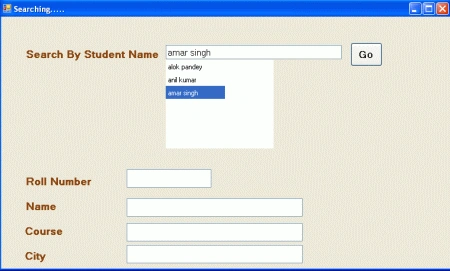
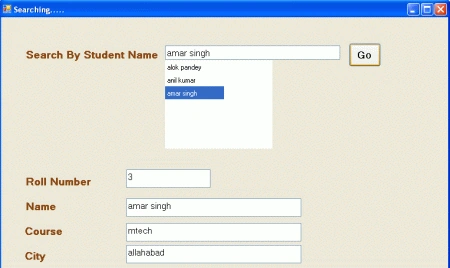
Create a Windows Forms Application. Take some UI controls and arrange them as in the
following figure.
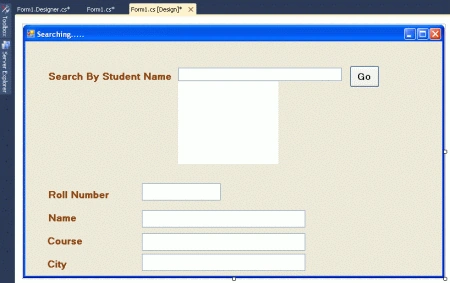
Write the following code
using System;
using
System.Collections.Generic;
using
System.ComponentModel;
using
System.Data;
using
System.Drawing;
using
System.Linq;
using
System.Text;
using
System.Windows.Forms;
using
System.Data.SqlClient;
namespace
SearchingInAdoDotNet
{
public partial
class Form1
: Form
{
public Form1()
{
InitializeComponent();
}
private void
Form1_Load(object sender,
EventArgs e)
{
txtsearch.Focus();
lblrollno.Visible = false;
dgvshow.Visible = false;
dadapter = new
SqlDataAdapter(sqlstate, connstring);
dset = new
DataSet();
dadapter.Fill(dset);
}
SqlDataAdapter dadapter;
DataSet dset;
DataView dview;
string connstring =
"database=student;server=.;user=sa;password=wintellect";
string sqlstate =
"select name,rollno from student_detail";
private void
txtsearch_KeyUp(object sender,
KeyEventArgs e)
{
if (e.KeyCode !=
Keys.Enter)
{
dview = new
DataView(dset.Tables[0]);
dview.RowFilter = "name like '"
+ txtsearch.Text + "%' ";
if (dview.Table.Rows.Count > 0)
{
dgvshow.Visible = true;
}
dgvshow.DataSource = dview;
dgvshow.Columns["rollno"].Visible
= false;
if (e.KeyCode ==
Keys.Down)
{
dgvshow.Focus();
}
}
}
private void
dgvshow_KeyPress(object sender,
KeyPressEventArgs e)
{
}
private void
dgvshow_KeyUp(object sender,
KeyEventArgs e)
{
txtsearch.Text =
dgvshow.Rows[dgvshow.CurrentCell.RowIndex].Cells[dgvshow.CurrentCell.ColumnIndex].Value.ToString();

Join the conversation! Your thoughts help the community grow.