Background
There is often a need to search records in a database for those that satisfy a specific condition and display them in a GridView in an ASP.NET application. So in consideration of that requirement, I've written this article. So let us proceed and follow these step-by-step instructions.
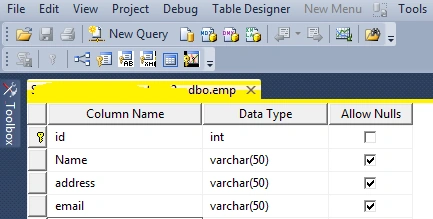
Before we create our Web application, let us create a database table named emp in SQL Server. The table looks like the following:
In the above table, I have created four columns. These columns are are id for the unique identity, Name for the emp name, address for emp address and email to store the email address of the emp.
Now insert some records into the table as you wish, such as:
I hope you have created the same type of table.
Now let us start to create an application to search the records, step-by-step.
Now create the project as:
- "Start" - "All Programs" - "Microsoft Visual Studio 2010".
- "File" -> "New" -> "Project..." -> "C#" -> "Empty Project" (to avoid adding a master page).
- Give the project a name, such as "SearchRecords" or another as you wish and specify the location.
- Then right-click on Solution Explorer and select "Add New Item" then create a "Default.aspx" page.
- Add a button, a label and a GridView in the Default.aspx page.
Then the <form> section of the Default aspx page will look as in the following:
- <form id="form1" runat="server">
- <div>
- <table>
- <tr>
- <td>
- Search
- </td>
- <td>
- <asp:TextBox ID="TextBox1" runat="server"></asp:TextBox>
- </td>
- <td>
- <asp:Button ID="Button1" runat="server" Text="Go" onclick="Button1_Click" />
- </td>
- </tr>
- </table>
- <table><tr><td><p><asp:Label ID="Label2" runat="server" Text="label"></asp:Label> </p></td></tr></table>
- <asp:GridView ID="GridView1" runat="server" >
- </asp:GridView>
- </div>
- </form>
Now switch to design mode and use the following code.
To bind the grid, create the following method:
- private void rep_bind()
- {
- connection();
- string query = "select * from emp where Name like '" + TextBox1.Text + "%'";
- SqlDataAdapter da = new SqlDataAdapter(query, con);
- DataSet ds = new DataSet();
- da.Fill(ds);
- GridView1.DataSource = ds;
- GridView1.DataBind();
- }
Then double-click on the "Go" button and use the following code:
- if (dr.HasRows)
- {
- dr.Read();
- rep_bind();
- GridView1.Visible = true;
- TextBox1.Text = "";
- Label1.Text = "";
- }
- else
- {
- GridView1.Visible = false;
- Label1.Visible = true;
- Label1.Text = "The search Term " + TextBox1.Text + " Is Not Available in the Records";
- }
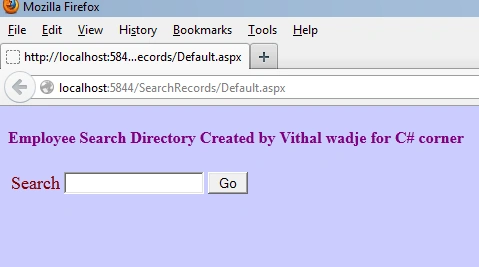
Now run the application, it will look as in the following:
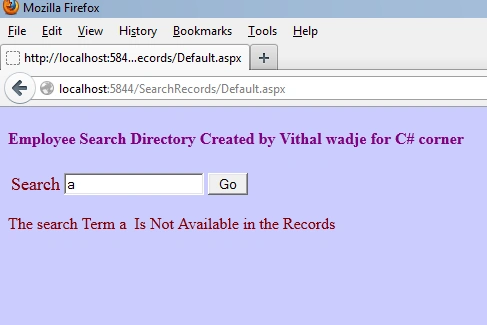
Now enter some characters in the TextBox that do not match the specified table's records (that we inserted into the table); that will produce the following message:
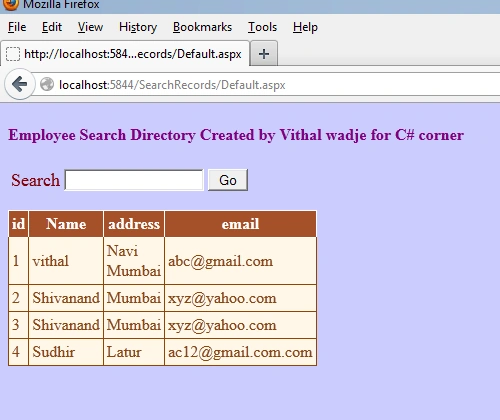
Now do not enter a value into the TextBox and click on the "Go" button, that will display all the records as in the following:
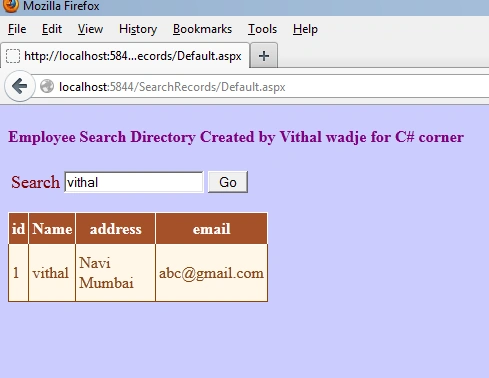
Now enter the specific name and click on the "Go" button to search the records specific to name as follows:
In all preceding examples, we learned how to search a database table records.
Note
- For detailed code please download the zip file attached above.
- Don't forget to apply the relevant changes in the Web.config file depending on your Server location.
Summary
We've learned how to search the records in a database and display them in a GridView control. I hope this article is useful for all students and beginners.


Talon YuPosted Jan 29, 2021, 5:47 AM
Is it possible to change the code to do search for multiple records? The current code allows to search for 1 record and display that 1 record. If I want to search for another record, it will still be displayed, but replaces that first record instead of displaying it under the first record. Is there anyway to change it? Thanks.
Rea JPosted May 14, 2020, 12:33 PM
The search isn't working for me. the rest is all fine. help please
Ravishankar VelladuraiPosted Mar 23, 2020, 5:27 AM
This article most helpful to me. Thanks
Bas MaPosted Aug 28, 2019, 1:49 PM
Thanks for explanation
indradeo kumarPosted Aug 3, 2019, 5:07 AM
Dropdown list value come from first table and gridview is sencond table
indradeo kumarPosted Aug 3, 2019, 5:06 AM
How to make search function using dropdownlist and display in gridview.
Vriti SharmaPosted Aug 15, 2018, 11:40 AM
How to search checked checkbox items in gridview
Vriti SharmaPosted Aug 15, 2018, 11:40 AM
Great article
Đăng HảiPosted Jun 8, 2018, 2:49 AM
I'm sure you missed some codes on the Go button. I can't see any definition of "dr"
Babu AliPosted Apr 16, 2018, 3:13 PM
I didn't get about dr from where it come..?? It gives error on my code..
Ajay SinghPosted Feb 28, 2018, 7:36 AM
What if search not found?
Netra GhagPosted Jan 21, 2018, 10:56 AM
Simply Gr8 thnaaaaaaqqqqqq soooo muchhhh for sharingggg this code :) thak you once again
Shankar BellurkarPosted Nov 20, 2017, 4:34 PM
What is dr.HasRows?
Zola ManuelPosted May 24, 2017, 5:19 AM
Hi, could you please help as i keep getting an error when i write dr on this codes..
Pratik ThakrePosted May 19, 2017, 1:22 AM
How to search article with any word like your page search box show
prince bhattPosted Mar 6, 2017, 1:16 AM
Hey just put the rep_bind() method code inside the go button .you never face any error
Nomfundo CindiPosted Feb 20, 2017, 6:45 AM
Thank you the article, please explain this rep_bind(); it give error on my code.
shiva chinthalaPosted Dec 15, 2016, 9:46 PM
Hi,nice article but i am having one doubt whether this text box can accept the input as both alphanumerical or only alpha sets.
Farhan KhanPosted Sep 24, 2016, 5:45 AM
How to integrate autocomplete in this
Vithal WadjePosted Sep 11, 2016, 12:28 PM
Thanks
SubashPosted Sep 10, 2016, 3:27 AM
Nice
Fernando ChachaPosted Aug 31, 2016, 10:44 AM
My gridview has page 1, 2, 3..., so when I go to page 2 for example , it doesn't view the data according the specified criterion in the search textbox.
Vithal WadjePosted Aug 31, 2016, 10:22 AM
Can you explain in detail
Fernando ChachaPosted Aug 31, 2016, 9:59 AM
Thanks Vithal, i have a doubt my gridview is paged when i click in page 2, it shows data not specified in parameter
Vithal WadjePosted Aug 20, 2016, 10:35 PM
Create data table dynamically as per column list coming from database
Wessel OosthuizenPosted Aug 19, 2016, 4:15 AM
Hi Vithal, I have 4 gridviews and i want each gridview to show a different column. How will i accomplish that. Thanks for your help
Vithal WadjePosted Jul 22, 2016, 10:58 AM
Welcome
Hanif HefazPosted Jul 22, 2016, 3:25 AM
Thank you sir for the nice aricle
Vithal WadjePosted Jul 15, 2016, 8:20 AM
Thanks
Suresh MolabantiPosted Jul 14, 2016, 9:26 AM
Good one...
Vithal WadjePosted Jun 21, 2016, 2:42 AM
thanks
RajaPosted Jun 16, 2016, 1:55 AM
Good Work....
Vithal WadjePosted May 30, 2016, 10:38 AM
Its simple add two more conditions
veera muthuPosted May 28, 2016, 1:10 AM
nice work...but if i am using one more tools like two textbox and one dropdownlist? how to search gridview records.. help me??
Vithal WadjePosted Mar 13, 2016, 4:11 PM
yes Nyra Leo you can get it. just append query output with + operator
Vithal WadjePosted Mar 13, 2016, 4:10 PM
sai refer my other articles
Nyra LeoPosted Mar 6, 2016, 11:00 AM
can I get this searched column elements in a variable Like if i have search query like" select telephoneno from table1 where city=Mumbai " then i want to take all telephone nos (seperated with commas)in a variable .Any idea hw can i do this?
AshokPosted Feb 19, 2016, 5:28 AM
ho to achieve both like and in condition here in the above article u implemented for like lets say i have 2 names arokya,ajit if i want to get based on these 2 names how to acevive this.Thanks
Vithal WadjePosted Dec 16, 2015, 12:43 PM
Thanks
Hari ShankerPosted Dec 16, 2015, 12:09 PM
nice article
Vithal WadjePosted Oct 12, 2015, 10:21 AM
dr has no rows ,check whether the records are coming properly or not .
Pavan BujjiPosted Oct 12, 2015, 3:46 AM
i have an error as Object reference not set to an instance of an object at the if(dr.has rows) for same above problem..how can i solve this problem..pleas tell me sir.
Vithal WadjePosted Sep 7, 2015, 1:33 PM
refer my latest article
Niren GuptaPosted Jul 22, 2015, 6:26 AM
INSTEAD OF GRID VIEW CAN I USE TABLE CONTROL IF YES THEN HOW ? MY CODE IS UNABLE TO DO THE SHORTING AS I USED TABLE CONTROL INSTEAD OF GRID VIEW?
Abhijit PatilPosted Jan 15, 2015, 9:52 PM
Hey usman khan do the same operation but change only query select * from bikemaster where name = ``+ textbox1.text +`` and city =`` +dropdownlist1.selected value +``; hope it helps
Abhijit PatilPosted Jan 15, 2015, 9:43 PM
Hey Nihalani Pankaj if you are not familiar with disconnected. ArcArchiecture ,refer my artical http://www.c-sharpcorner.com/UploadFile/8af593/ado-net-dis-connected-architecture/ hope it helps..
Vithal WadjePosted Jan 3, 2015, 8:12 AM
Welcome
usman khanPosted Jan 3, 2015, 7:39 AM
ok sure thanks
Vithal WadjePosted Jan 3, 2015, 6:51 AM
usman khan sir give me some time to write article on this or refer C#corner asp.net article list defiantly you will find solution
usman khanPosted Jan 3, 2015, 4:49 AM
Hey Guys! I need some help.. I am building an auto buy and sell website for my semester project in which I want to include a filter search i.e I want that the users select from two dropdownlists and then search...like the two dropdownlist will be City(in which city do you want to buy) and make(like Toyota, Honda etc)...so by selecting these and clicking on search button it should fetch the records from database and show these records in data list..thats all
Vithal WadjePosted Oct 31, 2014, 2:46 AM
make necessary changes as per your server location
Nihalani PankajPosted Oct 31, 2014, 2:29 AM
Error come that no constructor defined how to solve this error i download the zip file but solve this error
Vithal WadjePosted Oct 30, 2014, 12:02 AM
its a dataReader ,download zip file for better understanding
Nihalani PankajPosted Oct 30, 2014, 12:00 AM
Which Method is dr.read and please give me code of this method
Nihalani PankajPosted Oct 29, 2014, 11:54 PM
What is dr is that an dataset or what ?
Vithal WadjePosted Oct 28, 2014, 3:24 AM
balaji badrinath its fetch the records like character given input
Vithal WadjePosted Oct 28, 2014, 3:22 AM
Nihalani Pankaj dr.hasrows checks whether it has rows and dr.Read means it reads rows from dataReader
Nihalani PankajPosted Oct 28, 2014, 12:40 AM
What is that dr.hasrows and dr.read
praveen kumarPosted Jul 3, 2014, 5:55 AM
what is that dr.hasrows and dr.read
balaji badrinathPosted Jun 7, 2014, 8:15 AM
string query = 'select * from emp where Name like...in this one what is like?
Vithal WadjePosted May 26, 2014, 3:46 PM
thanks sir
Imran KaziPosted May 25, 2014, 3:55 AM
good work
shruti beriwalPosted May 14, 2014, 2:14 PM
showing a nullreference exception was handled by user code in the following line:::::::::::::::::;constr = ConfigurationManager.ConnectionStrings["emp"].ToString();
Vithal WadjePosted May 4, 2014, 1:13 PM
thanks,refer my article list
pushpa cpPosted Apr 30, 2014, 12:00 PM
gud article it worked bt may i know how can i export it into excel or word pls help with this as soon as possible
pushpa cpPosted Apr 30, 2014, 11:59 AM
gud article it worked.....
Vithal WadjePosted Apr 23, 2014, 3:45 PM
thanks saddique khan sir
saddique khanPosted Apr 22, 2014, 2:06 AM
It is good article
Vithal WadjePosted Apr 21, 2014, 1:00 PM
its my pleasure Abdullah Naeb sir
Abdullah NaebPosted Apr 17, 2014, 3:53 PM
Thanks a lot
Vivek DubeyPosted Apr 8, 2014, 1:47 AM
how we'll define the datareader dr?
pranay kumarPosted Nov 18, 2013, 12:54 AM
Thanks
Vithal WadjePosted Sep 30, 2013, 3:48 PM
thanks Nguyen Minh Triet sir
Nguyen Minh TrietPosted Sep 29, 2013, 5:32 AM
Thanks, it's works for me
Vithal WadjePosted Sep 23, 2013, 10:33 AM
thanks ketan
ketan italiyaPosted Sep 20, 2013, 1:51 AM
nice work thanks.
Vithal WadjePosted Aug 19, 2013, 7:40 AM
thanks and welcome Mohamed Ali sir
Mohamed AliPosted Aug 19, 2013, 7:39 AM
Thanks to C# conner Community