

As .NET developers, we have all faced this situation: you have built a sleek, high-performing ASP.NET Core Web API, and now it is time to expose it to external services or partners. However, you only want authorized consumers to access your API.
One of the simplest ways to secure a Web API is API Key Authentication.
In this article, I will walk you through five practical patterns for implementing API Key authentication in ASP.NET Core, along with code examples and their pros and cons.
Prerequisites
Before continuing, you should have:
Basic understanding of .NET 6 or later
Familiarity with ASP.NET Core Web API
Knowledge of Middleware and Dependency Injection
Understanding of the Authorize attribute
Basic knowledge of AuthenticationHandler and HttpContext
1. API Key Authentication using Custom Middleware
Steps:
Let's create a middleware that checks for an X-API-Key header and compares it to a key stored in appsettings.json
// appsettings.json
{ "ApiKey": "your-super-secret-api-key-12345" }
public class APIKeyMiddleware
{
private readonly RequestDelegate _next;
private const string API_KEY_HEADER_NAME = "X-API-Key";
public APIKeyMiddleware(RequestDelegate next)
{
_next = next;
}
public async Task InvokeAsync(HttpContext context, IConfiguration configuration)
{
// Skip validation for Swagger/development endpoints
if (context.Request.Path.StartsWithSegments("/swagger"))
{
await _next(context);
return;
}
if (!context.Request.Headers.TryGetValue(API_KEY_HEADER_NAME, out var extractedApiKey))
{
context.Response.StatusCode = (int)HttpStatusCode.Unauthorized;
await context.Response.WriteAsync("API Key is missing.");
return;
}
var apiKey = configuration["ApiKey"];
if (!string.Equals(apiKey, extractedApiKey))
{
context.Response.StatusCode = (int)HttpStatusCode.Unauthorized;
await context.Response.WriteAsync("Unauthorized: Invalid API Key.");
return;
}
// API Key is valid — continue processing
await _next(context);
}
}Now, Register it in Program.cs
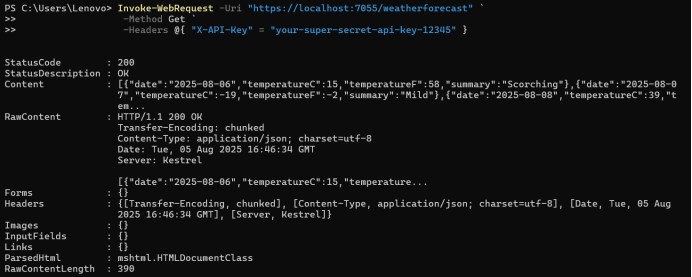
app.UseMiddleware<APIKeyMiddleware>();Run the application and test the endpoint using below powershell script.
Invoke-WebRequest -Uri "https://localhost:7055/weatherforecast"
                  -Method Get
                  -Headers @{ "X-API-Key" = "your-super-secret-api-key-12345" }
See the output in PowerShell
Pros
Super simple
No extra dependencies
Fast to implement
Cons
No support for multiple keys
Bypasses ASP.NET Core’s authentication pipeline
2. API Key Authentication using Custom Authentication Handler
We use into ASP.NET Core’s authentication pipeline using a custom AuthenticationHandler. This gives us full access to claims, policies, and the Authorize attribute.
Steps:
Define ApiKeyOptions
public class ApiKeyOptions : AuthenticationSchemeOptions
{
    public const string DefaultScheme = "ApiKey";
    public string Scheme => DefaultScheme;
    public string AuthenticationType = DefaultScheme;

    // Custom property for the header name
    public string HeaderName { get; set; } = "X-API-Key";
}
Create the Handler
public class ApiKeyAuthenticationHandler : AuthenticationHandler<ApiKeyOptions>
{
    private const string API_KEY_HEADER_NAME = "X-API-Key";
    private const string API_KEY_CONFIG_KEY = "ApiKey"; // Key in appsettings.json

    private readonly IConfiguration _configuration;

    public ApiKeyAuthenticationHandler(
        IOptionsMonitor<ApiKeyOptions> options,
        ILoggerFactory logger,
        UrlEncoder encoder,
        ISystemClock clock,
        IConfiguration configuration)
        : base(options, logger, encoder, clock)
    {
        _configuration = configuration;
    }

    protected override Task<AuthenticateResult> HandleAuthenticateAsync()
    {
        // Skip authentication for OPTIONS (preflight)
        if (Context.Request.Method == "OPTIONS")
        {
            return Task.FromResult(AuthenticateResult.NoResult());
        }

        if (!Context.Request.Headers.TryGetValue(API_KEY_HEADER_NAME, out var apiKeyHeader))
        {
            return Task.FromResult(AuthenticateResult.Fail("API Key missing"));
        }

        var apiKey = _configuration[API_KEY_CONFIG_KEY];
        var requestApiKey = apiKeyHeader;

        // Prevent timing attacks with constant-time comparison
        if (!SecureCompare(apiKey, requestApiKey))
        {
            return Task.FromResult(AuthenticateResult.Fail("Invalid API Key"));
        }

        var identity = new ClaimsIdentity(new[] { new Claim("ApiKey", "valid-key") }, Options.Scheme);
        var principal = new ClaimsPrincipal(identity);
        var ticket = new AuthenticationTicket(principal, Options.Scheme);

        return Task.FromResult(AuthenticateResult.Success(ticket));
    }

    private static bool SecureCompare(string? a, string? b)
    {
        if (string.IsNullOrEmpty(a) || string.IsNullOrEmpty(b))
            return false;

        if (a.Length != b.Length)
            return false;

        var result = 0;
        for (int i = 0; i < a.Length; i++)
        {
            result |= a[i] ^ b[i];
        }
        return result == 0;
    }
    public class ApiKeyAuthorizationRequirement : IAuthorizationRequirement
    {
        // This is an empty marker for custom policy evaluation
    }
}
Register in Program.cs
builder.Services.AddAuthentication(ApiKeyOptions.DefaultScheme)
    .AddScheme<ApiKeyOptions, ApiKeyAuthenticationHandler>(ApiKeyOptions.DefaultScheme, options =>
    {
        // You can configure options here if needed
    });

// Optional: Add Authorization with Policy (if using IAuthorizationHandler)
builder.Services.AddAuthorization(options =>
{
    options.AddPolicy("ApiKeyPolicy", policy =>
    {
        policy.RequireAuthenticatedUser();
        policy.Requirements.Add(new ApiKeyAuthorizationRequirement());
    });
});

// Learn more about configuring Swagger/OpenAPI
builder.Services.AddEndpointsApiExplorer();
builder.Services.AddSwaggerGen(options =>
{
    // Add API Key to Swagger
    options.AddSecurityDefinition("ApiKey", new OpenApiSecurityScheme
    {
        In = ParameterLocation.Header,
        Name = "X-API-Key",
        Type = SecuritySchemeType.ApiKey,
        Description = "Enter your API key"
    });

    options.AddSecurityRequirement(new OpenApiSecurityRequirement
    {
        {
            new OpenApiSecurityScheme
            {
                Reference = new OpenApiReference
                {
                    Type = ReferenceType.SecurityScheme,
                    Id = "ApiKey"
                }
            },
            Array.Empty<string>()
        }
    });
});
Add API Key in appsettings.json
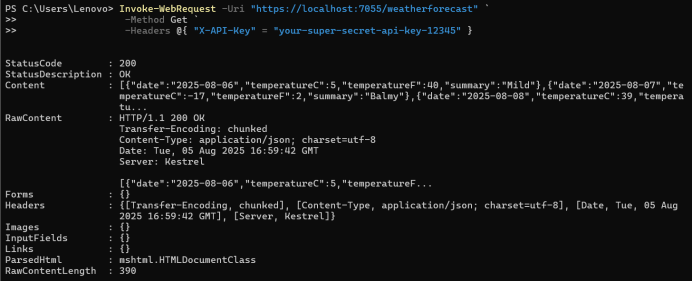
"ApiKey": "your-super-secret-api-key-12345"Run the application and test the API.
Invoke-WebRequest -Uri "https://localhost:7055/weatherforecast"
                   -Method Get
                 -Headers @{ "X-API-Key" = "your-super-secret-api-key-12345" }
See the output in PowerShell
Pros

Join the conversation! Your thoughts help the community grow.