

Introduction
In enterprise environments, securing APIs while maintaining developer productivity is a constant balancing act. Traditional approaches often involve:
Sharing client secrets among team members
Storing credentials in configuration files
Managing separate authentication flows for development and production
Complex secret rotation procedures
These practices introduce security vulnerabilities and operational complexity that modern cloud-native applications cannot afford to have.
This guide demonstrates how to build a Blazor Server application that securely calls APIs hosted behind Azure API Management (APIM) using a passwordless authentication approach. Developers authenticate using their own identities through Visual Studio or Azure CLI, while production workloads use Managed Identities—all through a unified DefaultAzureCredential implementation.
Security Risks of Sharing Secrets
Secret Sprawl: Client secrets scattered across developer machines, configuration files, and deployment pipelines
Operational Overhead: Regular secret rotation, secure distribution, and lifecycle management
Security Risks: Accidental exposure through version control, logs, or compromised developer workstations
Audit Challenges: Difficulty tracking which developer or system made specific API calls
Compliance Issues: Inability to enforce the principle of least privilege at the individual developer level
This article presents a comprehensive solution that eliminates these challenges by leveraging Microsoft Entra ID (formerly Azure Active Directory), DefaultAzureCredential, and Azure API Management, all while adhering to Zero Trust principles. Our implementation enables developers to authenticate using their own identities while maintaining strict security controls through app roles and APIM policies.
Traditional Secret-Based Authentication
In typical enterprise scenarios, development teams access backend APIs protected by Azure API Management. The traditional approach involves:
Creating a service principal with a client secret
Distributing this secret to all team members
Storing the secret in configuration files or environment variables
Implementing secret rotation policies
Managing access revocation when team members leave
This approach creates several problems:
Security Concerns
Shared secrets mean you cannot identify which individual developer made an API call
Secrets stored in plain text files risk exposure through version control systems
No built-in mechanism for automatic secret expiration or rotation
Compromised developer machines expose secrets to attackers
Operational Burden
IT teams must manually distribute secrets to each developer
Secret rotation requires coordinating updates across all developers
No centralized way to instantly revoke access for a single developer
Developers often store secrets insecurely for convenience
Compliance Challenges
Cannot demonstrate individual accountability for API calls
Difficult to enforce the separation of duties
No audit trail linking API actions to specific users
Fails Zero Trust verification principles
Understanding DefaultCredential
DefaultAzureCredential is a credential chain provided by the Azure Identity library that simplifies authentication for applications running in various environments. It attempts to authenticate using multiple credential types in the following order:
For Local Development:
Environment Credential: Reads AZURE_TENANT_ID, AZURE_CLIENT_ID, and AZURE_CLIENT_SECRET
Workload Identity Credential: For Kubernetes environments
Managed Identity Credential: For Azure resources with managed identities
Visual Studio Credential: Uses credentials from Visual Studio
Visual Studio Code Credential: Uses credentials from the VS Code Azure extension
Azure CLI Credential: Uses credentials from Azure CLI (az login)
Azure PowerShell Credential: Uses credentials from Azure PowerShell
Interactive Browser Credential: Opens a browser for user authentication
For Production (Azure Resources):
Managed Identity Credential: Automatically uses the identity assigned to the Azure resource
Key Benefits:
Environment Flexibility: Same code works in development, testing, and production
No Secret Management: Developers never handle client secrets
Automatic Failover: If one credential type fails, it tries the next
Security by Default: Prioritizes more secure credential types
Simplified Code: Single credential object works everywhere
How does it work?
In Development:
When a developer runs the application, DefaultAzureCredential checks if they are signed in to Visual Studio Code or Azure CLI. If authenticated, it uses their personal Entra ID to acquire tokens. The token includes their user information and any app roles assigned to them through group membership.
In Production:
When deployed to Azure (App Service, Container Apps, AKS, etc.), the application automatically uses the Managed Identity assigned to the resource. No configuration changes needed. The managed identity is also assigned the necessary app roles.
The Architecture Overview
The solution consists of several components working together:
1. Microsoft Entra ID (Azure AD):
Manages user identities and group memberships
Hosts app registrations for the backend API and client application
Issues access tokens with user identity and app roles
2. Dev-Team Security Group:
Contains all authorized developers
Assigned the weather.read app role
Provides centralized access management
3. Backend API App Registration:
Defines the weather.read app role
Exposes the access_as_user delegated permission scope
Represents the protected resource
4. Client App Registration:
Configured to request tokens for the backend API
Granted access to the access_as_user scope
Used only for app role assignment (not for secrets)
5. Azure API Management:
Acts as the gateway to backend APIs
Validates incoming JWT tokens
Enforces app role requirements through policies
Routes authenticated requests to backend services
6. Blazor Client Application:
Uses DefaultAzureCredential for authentication
Acquires tokens with user identity and app roles
Calls APIM endpoints with Bearer tokens
Step-By-Step Implementation
Step 1: Creating the App Role
App roles are application-specific permissions that can be assigned to users or groups. They appear in the token's roles claim, which APIM can validate.
Creating the App Role:
1. Navigate to Azure Portal > Entra ID > App Registrations
2. Select the backend API app registration (APIM-Weather-API)
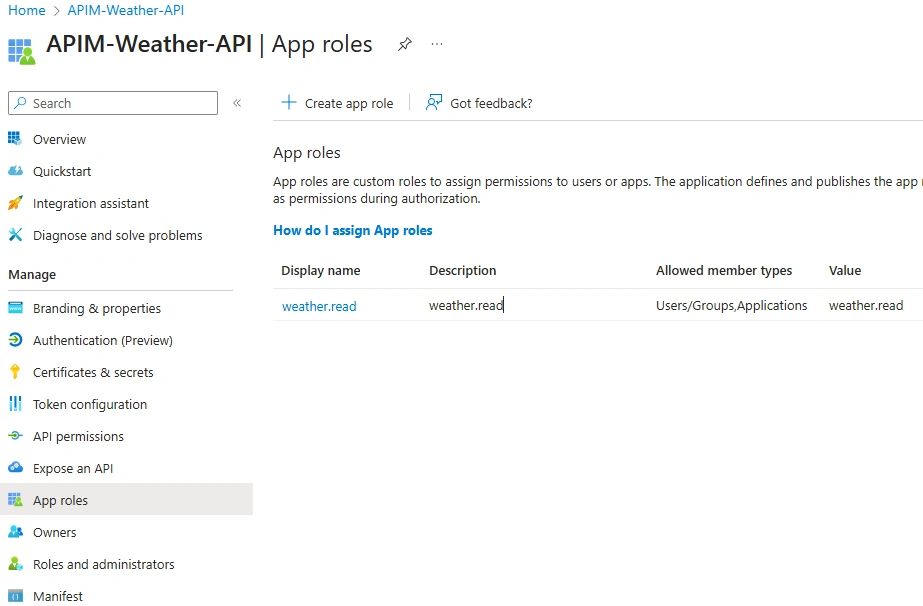
3. Go to App roles > Create app role
4. Configure the role:
Display name: Weather Read
Allowed member types: Users/Groups
Value: weather.read
Description: Allows reading weather forecast data
Enable this app role: Yes
5. Save the app role
The app role is now defined but not yet assigned to anyone. This is intentional - we'll assign it to the Dev-Team group so all members automatically inherit it.
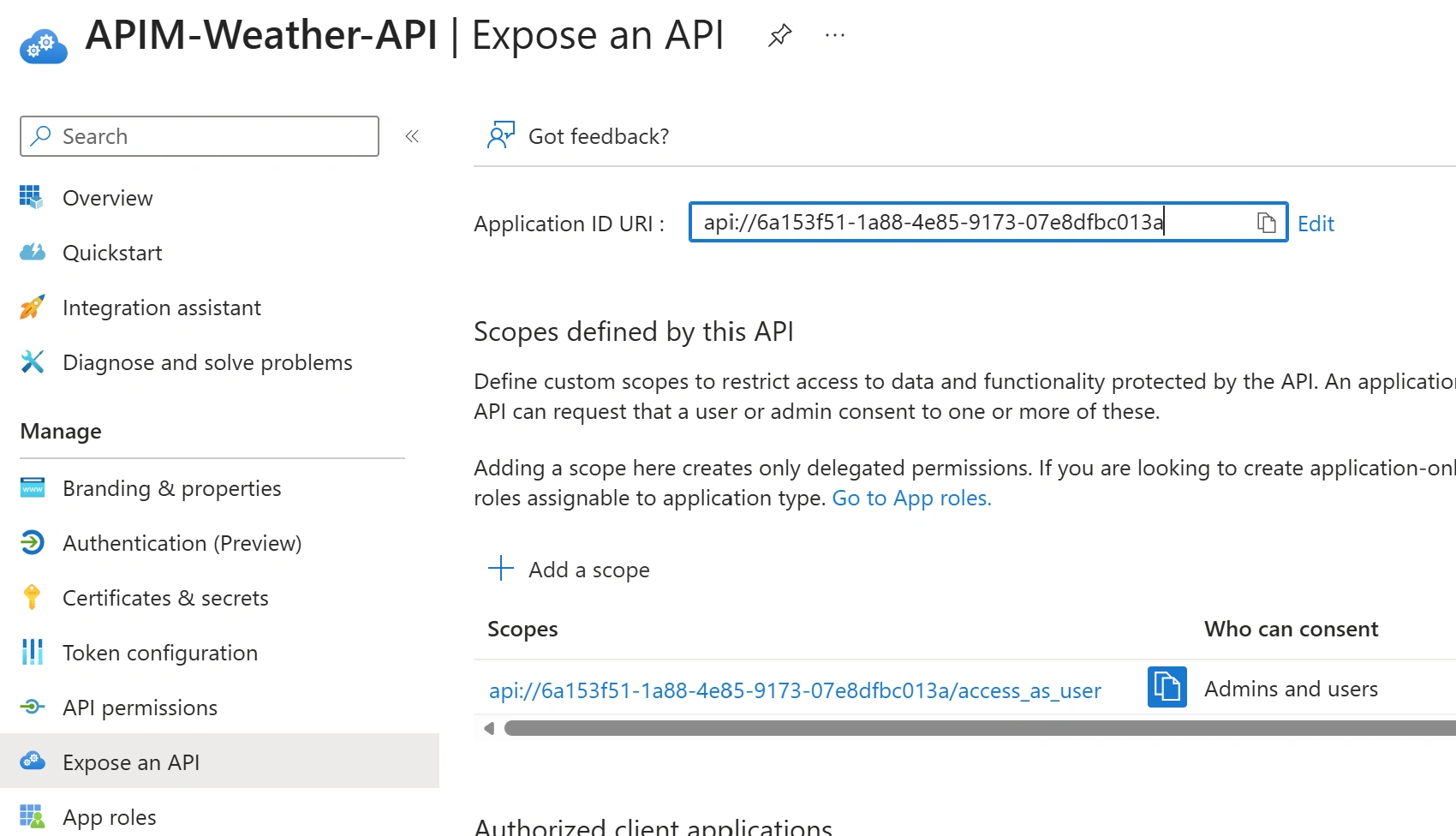
Click on Expose an API, add a scope access_as_user
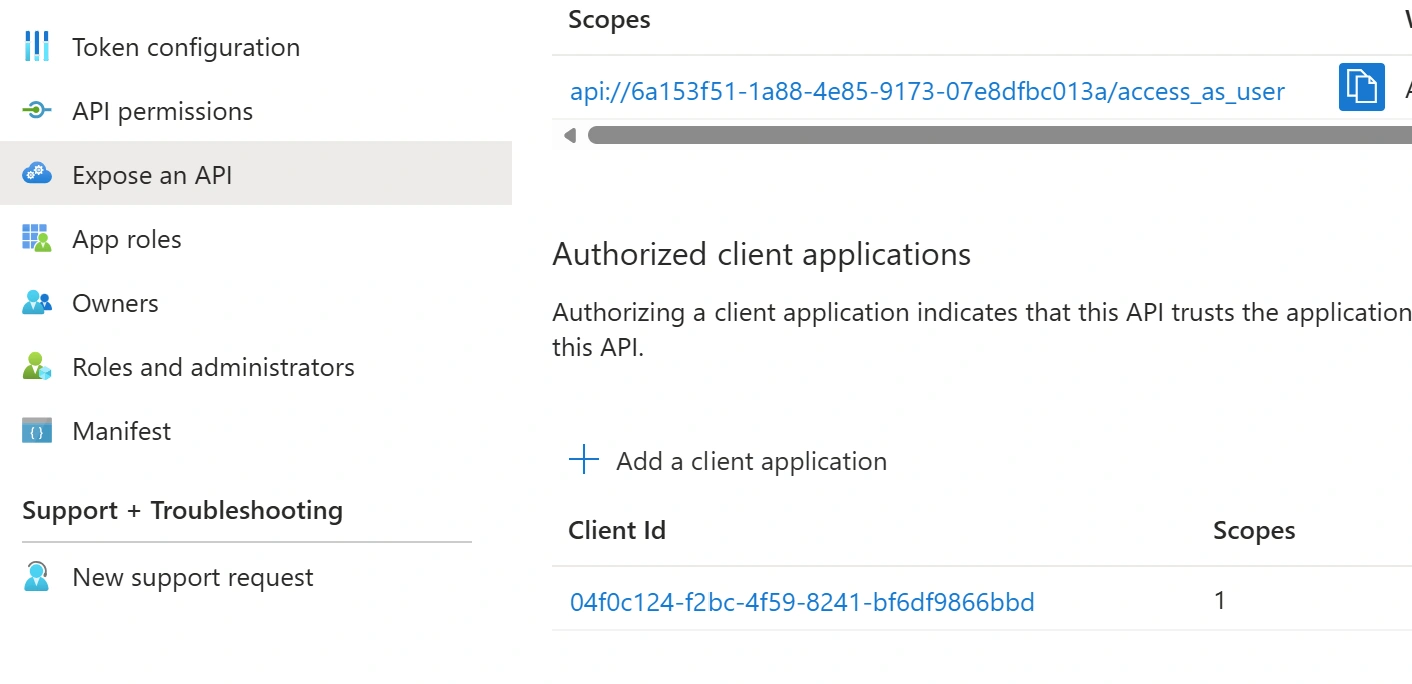
Add a client application, app id : 04f0c124-f2bc-4f59-8241-bf6df9866bbd. This is a unique app ID registered in the Microsoft Entra ID for the Visual Studio
Step 2: Creating the Dev-Team Group:
1. Navigate to Azure Portal > Entra ID > Groups
2. Click New group
3. Configure:
Group type: Security
Group name: Dev-Team
Group description: Development team members with API access
4. Add members: Select all developers who need API access
5. Create the group
Step 3: Assigning App Role to Dev-Team Group
Now we connect the app role to the security group:
Navigate to Azure Portal > Entra ID > Enterprise Registrations
Select the backend API app registration (APIM-Weather-API)
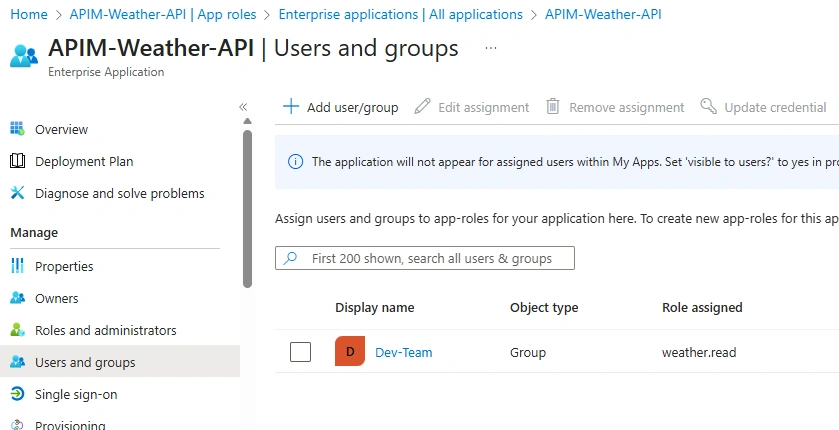
Click on users or group and assign the app role to the Group
What this does:
Assigns the weather.read app role from the backend API
To the Dev-Team security group
All current and future group members automatically get this role
Tokens acquired by group members will include "roles": ["weather.read"]
Step 4: Configuring APIM Policy
Azure API Management policies allow you to modify API behavior and enforce security rules. We'll create a policy that validates JWT tokens and checks for the required app role.
The APIM Policy:
<policies>
    <inbound>
        <base />
        <validate-jwt header-name="Authorization" failed-validation-httpcode="401" failed-validation-error-message="Unauthorized. Valid Azure AD token with Weather.Read app role required.">
            <openid-config url="https://login.microsoftonline.com/{your-tenant-id}/v2.0/.well-known/openid-configuration" />
            <audiences>
                <audience>api://{your-api-appid}</audience>
            </audiences>
            <required-claims>
                <claim name="roles" match="any">
                    <value>weather.read</value>
                </claim>
            </required-claims>
        </validate-jwt>
    </inbound>
</policies>
Why use APIM policies instead of backend validation?
Centralized security enforcement
Consistent validation across all backend services
Reduced load on backend APIs
Fail fast - reject invalid requests at the gateway
Policy updates don't require backend code changes
Step 5: Implementing DefaultAzureCredential in the Application
Now we implement the client application that uses DefaultAzureCredential.
Application Configuration (Program.cs):
using Azure.Core;
using Azure.Identity;
using EntraID_Blazor_APIM_Client.Components;
using EntraID_Blazor_APIM_Client.Services;

var builder = WebApplication.CreateBuilder(args);

TokenCredential credential;
string authMethod;

var tenantId = {your-tenant-id};


try
{
    credential = new DefaultAzureCredential(new DefaultAzureCredentialOptions
    {
        TenantId = tenantId,
        ExcludeEnvironmentCredential = true,  // Exclude client secret from env vars
        ExcludeWorkloadIdentityCredential = true,
        ExcludeManagedIdentityCredential = true,
        ExcludeVisualStudioCredential = false,  // Try Visual Studio first
        ExcludeVisualStudioCodeCredential = true,
        ExcludeAzureCliCredential = false,  // Enable Azure CLI as fallback
        ExcludeAzurePowerShellCredential = true,
        ExcludeInteractiveBrowserCredential = true
    });

    authMethod = "DefaultAzureCredential (Developer Identity)";

}
catch (Exception ex)
{
    Console.WriteLine($"DefaultAzureCredential setup failed: {ex.Message}");
    throw;
}

builder.Services.AddSingleton<TokenCredential>(credential);
builder.Services.AddSingleton(new AuthenticationInfo { Method = authMethod });

// Register Auth Service for dynamic authentication
builder.Services.AddSingleton(sp =>
{
    var config = sp.GetRequiredService<IConfiguration>();
    return new AuthService(credential, config, authMethod);
});

// Register HttpClient for calling the API
builder.Services.AddHttpClient("BackendAPI", client =>
{
    var apimEndpoint = builder.Configuration["BackendAPI:BaseUrl"];
    client.BaseAddress = new Uri(apimEndpoint ?? "https://your-apim-gateway.azure-api.net");
});

// Register API Service
builder.Services.AddScoped<ApiService>();

// Add services to the container.
builder.Services.AddRazorComponents()
    .AddInteractiveServerComponents();

var app = builder.Build();

// Configure the HTTP request pipeline.
if (!app.Environment.IsDevelopment())
{
    app.UseExceptionHandler("/Error", createScopeForErrors: true);

    app.UseHsts();
}

app.UseHttpsRedirection();

app.UseStaticFiles();
app.UseAntiforgery();

app.MapRazorComponents<App>()
    .AddInteractiveServerRenderMode();

app.Run();

// Authentication info class for tracking which credential method is being used
public class AuthenticationInfo
{
    public string Method { get; set; } = "Unknown";
}
Excluded Credentials
EnvironmentCredential: Excluded to prevent use of client secrets
WorkloadIdentityCredential: Not applicable for local development
ManagedIdentityCredential: Excluded for local development (enabled in production)
SharedTokenCacheCredential: Deprecated by Microsoft
VisualStudioCredential: Optional, but can cause issues with token scopes
Enabled Credentials
VisualStudioCodeCredential: Primary for developers using VS Studio
AzureCliCredential: For developers who prefer command-line tools
AzurePowerShellCredential: For PowerShell users
InteractiveBrowserCredential: Fallback if other methods are unavailable
This configuration prioritizes developer tooling credentials over secrets, enforcing passwordless authentication.
Get the complete source code from my GitHub Repo
Step 6: Testing with Visual Studio
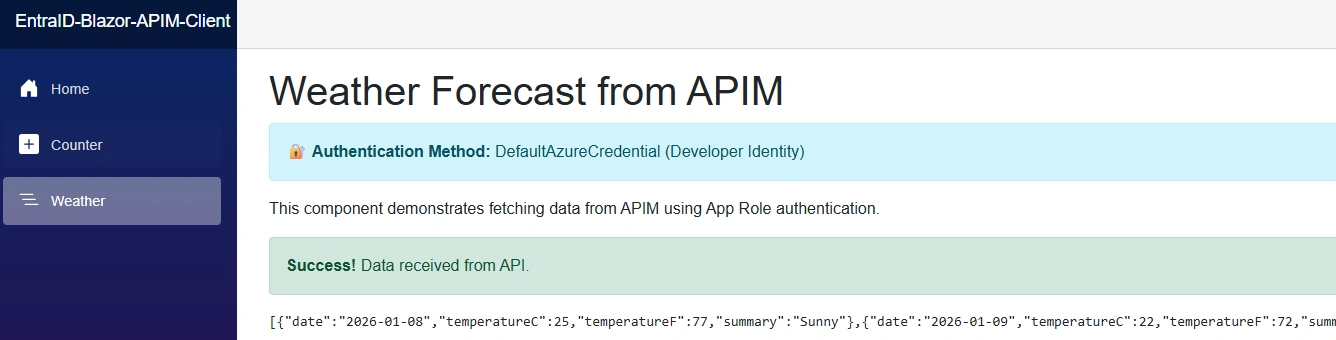
From Visual Studio, make sure you are logged in and use the developer account. Run the application, navigate to the Weather page to test the APIM endpoint call,
Summary
We have seen how to implement secure, passwordless API authentication for Blazor Server applications calling Azure API Management (APIM) endpoints, using Microsoft Entra ID and the DefaultAzureCredential from the Azure Identity library. It addresses the security risks and operational overhead of traditional shared-secret approaches—including secret sprawl, lack of accountability, compliance challenges, and costly secret rotation—by adopting a Zero Trust security model where each developer authenticates using their own identity through Visual Studio or Azure CLI during development, while production workloads seamlessly transition to Azure Managed Identities without any code changes. The solution leverages App Roles defined in Microsoft Entra ID for fine-grained authorization, with APIM policies validating JWT tokens and enforcing role-based access control. This approach eliminates the need to share client secrets across development teams, provides full audit accountability for every API call, and reduces operational overhead to near-zero.
Join the conversation! Your thoughts help the community grow.