

To run the excel report, security settings are required for excel application because while working with the excel application we are going to use some of the classes for manipulating the data inside the file. Since the output of the excel report will come as a file. So that to do the manipulation with the file we need to grant the access or rights(Read/Write) to those files.
After following the steps we will be having a full control over the Excel Application.
Step 1:-
* We need to grant write privileges to your Web directory for this account (IUSR_machinename since we are using <identity impersonation=true> in web.config) for that add IUSR_machinename as administrator.
Step 2:-
-
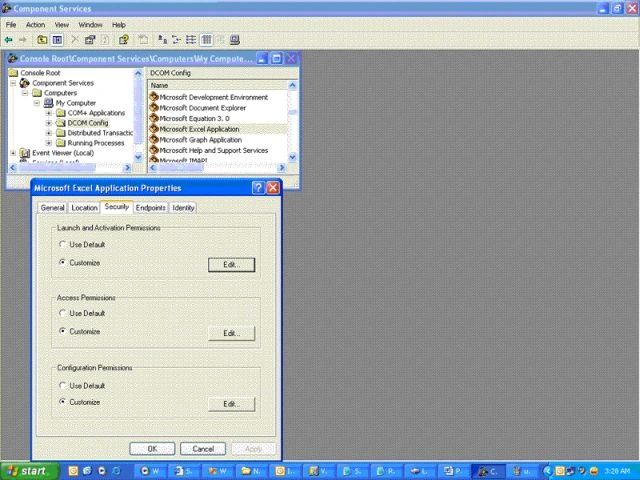
Click Start, click Run, and then type DCOMCNFG.exe .Select the Microsoft Excel Application that we want to automate.
-
Click Properties to open the property dialog box for this application.
-
Click the Security tab. Verify that Use Default Access Permissions and Use Default Launch Permissions are selected.
-
Click the Identity tab. Verify that The Launching User is selected.
-
Click OK to close the property dialog box and return to the main applications list dialog box.
-
In the DCOM Configuration dialog box, click the Default Security tab.
-
Click Edit Defaults for access permissions. Verify that the following users are listed in the access permissions, or add the users if they are not listed:
SYSTEM
INTERACTIVE
Everyone
Administrators
OfficeAutomationUser
IUSR_<machinename>*
IWAM_<machinename>*
* These accounts exist only if Internet Information Server (IIS) is installed on the computer.
A: Screen Layout of Dcomcnfg.exe Excel Property
Jimit ShahPosted May 18, 2011, 2:35 PM
I have created an excel add-in for excel 2007. Here when I click on button it will invoke a webservice. This webservice requires session ID for authentication. Now, I would like to allow the user to use the webservice if he is already logged into the web application and this is possible only if I am able to get the session ID from the client machine. From where can I find the session ID from the client machine so that user doesn't require to login again from the excel add-in? I am new to web applications so please explain to me in details considering me a newbie. If Session ID is browser specific then is it possible to store the session ID in clients machine in a manner that it can be accessible by stand alone excel sheet? Please help if possible. Thanks.
rama demaPosted Dec 2, 2009, 1:42 AM
helpful article,I have a problem that the I can generate the excel report but it does not display as I run the application .If I saved it in a specific directory I find it.please help me if you can. thanks
Praveen KumarPosted Jan 2, 2006, 3:21 AM
The image is not uploaded in the last page of article publishing. Please upload the file so that the article wiil be published.