Introduction
In the previous article we have seen how to add a Checkbox Column In DataGrid and how to achieve multi select delete operation. In this article we will see how we can select all rows of DataGrid and delete all selected.
Creating Silverlight Project
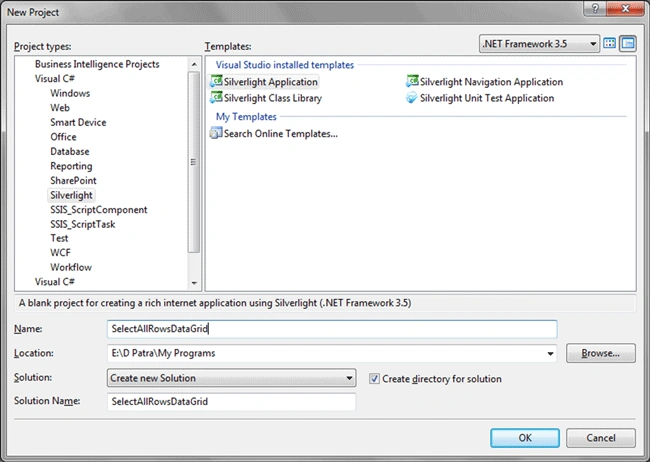
Fire up Visual Studio 2008 and create a new Silverlight 3 Project. Name it as SelectAllRowsDataGrid.
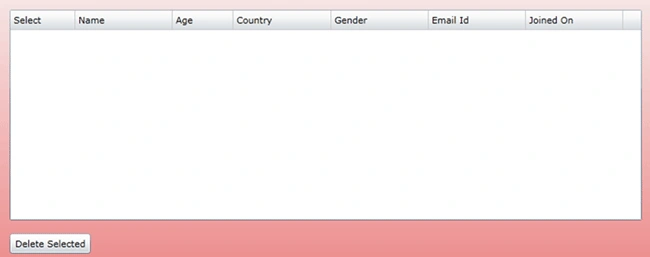
First we will design our application to have a DataGrid to display data and a Button to Delete Selected Rows.
As you see we have customized the Columns in the DataGrid.
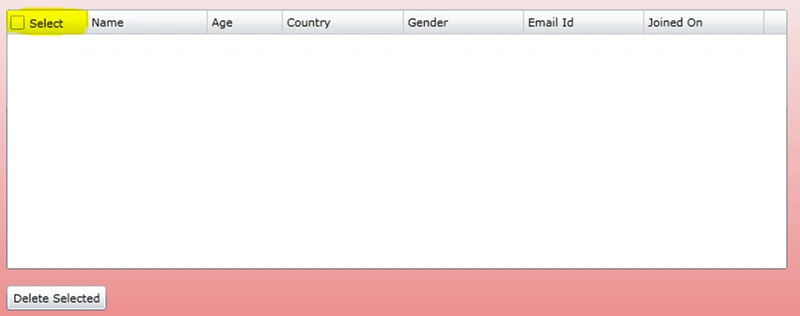
Now we will add a CheckBox Control in the Header of first column.
I tried many ways to put a CheckBox over there, but the effective way is to create a style and assign the style to HeaderStyle of that Column.
Here is the Style in XAML.
<UserControl.Resources>
<Style x:Key="DataGridColumnHeaderStyle" TargetType="dataPrimitives:DataGridColumnHeader">
<Setter Property="Foreground" Value="#FF000000"/>
<Setter Property="HorizontalContentAlignment" Value="Left"/>
<Setter Property="VerticalContentAlignment" Value="Center"/>
<Setter Property="IsTabStop" Value="False"/>
<Setter Property="SeparatorBrush" Value="#FFC9CACA"/>
<Setter Property="Padding" Value="4"/>
<Setter Property="Template">
<Setter.Value>
<ControlTemplate TargetType="dataPrimitives:DataGridColumnHeader">
<Grid x:Name="Root">
<Grid.ColumnDefinitions>
<ColumnDefinition/>
<ColumnDefinition Width="Auto"/>
</Grid.ColumnDefinitions>
<VisualStateManager.VisualStateGroups>
<VisualStateGroup x:Name="CommonStates">
<VisualState x:Name="Normal"/>
<VisualState x:Name="MouseOver">
<Storyboard>
<ColorAnimation Duration="0" Storyboard.TargetName="BackgroundRectangle" Storyboard.TargetProperty="(Fill).Color" To="#FF448DCA"/>
<ColorAnimation Duration="0" Storyboard.TargetName="BackgroundGradient" Storyboard.TargetProperty="(Fill).(GradientStops)[3].Color" To="#7FFFFFFF"/>
<ColorAnimation Duration="0" Storyboard.TargetName="BackgroundGradient" Storyboard.TargetProperty="(Fill).(GradientStops)[2].Color" To="#CCFFFFFF"/>
<ColorAnimation Duration="0" Storyboard.TargetName="BackgroundGradient" Storyboard.TargetProperty="(Fill).(GradientStops)[1].Color" To="#F2FFFFFF"/>
</Storyboard>
</VisualState>
<VisualState x:Name="Pressed">
<Storyboard>
<ColorAnimation Duration="0" Storyboard.TargetName="BackgroundRectangle" Storyboard.TargetProperty="(Fill).Color" To="#FF448DCA"/>
<ColorAnimation Duration="0" Storyboard.TargetName="BackgroundGradient" Storyboard.TargetProperty="(Fill).(GradientStops)[0].Color" To="#D8FFFFFF"/>
<ColorAnimation Duration="0" Storyboard.TargetName="BackgroundGradient" Storyboard.TargetProperty="(Fill).(GradientStops)[1].Color" To="#C6FFFFFF"/>
<ColorAnimation Duration="0" Storyboard.TargetName="BackgroundGradient" Storyboard.TargetProperty="(Fill).(GradientStops)[2].Color" To="#8CFFFFFF"/>
<ColorAnimation Duration="0" Storyboard.TargetName="BackgroundGradient" Storyboard.TargetProperty="(Fill).(GradientStops)[3].Color" To="#3FFFFFFF"/>
</Storyboard>
</VisualState>
</VisualStateGroup>
<VisualStateGroup x:Name="SortStates">
<VisualState x:Name="Unsorted"/>
<VisualState x:Name="SortAscending"/>
<VisualState x:Name="SortDescending"/>
</VisualStateGroup>
</VisualStateManager.VisualStateGroups>
<Rectangle x:Name="BackgroundRectangle" Fill="#FF1F3B53" Stretch="Fill" Grid.ColumnSpan="2"/>
<Rectangle x:Name="BackgroundGradient" Stretch="Fill" Grid.ColumnSpan="2">
<Rectangle.Fill>
<LinearGradientBrush EndPoint=".7,1" StartPoint=".7,0">
<GradientStop Color="#FCFFFFFF" Offset="0.015"/>
<GradientStop Color="#F7FFFFFF" Offset="0.375"/>
<GradientStop Color="#E5FFFFFF" Offset="0.6"/>
<GradientStop Color="#D1FFFFFF" Offset="1"/>
</LinearGradientBrush>
</Rectangle.Fill>
</Rectangle>
<Rectangle x:Name="VerticalSeparator" Fill="{TemplateBinding SeparatorBrush}" VerticalAlignment="Stretch" Width="1" Visibility="{TemplateBinding SeparatorVisibility}" Grid.Column="1"/>
<CheckBox x:Name="chkSelectAll" Click="chk_Click" Margin="2,0,0,0" Content="Select" d:LayoutOverrides="Width,
Height" VerticalAlignment="Center"
HorizontalAlignment="Left"/>
</Grid>
</ControlTemplate>
</Setter.Value>
</Setter>
</Style>
</UserControl.Resources>
Now assign the Style to your HeaderStyle of the Column.
<data:DataGrid x:Name="dgPerson" Margin="8" Grid.Column="1" IsReadOnly="True"
LoadingRow="dgPerson_LoadingRow" Grid.Row="1" AutoGenerateColumns="False">
<data:DataGrid.Columns>
<data:DataGridTemplateColumn Width="80" HeaderStyle="{StaticResource
DataGridColumnHeaderStyle}">
<data:DataGridTemplateColumn.CellTemplate>
<DataTemplate>
<CheckBox x:Name="chkPerson" Click="chkPerson_Click"
VerticalAlignment="Center" IsChecked="false"
HorizontalAlignment="Center" HorizontalContentAlignment="Center"/>
</DataTemplate>
</data:DataGridTemplateColumn.CellTemplate>
</data:DataGridTemplateColumn>
<data:DataGridTextColumn Header="Name" Binding="{Binding Name}" MinWidth="120" Width="SizeToCells" CanUserReorder="True" CanUserSort="True"/>
<data:DataGridTextColumn Header="Age" Binding="{Binding Age}" MinWidth="75" Width="SizeToCells" CanUserReorder="True" CanUserSort="True"/>
<data:DataGridTextColumn Header="Country" Binding="{Binding Country}" MinWidth="120" Width="SizeToCells" CanUserReorder="True" CanUserSort="True"/>
<data:DataGridTextColumn Header="Gender" Binding="{Binding Gender}" MinWidth="120" Width="SizeToCells" CanUserReorder="True" CanUserSort="True"/>
<data:DataGridTextColumn Header="Email Id" Binding="{Binding EmailId}" MinWidth="120" Width="SizeToCells" CanUserReorder="True" CanUserSort="True"/>
<data:DataGridTextColumn Header="Joined On" Binding="{Binding JoinedOn}" MinWidth="120" Width="SizeToCells" CanUserReorder="True" CanUserSort="True"/>
</data:DataGrid.Columns>
</data:DataGrid>
Now Run the Application to see the Header CheckBox.
Now we will create a class that will hold the Properties of sample data and create sample data to populate the DataGrid.
public class Person
{
public string Name { get; set; }
public int Age { get; set; }
public string Country
{ get; set; }
public string Gender
{ get; set; }
public string EmailId
{ get; set; }
public DateTime
JoinedOn { get; set;
}
}
//List for Original List of Persons
ObservableCollection<Person>
myList;
//List for selected Persons
ObservableCollection<Person>
personList = new ObservableCollection<Person>();
public MainPage()
{
InitializeComponent();
myList = new ObservableCollection<Person>()
{
new Person{ Name="Person 1", Age=21, Country="India", Gender="Male",
EmailId="[email protected]", JoinedOn=DateTime.Now},
new Person{ Name="Person 2", Age=29, Country="India", Gender="Male",
EmailId="[email protected]", JoinedOn=DateTime.Now},
new Person{ Name="Person 3", Age=20, Country="India", Gender="Male",
EmailId="[email protected]", JoinedOn=DateTime.Now},
new Person{ Name="Person
4", Age=22, Country="India",
Gender="Male", EmailId="[email protected]", JoinedOn=DateTime.Now},
new Person{ Name="Person 5", Age=23, Country="India", Gender="Female",
EmailId="[email protected]", JoinedOn=DateTime.Now},
new Person{ Name="Person 6", Age=23, Country="India", Gender="Male",
EmailId="[email protected]", JoinedOn=DateTime.Now},
new Person{ Name="Person 7", Age=25, Country="India", Gender="Female",
EmailId="[email protected]", JoinedOn=DateTime.Now},
new Person{ Name="Person 8", Age=25, Country="India", Gender="Female",
EmailId="[email protected]", JoinedOn=DateTime.Now},
new Person{ Name="Person 9", Age=24, Country="India", Gender="Male",
EmailId="[email protected]", JoinedOn=DateTime.Now}
};
dgPerson.ItemsSource = myList;
}
We will add the event for LoadingRow for the DataGrid.
private void dgPerson_LoadingRow(object sender, DataGridRowEventArgs
e)
{
CheckBox chk = (CheckBox)this.dgPerson.Columns[0].GetCellContent(e.Row);
chk.Click += new RoutedEventHandler(chkPerson_Click);
Person p = chk.DataContext as Person;
chk.IsChecked =
personList.Contains(p);
}
Now we will add the Click event handler to the Header CheckBox and the CheckBox in DataGrid Rows.
void chk_Click(object sender, RoutedEventArgs e)
{
CheckBox chk = sender as
CheckBox;
bool check = chk.IsChecked.Value;
if (check)
{
foreach (Person p in
myList)
{
personList.Add(p);
chk =
dgPerson.Columns[0].GetCellContent(p) as CheckBox;
if (chk != null)
chk.IsChecked = true;
}
}
else
{
foreach (Person p in
myList)
{
chk = dgPerson.Columns[0].GetCellContent(p)
as CheckBox;
if (chk != null)
chk.IsChecked = false;
}
personList.Clear();
}
}
private void chkPerson_Click(object sender, RoutedEventArgs
e)
{
CheckBox chk = sender as
CheckBox;
bool check = chk.IsChecked.Value;
Person p = chk.DataContext as Person;
if (check)
{
if
(!personList.Contains(p))
personList.Add(p);
}
else
{
personList.Remove(p);
}
}
Now we will have the Delete Button Click handler.
private void btnDelete_Click(object sender, RoutedEventArgs
e)
{
string persons = string.Empty;
foreach (var item in personList)
{
myList.Remove(item);
}
dgPerson.ItemsSource
= myList;
personList.Clear();
}
Now we will run the application and test the application.
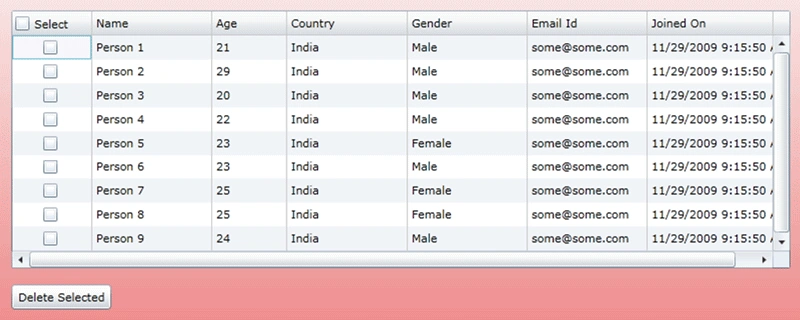
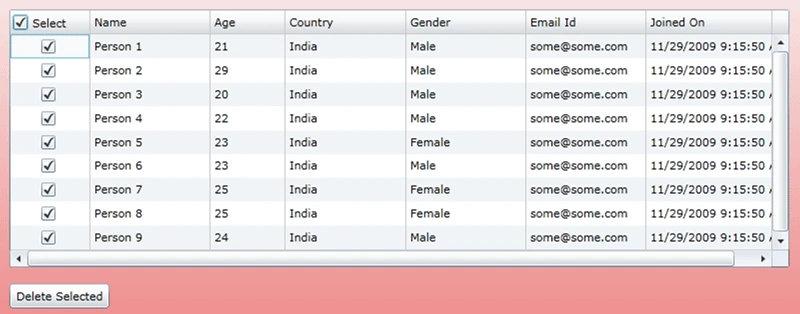
If we click on the Select CheckBox in the header of the First Column, all the rows would be selected.
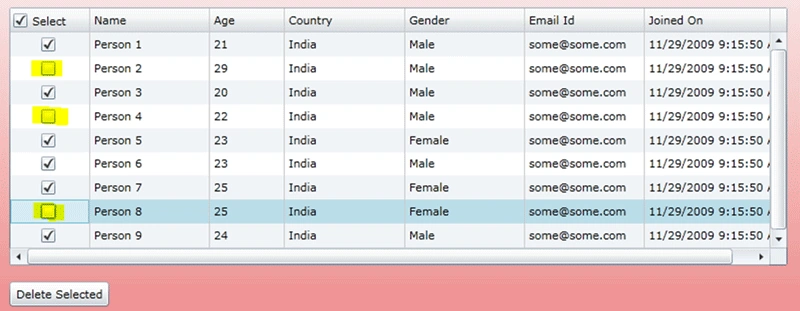
Now if we don't need everything to be selected but few, then we would uncheck the respective rows.
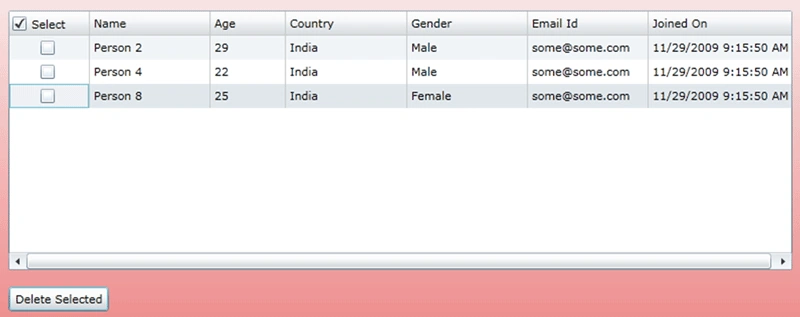
Now we would delete the selected rows.
The selected rows got deleted.
Hope this article helps.


Vu Hong TrieuPosted Jun 4, 2015, 9:22 AM
I want apply this code to my WPF code. How to use?
Anbazhagan APosted Jul 30, 2014, 1:26 PM
Hi!, First of all thanks with this article...This really helped me. In my scenario I have a tabcontrol with various tabs ...Each tab contains one Datagrid....As per your suggestion I was able to add checkbox to each datagrid...I have used same DataGridColumnHeaderStyle for all datagrids.. For the Chk_all event to give specific datagrid name....I am unable to get the information from Sender which datagrid was clicked ....Do I have to create multiple style for all 14 grids...:( Plz help..
chandan ksPosted Oct 12, 2013, 6:01 AM
thnaks man...really usefull..
Mitesh PatelPosted Mar 20, 2012, 12:15 PM
Hi!, When I tried to run this solution by implementing on my page. it is giving me following error. Failed to create a 'System.Type' from the text 'dataPrimitives:DataGridColumnHeader'. can any one solve my problem? Thanks in advance. :)
Guest UserPosted May 5, 2011, 10:56 AM
This is actually a bad example with several issues in it. It doesn't work well once virtualization kicks in. The event handler for the row checkbox is added every time a row is loaded, which results in potentially hundreds of unnecessary invokes (with all side effects and performance degradation) when you scroll through the list for some time. It doesn't use data binding for the check boxes which would've made things easier and reduced code, and it has superfluous code fragments in it that are not needed (e.g. updating the ItemsSource property of the grid in the delete routine). More discussion: http://forums.silverlight.net/forums/p/227596/553093.aspx#553093 -Peter
drsullivanPosted Apr 4, 2011, 6:19 PM
This is just what I was looking for, thank you so much. Now, have you ever made the default Key.Enter work like a Key.Tab in a datagrid? My users are used to what is called 10 key entry, easy in asp.net but I have not figured it out in Silverlight. Thanks for all your fine articles. David Sullivan
hkman hkmanPosted Feb 4, 2010, 8:46 PM
pls fix , thanks