

Introduction
Today, in this article let's play around with one of the interesting and most useful concepts in EDM Framework.
What is select data with reverse engineering via the EDM framework?
In simple terms "It provides flexibility to pull out the data using a reverse engineering mechanism via EDM framework".
Step 1. Create a new web application.
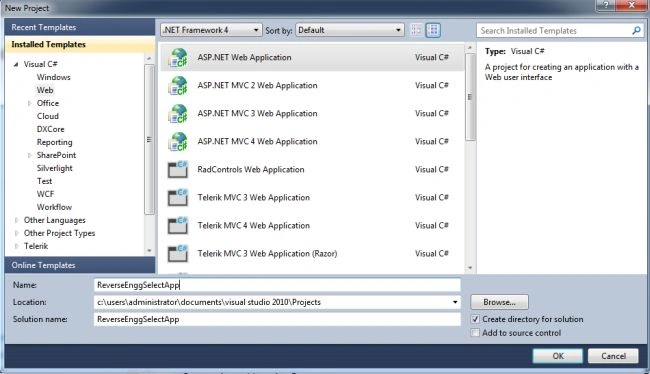
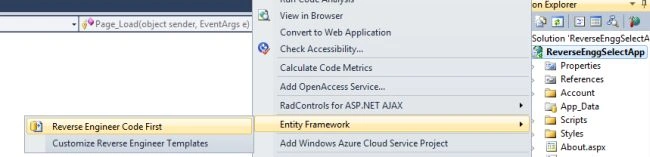
Step 2. Set up a new EDM framework with reverse engineering for the project.
Step 3. The complete code of WebForm1.aspx looks like this.
<%@ Page Language="C#" AutoEventWireup="true" CodeBehind="WebForm1.aspx.cs" Inherits="ReverseEnggApp.WebForm1" %>
<!DOCTYPE html PUBLIC "-//W3C//DTD XHTML 1.0 Transitional//EN" "http://www.w3.org/TR/xhtml1/DTD/xhtml1-transitional.dtd">

<html xmlns="http://www.w3.org/1999/xhtml">
<head id="Head1" runat="server">
    <style type="text/css">
        .grid {
            margin-top: 50px;
        }
    </style>
    <title></title>
</head>
<body>
    <form id="form1" runat="server">
        <center>
            <div>
                <table>
                    <tr>
                        <td colspan="2" align="center">
                            <asp:Label ID="Label1" runat="server" Text="Select Data with Reverse Engg. via EDM Framework"
                                Font-Bold="true" Font-Size="Large" Font-Names="Verdana" ForeColor="Maroon"></asp:Label>
                        </td>
                    </tr>
                    <tr>
                        <td colspan="2" align="center">
                            <asp:Button ID="Button1" runat="server" Text="Select Data" Font-Names="Verdana" Width="213px"
                                BackColor="Orange" Font-Bold="True" OnClick="Button1_Click" />
                        </td>
                    </tr>
                    <tr>
                        <td colspan="2" align="center">
                            <asp:GridView ID="GridView1" runat="server" CssClass="grid" BackColor="LightGoldenrodYellow"
                                BorderColor="Tan" BorderWidth="1px" CellPadding="2" ForeColor="Black" GridLines="None">
                                <AlternatingRowStyle BackColor="PaleGoldenrod" />
                                <FooterStyle BackColor="Tan" />
                                <HeaderStyle BackColor="Tan" Font-Bold="True" />
                                <PagerStyle BackColor="PaleGoldenrod" ForeColor="DarkSlateBlue" HorizontalAlign="Center" />
                                <SelectedRowStyle BackColor="DarkSlateBlue" ForeColor="GhostWhite" />
                                <SortedAscendingCellStyle BackColor="#FAFAE7" />
                                <SortedAscendingHeaderStyle BackColor="#DAC09E" />
                                <SortedDescendingCellStyle BackColor="#E1DB9C" />
                                <SortedDescendingHeaderStyle BackColor="#C2A47B" />
                            </asp:GridView>
                        </td>
                    </tr>
                    <tr>
                        <td colspan="2" align="center">
                            <asp:Label ID="Label3" runat="server" Font-Bold="true" Font-Size="Medium" Font-Names="Verdana"></asp:Label>
                        </td>
                    </tr>
                </table>
            </div>
        </center>
    </form>
</body>
</html>
Step 4. The complete code of WebForm1.aspx.cs looks like this.
using System;
using System.Collections.Generic;
using System.Linq;
using System.Web;
using System.Web.UI;
using System.Web.UI.WebControls;
using ReverseEnggApp.Models;

namespace ReverseEnggApp
{
    public partial class WebForm1 : System.Web.UI.Page
    {
        protected void Page_Load(object sender, EventArgs e)
        {
        }

        protected void Button1_Click(object sender, EventArgs e)
        {
            var query = (from r in objContext.tblEmployees
                         select new
                         {
                             EmpId = r.EmpId,
                             FirstName = r.FirstName,
                             LastName = r.LastName,
                             Age = r.Age
                         }).ToList();
            GridView1.DataSource = query;
            GridView1.DataBind();
        }

        #region Instance Members
        CompanyContext objContext = new CompanyContext();
        #endregion
    }
}
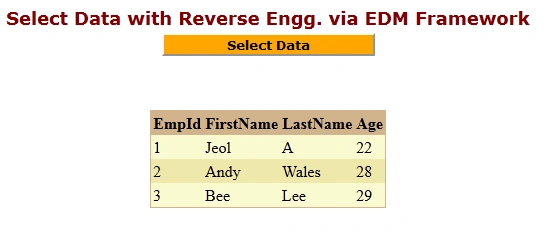
Step 5. The output of the application looks like this.

Step 6. The selected data output of the application looks like this.
Let's play around with one of the interesting and most useful concepts in the EDM Framework.
What is insert data with reverse engineering via the EDM framework?
In simple terms "It provides flexibility to insert the data using a reverse engineering mechanism via EDM framework".
Step 1. Create a new web application.
Step 2. Set up a new EDM framework with reverse engineering for the project:
Step 3. The complete code of WebForm1.aspx looks like this.
<%@ Page Language="C#" AutoEventWireup="true" CodeBehind="WebForm1.aspx.cs" Inherits="InsertDataReverseEnggApp.WebForm1" %>

<!DOCTYPE html PUBLIC "-//W3C//DTD XHTML 1.0 Transitional//EN" "http://www.w3.org/TR/xhtml1/DTD/xhtml1-transitional.dtd">
<html xmlns="http://www.w3.org/1999/xhtml">
<head id="Head1" runat="server">
    <title></title>
</head>
<body>
    <form id="form1" runat="server">
    <div>
        <center>
            <table>
                <tr>
                    <td>
                        <asp:Label ID="Label1" runat="server" Text="Insert Data with Reverse Engineering via EDM Framework"
                            Font-Bold="true"></asp:Label>
                    </td>
                </tr>
            </table>
            <br />
            <br />
            <table>
                <tr>
                    <td>
                        <asp:Label ID="Label2" runat="server" Text="Please Enter FirstName: " ForeColor="Brown"
                            Font-Bold="true" Font-Italic="true"></asp:Label>
                    </td>
                    <td>
                        <asp:TextBox ID="TextBox1" runat="server"></asp:TextBox>
                    </td>
                </tr>
                <tr>
                    <td>
                        <asp:Label ID="Label3" runat="server" Text="Please Enter LastName: " ForeColor="Brown"
                            Font-Bold="true" Font-Italic="true"></asp:Label>
                    </td>
                    <td>
                        <asp:TextBox ID="TextBox2" runat="server"></asp:TextBox>
                    </td>
                </tr>
                <tr>
                    <td>
                        <asp:Label ID="Label4" runat="server" Text="Please Enter Age: " ForeColor="Brown"
                            Font-Bold="true" Font-Italic="true"></asp:Label>
                    </td>
                    <td>
                        <asp:TextBox ID="TextBox3" runat="server"></asp:TextBox>
                    </td>
                </tr>
                <tr>
                    <td colspan="2" align="center">
                        <asp:Button ID="Button1" runat="server" Text="Insert Data" OnClick="Button1_Click"
                            BackColor="Orange" Font-Bold="true" /><br />
                        <br />
                    </td>
                </tr>
            </table>
            <br />
            <br />
            <table>
                <tr>
                    <td colspan="3">
                        <asp:Label ID="Label5" runat="server" Font-Bold="true"></asp:Label>
                    </td>
                </tr>
            </table>
        </center>
    </div>
    </form>
</body>
</html>
Step 4. The complete code of WebForm1.aspx.cs looks like this.
using System;
using System.Collections.Generic;
using System.Linq;
using System.Web;
using System.Web.UI;
using System.Web.UI.WebControls;
using InsertDataReverseEnggApp.Models;

namespace InsertDataReverseEnggApp
{
    public partial class WebForm1 : System.Web.UI.Page
    {
        protected void Page_Load(object sender, EventArgs e)
        {
        }

        protected void Button1_Click(object sender, EventArgs e)
        {
            if (string.IsNullOrEmpty(TextBox1.Text) || string.IsNullOrEmpty(TextBox2.Text) || string.IsNullOrEmpty(TextBox3.Text))
            {
                Label5.Text = "Please Enter Some Values";
                Label5.ForeColor = System.Drawing.Color.Green;
            }
            else
            {
                objContext.tblEmployees.Add(new tblEmployee
                {
                    FirstName = TextBox1.Text,
                    LastName = TextBox2.Text,
                    Age = int.Parse(TextBox3.Text)
                });
                objContext.SaveChanges();
                Label5.Text = "Data Inserted Successfully";
                Label5.ForeColor = System.Drawing.Color.Green;
                TextBox1.Text = string.Empty;
                TextBox2.Text = string.Empty;
                TextBox3.Text = string.Empty;
            }
        }

        #region Instance Members
        CompanyContext objContext = new CompanyContext();
        #endregion

    }
}
Step 5. The output of the application looks like this.
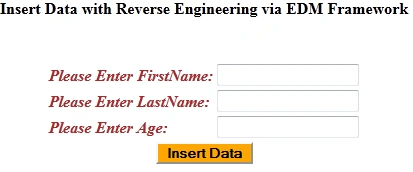
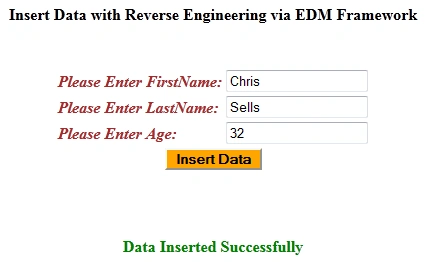
Step 6. The inserted data output of the application looks like this.
I hope this article is useful for you.
Join the conversation! Your thoughts help the community grow.