

In this article we will learn about SELECT command with different commands.
- Select
- Select Distinct
- Select Where with Arithmetic Operator
- Select Where with Comparison Operator
- Select Where with Logical Operator
SQL Select command
As command itself define its functionalities Select command select the rows and columns as per given in command.
Table : tblFriends structure with Data Records
- CREATE TABLE[dbo].[tblFriends]
- (
- [FriendID][int] IDENTITY(1, 1) NOT NULL, [Name][varchar](50) NULL, [Place][varchar](25) NULL, [Mobile][varchar](15) NULL, [EmailAddress][varchar](150) NULL, [Qty][int] NULL, [Rate][int] NULL, [DiscountAmt][int] NULL, [PackingCharge][int] NULL, [TransportCharge][int] NULL
- ) ON[PRIMARY]
- GO
Syntax1
Select * From <TableName>
Example1
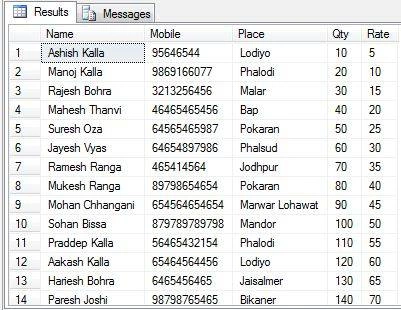
Select * From tblFriends
Above command will return all rows and columns from tblFriends.
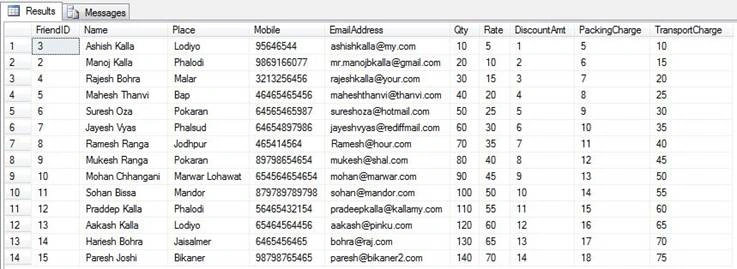
Note: This is not a good practice, Always specify your columns in select command while you use in programming.
Syntax 2
Select <ColumnName>, <ColumnName> …. From <TableName>
Example 2
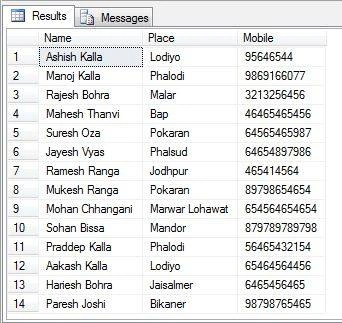
Select Name, Place, Phone From tblFriends
Above command will return all rows but selected columns are: Name, Place, Phone.
How to display distinct, Non-duplicate records from table
Syntax:
Select Distinct <ColumnName>, <ColumnName> …. From <TableName>
Example:
Select Distinct Place From tblFriends
Above command will not display duplicate records. It will display unique place name from tblFriends table.
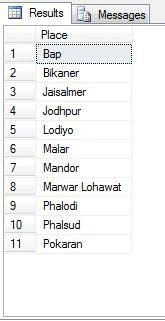
Total 14 records but distinct PLACE value come around 11 records.
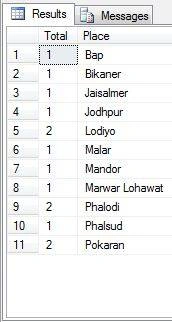
Duplicate Places
Lodiyo 2 Time
Phalodi 2 Time
Pokaran 2 Time
You can check repeated PLACE with this command also.
Select Count(*) as Total, Place from tblFriends group by Place,
Select Where with Arithmetic Operator
The following are Arithmetic operator,
- + = Addition
- – = Subtraction / Minus
- * = Multiplication
- / = Divide
+ = Addition
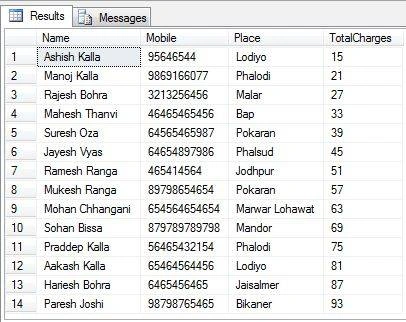
Now, I am going to add two different fields value into one in query.
PackingCharges + TransportCharges = TotalCharges
Query
- Select Name,
- Mobile,
- Place,
- (PackingCharge + TransportCharge) as Charges
- From tblFriends
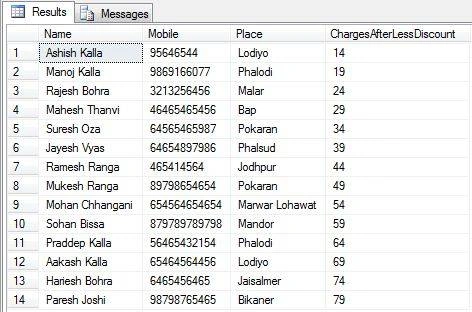
– = Subtraction/Minus
- Select Name,
- Mobile,
- Place,
- ((PackingCharge +TransportCharge)-DiscountAmt ) as ChargesAfterLessDiscount
- From tblFriends
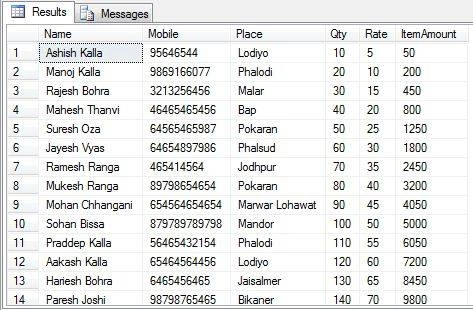
* = Multiplication
- Select
- Name,
- Mobile,
- Place,
- Qty,
- Rate,
- (Qty * Rate) As ItemAmount
- From tblFriends
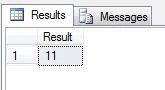
/ = Divide
Select 55/5 as Result.
Select Where with Comparison Operator
The following are Arithmetic operators,





Santhakumar MunuswamyPosted Jan 19, 2016, 3:19 PM
Thanks for nice article. Keep it up
Roshan MulePosted Jan 19, 2016, 3:19 PM
vary useful article, thank you Sir.
Pankaj Kumar ChoudharyPosted Jan 19, 2016, 7:14 AM
Nice Explain Sir.........