
Introduction
The select element creates a drop-down list.
This element is used in conjunction with the <option> element to produce a list of options that the user can choose from. The <select> tag is supported in all major browsers. You can use <optgroup> tag within <select> tag for grouping
option.
Syntax
<select>
<option>Text</option>
<option>Text</option>
</select >
<option>Text</option>
<option>Text</option>
</select >
Attributes
There are 3 kinds of attributes that you can add to your
HTML tags: Element-specific, global, and event handler content attributes. The attributes that you can add to this tag are listed below.
Element-Specific Attributes
Attributes Introduced by
HTML5
| Attributes | Description |
| autofocus (New) | Automatically gives focus to this control when the page loads. This allows the user to start using the control without having to select it first. |
| disabled | Disables the input control. The button won't accept changes from the user. |
| multiple | When present, it specifies that multiple items can be selected at a time. |
| Name | Defines a unique name for the drop-down list. |
| size | Defines the number of visible items in the drop-down list. |
Global Attributes
|
HTML5
Global Attributes
|
||
| accesskey | draggable | style |
| class | hidden | tabindex |
| dir | spellcheck | |
| contenteditable | id | title |
| contextmenu | lang | |
Event Handler Content Attributes
Here are the standard HTML 5 event handler content
attributes.
| onabort | onerror* | onmousewheel |
| onblur* | onfocus* | onpause |
| oncanplay | onformchange | onplay |
| oncanplaythrough | onforminput | onplaying |
| onchange | oninput | onprogress |
| onclick | oninvalid | onratechange |
| oncontextmenu | onkeydown | onreadystatechange |
| ondblclick | onkeypress | onscroll |
| ondrag | onkeyup | onseeked |
| ondragend | onload* | onseeking |
| ondragenter | onloadeddata | onselect |
| ondragleave | onloadedmetadata | onshow |
| ondragover | onloadstart | onstalled |
| ondragstart | onmousedown | onsubmit |
| ondrop | onmousemove | onsuspend |
| ondurationchange | onmouseout | ontimeupdate |
| onemptied | onmouseover | onvolumechange |
| onended | onmouseup | onwaiting |
autofocus (New)
This is a new
attribute in HTML5. This tag is used to
automatically gives focus to this control when the page loads.
Syntax
<select autofocus="autofocus">
For Example
- <select autofocus="autofocus">
- <option value="volvo">-Select Color-</option>
- <option value="volvo">Red</option>
- <option value="saab">Green</option>
- <option value="opel">Pink</option>
- <option value="audi">Blue</option>
- </select>
Disabled attribute
The disabled attribute specifies that a drop-down list
should be disabled. A disabled drop-down list is unusable and un-clickable.
Syntax
<select disabled="disabled">
For Example
- <select disabled ="disabled">
- <option value="volvo">-Select Color-</option>
- <option value="volvo">Red</option>
- <option value="saab">Green</option>
- <option value="opel">Pink</option>
- <option value="audi">Blue</option>
- </select>
Multiple Attribute
The multiple attribute specifies that multiple options
can be selected at the same time.
Syntax
<select multiple="multiple">
For Example
- <select multiple="multiple" name="D1">
- <option value="volvo">-Select Color-</option>
- <option value="volvo">Red</option>
- <option value="saab">Green</option>
- <option value="opel">Pink</option>
- <option value="audi">Blue</option>
- </select>
Size Attribute
The size attribute specifies the number of visible
options in a drop-down list.
Syntax
<select size="value">
For Example
- <select size="3">
- <option value="volvo">-Select Color-</option>
- <option value="volvo">Red</option>
- <option value="saab">Green</option>
- <option value="opel">Pink</option>
- <option value="audi">Blue</option>
- </select>
Using all Attribute
For Example
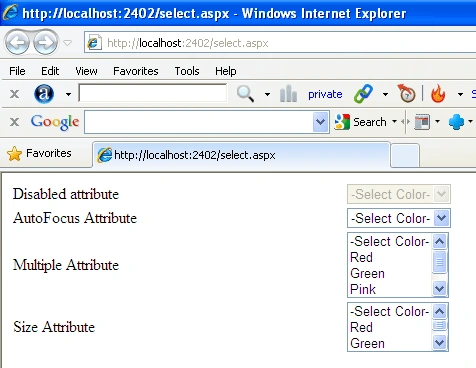
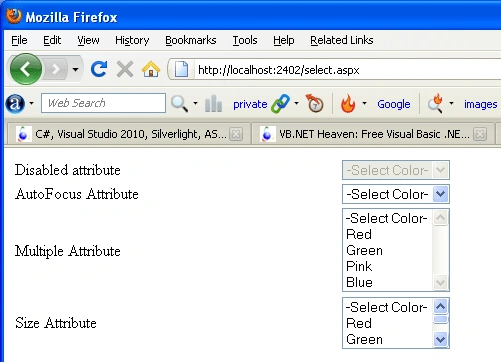
- <html>
- <body>
- <table style="width: 49%">
- <tr>
- <td>
- Disabled attribute
- </td>
- <td>
- <select disabled="disabled">
- <option value="volvo">-Select Color-</option>
- <option value="volvo">Red</option>
- <option value="saab">Green</option>
- <option value="opel">Pink</option>
- <option value="audi">Blue</option>
- </select>
- </td>
- </tr>
- <tr>
- <td>
- AutoFocus Attribute
- </td>
- <td>
- <select autofocus="autofocus">
- <option value="volvo">-Select Color-</option>
- <option value="volvo">Red</option>
- <option value="saab">Green</option>
- <option value="opel">Pink</option>
- <option value="audi">Blue</option>
- </select>
- </td>
- </tr>
- <tr>
- <td>
- Multiple Attribute
- </td>
- <td>
- <select multiple="multiple" name="D1">
- <option value="volvo">-Select Color-</option>
- <option value="volvo">Red</option>
- <option value="saab">Green</option>
- <option value="opel">Pink</option>
- <option value="audi">Blue</option>
- </select>
- </td>
- </tr>
- <tr>
- <td>
- Size Attribute
- </td>
- <td>
- <select size="3">
- <option value="volvo">-Select Color-</option>
- <option value="volvo">Red</option>
- <option value="saab">Green</option>
- <option value="opel">Pink</option>
- <option value="audi">Blue</option>
- </select>
- </td>
- </tr>
- </table>
- </body>
- </html>
Internet explorer
Fire Fox
Join the conversation! Your thoughts help the community grow.