

Every e-commerce backend reaches the same point: an order is confirmed, and now the system has to produce a document a customer will actually keep. Not a screen but a file, a branded invoice with the line items, the totals, the tax breakdown, and the company logo, generated server-side the instant checkout completes. In most storefronts the HTML for that invoice already exists, because it is the same markup the order-confirmation page renders. The remaining question is narrow and practical. How do you turn that HTML into a PDF inside an ASP.NET Core service?
This article walks the SelectPdf HTML to PDF C# path first, then the IronPDF path, building the same feature both ways so you can see what each toolchain asks of you. We work at Iron Software, and IronPDF is one of the two libraries here. We have kept the SelectPdf implementation complete and honest, because for a single-page receipt it is genuinely all you need.
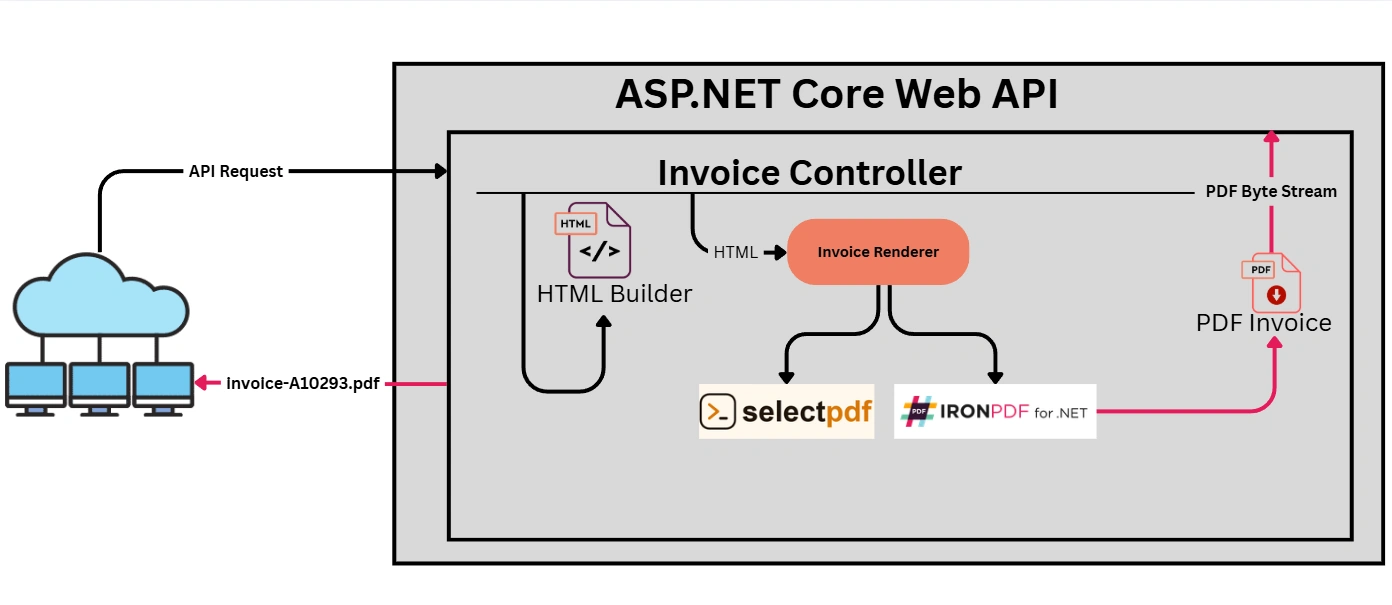
The task is fixed across both halves, an InvoiceController accepts an order ID, an injected renderer turns a Razor-style HTML invoice into PDF bytes, and the action returns a FileContentResult. Same controller, same HTML, two renderers.
The Shared Invoice Markup
Both implementations consume identical HTML. Listing 1 shows the template builder, a plain service that interpolates order data into a styled invoice. Keeping this separate from the renderer is the whole point: the rendering library is swappable, the document is not.
public sealed class InvoiceHtmlBuilder
{
    public string Build(Order order)
    {
        var rows = string.Join("", order.Lines.Select(l =>
            $"<tr><td>{l.Sku}</td><td>{l.Name}</td>" +
            $"<td class='num'>{l.Qty}</td>" +
            $"<td class='num'>{l.LineTotal:C}</td></tr>"));

        return $@"

<!DOCTYPE html><html><head><style>
  body {{ font-family: 'Segoe UI', sans-serif; color: #1a1a2e; margin: 40px; }}
  .brand {{ color: #16213e; font-size: 28px; font-weight: 700; }}
  table {{ width: 100%; border-collapse: collapse; margin-top: 24px; }}
  th, td {{ padding: 10px; border-bottom: 1px solid #e0e0e0; text-align: left; }}
  .num {{ text-align: right; }}
  .total {{ font-weight: 700; font-size: 18px; }}

</style></head><body>
  <div class='brand'>Northwind Outfitters</div>
  <p>Invoice #{order.Number} · {order.PlacedAt:yyyy-MM-dd}</p>
  <table>

    <thead><tr><th>SKU</th><th>Item</th><th class='num'>Qty</th><th class='num'>Total</th></tr></thead>
    <tbody>{rows}</tbody>
  </table>
  <p class='total'>Amount due: {order.Total:C}</p>
</body></html>";
    }
}
Implementing HTML to PDF conversion with SelectPdf Community Edition
SelectPdf's free Community Edition is a fully functional HTML-to-PDF converter for .NET, free for production use, with no watermark on its output. Per the Community Edition page, it shares the commercial library's rendering engine, supports HTML5 and CSS3 with a real JavaScript runtime, and handles custom headers and footers. It also works as a NET PDF Library for .NET applications, with support for .NET framework, .NET core, and newer .NET versions. Install it with a single package:
dotnet add package Select.HtmlToPdfThis goes beyond PDF conversion: you can create PDF documents from scratch and manipulate existing files through its PDF API.
Beyond convert HTML flows, it can extract text, handle interactive form filling, and turn PDF pages into images such as PNG or JPEG. It also includes PDF security features like encryption and digital signatures, plus PDF/A-3 output for archiving. Listing 2 wires it into a renderer behind an interface. HtmlToPdf.ConvertHtmlString does the work; Save returns a byte[] straight to the controller.
using SelectPdf;

public interface IInvoiceRenderer
{
    byte[] Render(string html);
}

public sealed class SelectPdfInvoiceRenderer : IInvoiceRenderer
{
    public byte[] Render(string html)
    {
        var converter = new HtmlToPdf();

        converter.Options.PdfPageSize = PdfPageSize.A4;
        converter.Options.MarginTop = 20;
        converter.Options.MarginBottom = 20;

        PdfDocument doc = converter.ConvertHtmlString(html);

        try
        {
            return doc.Save();   // byte[]: no watermark on Community Edition output
        }

        finally
        {
            doc.Close();
        }
    }
}
The controller never knows which renderer it holds (Listing 3):
[ApiController]

[Route("invoices")]
public sealed class InvoiceController : ControllerBase
{
    private readonly IInvoiceRenderer _renderer;
    private readonly InvoiceHtmlBuilder _builder;
    private readonly IOrderStore _orders;
    public InvoiceController(IInvoiceRenderer renderer,
                             InvoiceHtmlBuilder builder,
                             IOrderStore orders)

    {
        _renderer = renderer;
        _builder = builder;
        _orders = orders;
    }

    [HttpGet("{orderId}/pdf")]
    public async Task< IActionResult> GetInvoice(string orderId)
    {
        Order order = await _orders.GetAsync(orderId);
        if (order is null) return NotFound();
        string html = _builder.Build(order);
        byte[] pdf = _renderer.Render(html);
        return File(pdf, "application/pdf", $"invoice-{order.Number}.pdf");
    }
}
Register it in Program.cs with builder.Services.AddScoped< IInvoiceRenderer, SelectPdfInvoiceRenderer>(); and the endpoint is live. On a Windows host, a customer hits /invoices/A-10293/pdf and downloads a clean, branded, single-page receipt. The CSS in Listing 1 renders faithfully, the logo and totals land where the markup puts them, and nothing is watermarked. For a per-order receipt, this is a finished feature, though security coverage does not extend to CSS Paged Media, built-in redaction, or accessible tagged PDFs.
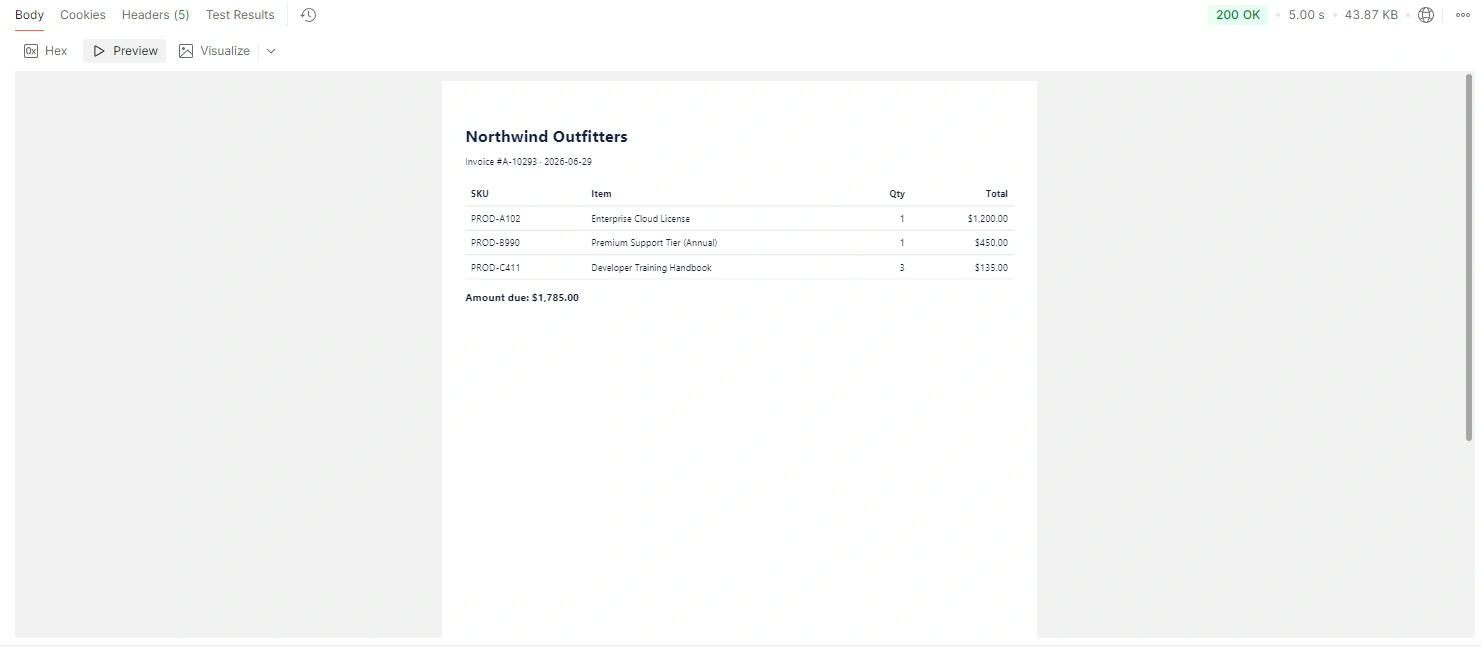
Output PDF Document with SelectPdf
Implementing the Same Task with IronPDF
IronPDF takes the identical HTML and the identical interface. Install the IronPdf package (2026.6.1 at the time of writing) and swap the renderer body. It uses a bundled Chromium engine through ChromePdfRenderer.RenderHtmlAsPdf(), which closely matches the rendering behavior developers expect from google chrome, documented here:
using IronPdf;

public sealed class IronPdfInvoiceRenderer : IInvoiceRenderer
{
    private readonly ChromePdfRenderer _renderer = new();

    public byte[] Render(string html)
    {
        _renderer.RenderingOptions.MarginTop = 20;
        _renderer.RenderingOptions.MarginBottom = 20;
        PdfDocument pdf = _renderer.RenderHtmlAsPdf(html);
        return pdf.BinaryData;
    }
}
Output PDF Document with IronPDF
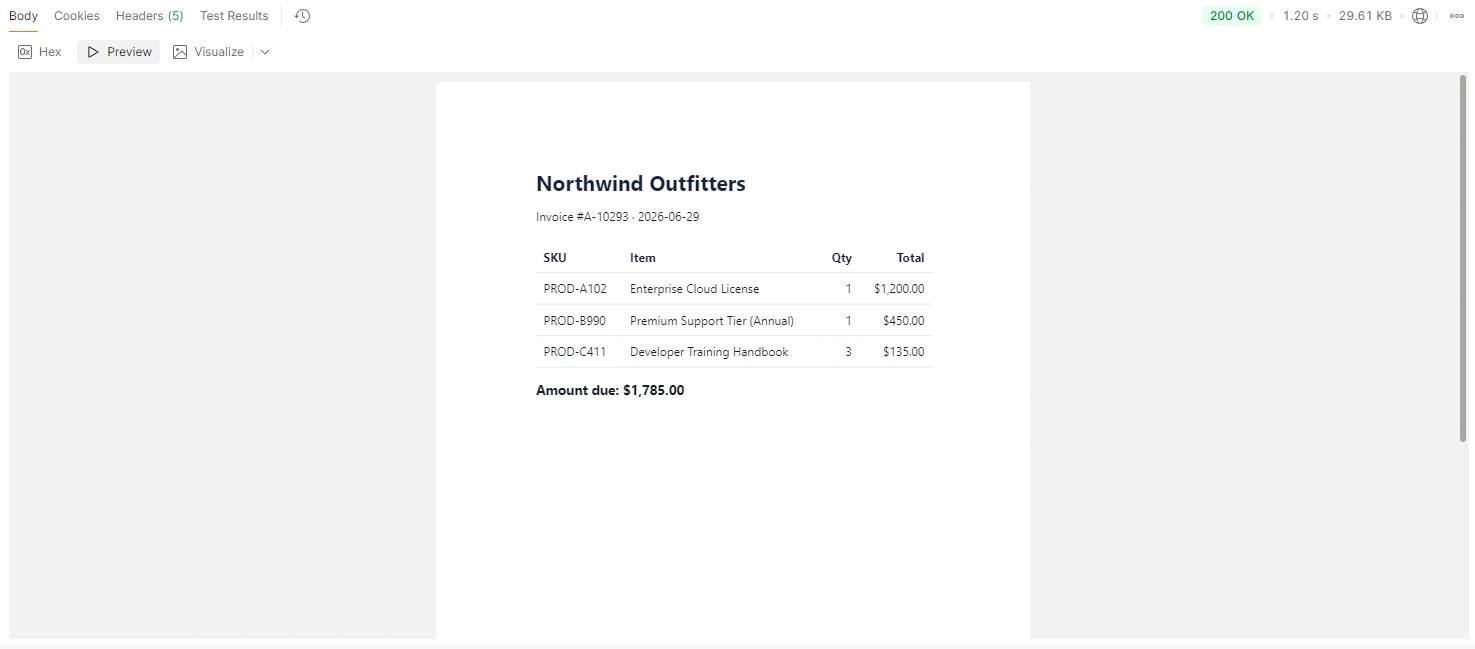
Change one line in Program.cs (AddScoped< IInvoiceRenderer, IronPdfInvoiceRenderer>()) and the same controller now produces the same single-page receipt. At the receipt scale, the two are interchangeable. Both handle HTML to PDF conversion for web pages, but the rendering approach differs. That is the honest comparison: pick either and ship. Because both renderers sit behind IInvoiceRenderer, the choice is also reversible. Nothing in the controller, the HTML builder, or the order store knows which engine is loaded, so a team can start on one and move to the other later without touching its business code. SelectPdf also supports Azure Cloud deployment, can create PDFs from scratch and manipulate existing documents, and offers a rest API plus a live demo on its website, even though this walkthrough uses the .NET library path.
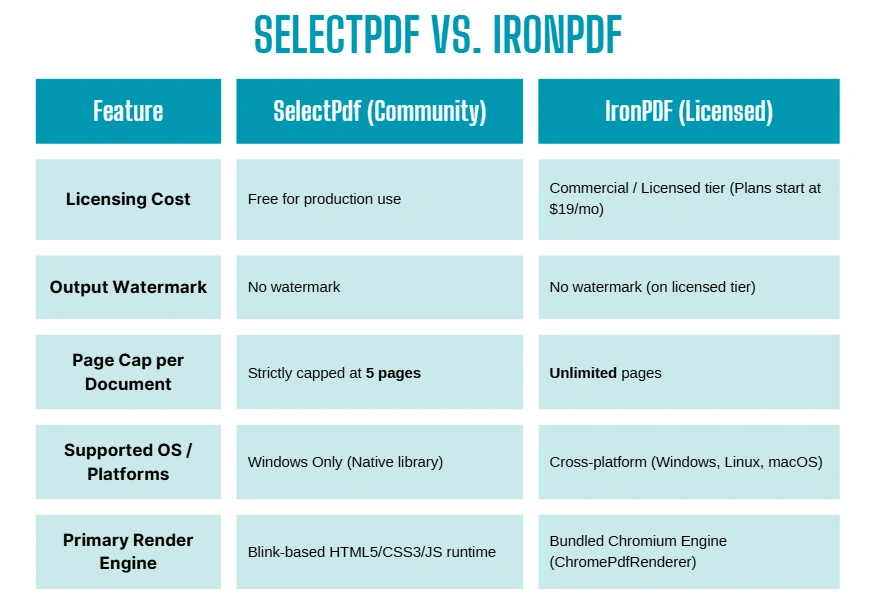
Where the Task Grows: The Capability Delta
The receipt is where most carts start, it is rarely where an e-commerce platform stays. Two extensions of this exact task are where the libraries diverge, both on documented limits rather than rendering quality.
Document length. A monthly account statement for a high-volume B2B buyer covers every order, every credit, every adjustment, and it runs long. SelectPdf's Community Edition caps generated documents at five pages per PDF; past that, you move to the commercial library. IronPDF applies no per-PDF page cap on licensed output, so a 30-page statement is the same RenderHtmlAsPdf call with more rows in the markup. When several statements need to become one document, PdfDocument.Merge() and AppendPdf() (merge guide) combine them in process.
Deployment surface. Many storefronts now run their backends in Linux containers. SelectPdf's .NET library is limited to Windows and does not run on Linux, macOS, or Xamarin, while its online service adds Azure Cloud deployment options; that matters if your estate mixes Windows systems with hosted API calls. IronPDF runs on Windows, Linux, macOS, Docker, Azure, and AWS Lambda, so the same renderer that produced the receipt on a developer's Windows machine produces the statement inside an Alpine container without a code change. The same library also targets .NET 10, 9, 8, Framework 4.6.2+, and .NET Standard, which keeps the renderer choice independent of the runtime the rest of the service runs on. SelectPdf also offers support through chat email channels when teams are evaluating deployment or integration.
So the boundary is concrete. The order receipt is fully served by SelectPdf Community Edition on Windows, free and watermark-free; the long statement generated at volume inside a Linux container is the case that runs past the five-page cap and off the supported platform. Both libraries are correct answers to the receipt. Only one of them keeps answering as the document and the deployment grow.
That boundary is the decision, and it reads against your own roadmap and version planning rather than against a scoreboard. If your invoices are receipts and your servers are Windows, the free converter is a complete answer: keep your code, ship it, move on. Its pricing model starts at $19/month, with online API plans from $19 to $449/month, a free 7-day trial for 200 documents, and charges per conversion based on document pages. If the statement is on the backlog, or the container is Linux, the toolchain that survives the page count climbing is the one to start on now, the rewrite you spare yourself is the one triggered by your own success. Map the choice to where your documents are headed, not to where they sit today, and the library that fits is the one already standing at that scale.
Conclusion & Next Steps
If your application only needs to generate standard, single-page order receipts on a Windows host, the SelectPdf Community Edition provides a functional, zero-cost starting point. However, if your long-term product roadmap includes multi-page monthly account statements, cross-platform cloud hosting inside Linux Docker containers, or high-performance concurrent processing, you will quickly outgrow those platform boundaries.
The major advantage of the decoupled architecture built today is how easily you can switch engines when your business scaling demands it. If you are ready to future-proof your document pipelines and test your workflows against production-grade workloads, you can swap your rendering engine seamlessly today. Get started by activating a free trial of IronPDF to test its advanced features, deployment flexibility, and unlimited page rendering directly in your own development environment.
Join the conversation! Your thoughts help the community grow.