

Introduction
In this article you learn about Self-Host, how we can Self-Host the ASP.NET Web API. In this article, you don't have need of the IIS server. We Host the Web API in a Console application.
Step 1
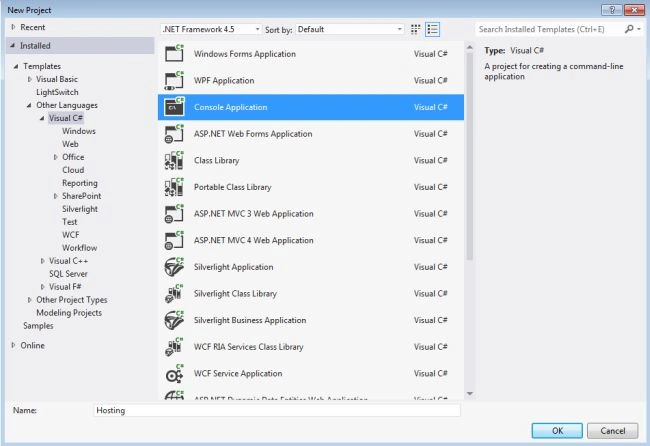
First we create the console application.
- Start Visual Studio 2012.
- Select "New Project" from the Start page.
- In the Templates, select Installed template->Visual C#.
- Select "Console application" and change name to "Hosting".
- Click on the "OK" button.
Step 2
Set the ".Net Framework 4".
- In the "Solution Explorer" right-click on the project.
- Select "Properties".
- In the "Properties windows" Select the ".Net Framework 4" From the Drop Down List of Target Folder.

- For applying the change open a prompt and click on "Yes".
Step 3
We check that the Nuget Package Manager is installed or not.
- Go to the Tools menu.
- If there is a "Library Package Manager" visible then the "Nuget Package Manager" is installed.
- If "Library Package Manager" is not visible then it is not installed.
For installation of "Nuget Package Manager":
- Go to the "Tools" menu then select "Extension and Updates".
- In the "Extension and Updates" dialog box select "Online".
- In the search box Type "nuget package manager".
- Select the "Nuget Package Manager and Install it.
Step 4
Now we install the Web API Self-Host Package.
- Go to the "Tools" menu then select "Library Package Manager" -> "Manages Nuget Packages For Solution".
- In the "Nuget Package Manager" dialog box type "Microsoft.AspNet.WebApi.SelfHost".
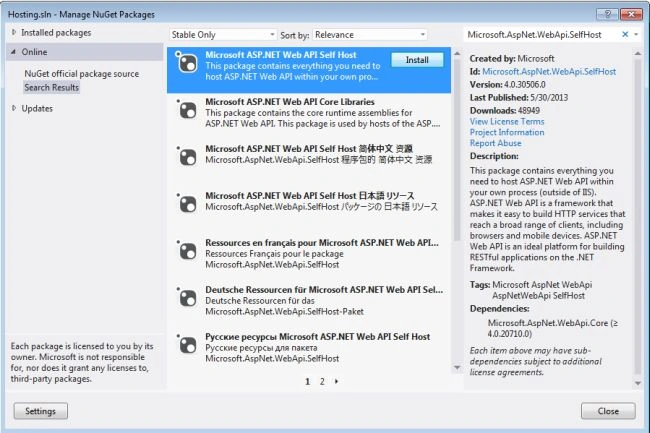
- Select the ASP.NET Web API Self Host and click Install.

- Click on the "I Accept" button.
Step 5
Create the Model class:
- In the "Solution Explorer".
- Right-click on the project then select "Hosting" -> "Add" -> "Class".
- Change the name of class as "Item".
- Click on the "OK" button.
Add this code in the "Item" Class:
- using System;
- using System.Collections.Generic;
- using System.Linq;
- using System.Text;
- using System.Threading.Tasks;
- namespace Hosting
- {
- public class Item
- {
- public int Id { get; set; }
- public string Name { get; set; }
- public string Category { get; set; }
- }
- }
Step 6
To add a Controller class:
- In the "Solution Explorer".
- Right-click on the project then select "Hosting" -> "Add" -> "Class".
- Change the name of the class to "ItemsController".
- Click on the "OK" button.
Add this code in the "ItemsController" class:
- using System;
- using System.Collections.Generic;
- using System.Linq;
- using System.Net;
- using System.Text;
- using System.Web.Http;
- namespace Hosting
- {
- public class ItemsController : ApiController
- {
- Item[] items = new Item[]
- {
- new Item { Id = 1, Name = "Apple", Category = "Fruit" },
- new Item{ Id = 2, Name = "Tomato", Category = "vasitable" },
- new Item{ Id = 3, Name = "T-Shirt", Category = "cloths" }
- };
- public IEnumerable<Item> GetAllItems()
- {
- return items;
- }
- public Item GetItemById(int id)
- {
- var item = items.FirstOrDefault((i) => i.Id == id);
- if (item == null)
- {
- throw new HttpResponseException(HttpStatusCode.NotFound);
- }
- return item;
- }
- public IEnumerable<Item> GetItemsByCategory(string category)
- {
- return items.Where(i => string.Equals(i.Category, category,
- StringComparison.OrdinalIgnoreCase));
- }
- }
- }
Step 7




ravi khodaPosted Apr 25, 2022, 5:49 AM
How can I introduce login for the self hosted api with above example?
ca ThichPosted Jul 13, 2021, 5:35 PM
Can .net framework 4.0 support webApi security? Thanks
mohamedamine melaouhiaPosted Oct 9, 2014, 5:48 AM
i have got the following exception A first chance exception of type 'System.AggregateException' occurred in mscorlib.dll