

In this article, we will see how to configure Self-Service Site Collection in SharePoint 2013 Central Admin. This configuration allows you to allow or disallow the users from creating Site Collections on the web.
This can be allowed or disallowed as per the governance of your organization.
How to configure it?
Let’s open Central Admin of SharePoint on your machine. On your Windows desktop screen, click Start >> Administrative Tools >> SharePoint 2013 Central Administration.
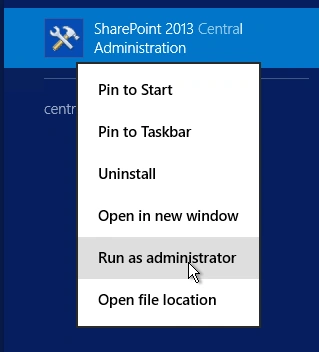
- Run it as an administrator to have elevated privileges.
- You will see the screenshot given below.
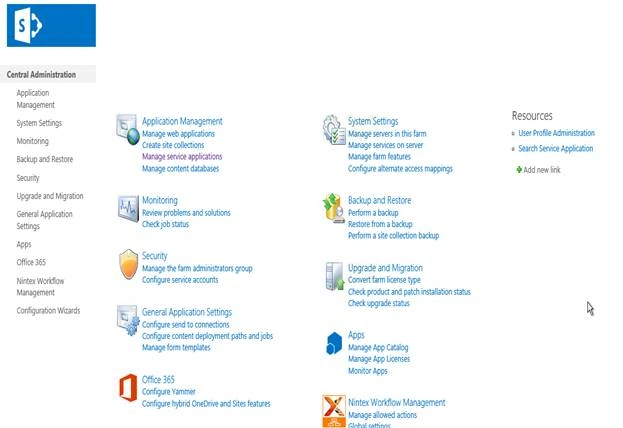
- Central Admin is configured under the categories given below.
- Click on "Application Management".
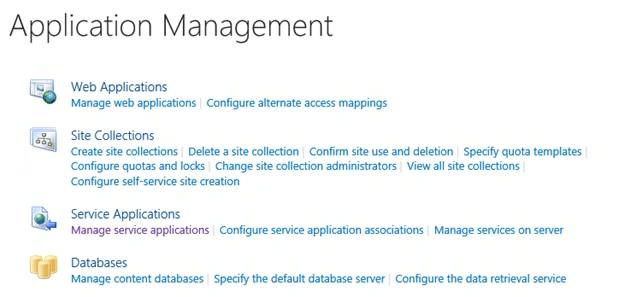
- Go to Site Collections.

- Click on “Configure self – service site creation”.
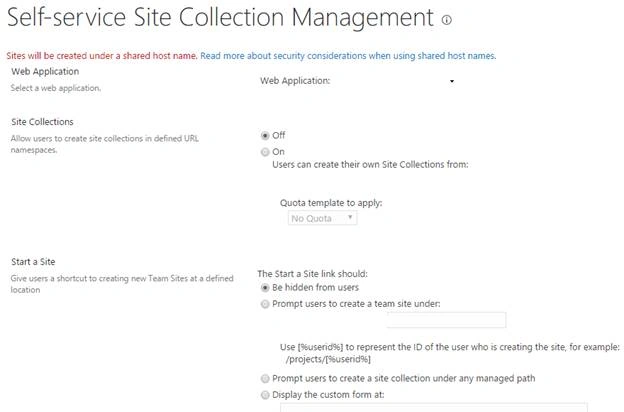
- You will see the screen below.
Configure
- Web Application
Select the web application under which you want to configure these settings. - Site Collection
Here, you can choose if you want to allow or disallow the users to create their own site collection. - Start a Site
Here, you can select any of these options for starting a site link to be, - Be hidden from users
- Prompt users to create a site using a defined link.
- Prompt users to create a site collection under a managed path.
- Or display the custom form at a custom location.
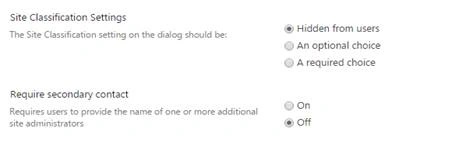
- Site Classification Settings
Here, you can choose if you want the site classification setting on, the dialog should be. - Hidden from users
- An optional choice
- A required choice
- Require secondary contact
Here, you can provide users to enter a secondary site collection admin while creating a new site collection or not. This setting allows you to view all the site collections on the Central Admin under the chosen web application.
Once you configure, the settings will be applied on the web application and the self – service site creation will work as expected
Here, in this article, we saw how to configure self-service site creation on SharePoint 2013 Central Administration. There are more articles to come on Central Administration; until then, keep reading and keep learning!
Join the conversation! Your thoughts help the community grow.