

This article explains how to send asynchronous mail using a SmtpClient.SendCompleted Event and a SmtpClient.SendAsyncCancel Method in ASP.NET 4.5 for sending the specified message to an SMTP server for delivery as an asynchronous operation.
So, let's proceed with the following procedure:
- Create an Asynchronous Page ASP.NET web page
- Create a SmtpClient.SendCompleted Event and SmtpClient.SendAsyncCancel Method
Creating an Asynchronous Page
Create a new project using "File" -> "New" -> "Project..." then select web "ASP.NET Web Forms Application". Name it "SendMailAsync".
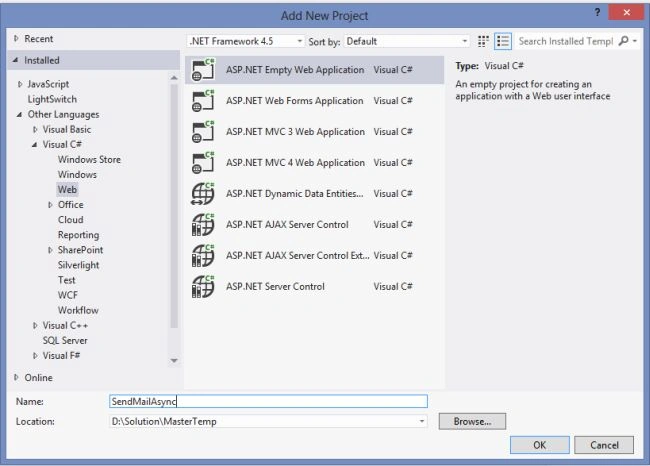
Next, create the code-behind as follows: The first step is to build an asynchronous page and setting the Async attribute in the Page directive to true, as shown here:
<%@ Page Language="C#" Async="true" %>

Now, in the code behind file SendMail.aspx use the following code.
SendMail.aspx
- <%@ Page Title="SendMailAsync|SendAsyncCancel" Async="true" Language="C#" MasterPageFile="~/Site.Master" AutoEventWireup="true" CodeBehind="SendMail.aspx.cs" Inherits="SendMailAsync.SendMail" %>
- <asp:Content ID="Content1" ContentPlaceHolderID="titleContent" runat="server">
- Send Email Asynchronously
- </asp:Content>
- <asp:Content ID="Content2" ContentPlaceHolderID="head" runat="server">
- <script type="text/javascript">
- function validationCheck() {
- var summary = "";
- summary += isvalidName();
- summary += isvalidEmail();
- summary += isvalidSubject();
- summary += isvalidMessage();
- if (summary != "") {
- alert(summary);
- return false;
- }
- else {
- return true;
- }
- }
- function isvalidName() {
- var id;
- var temp = document.getElementById("<%=txtName.ClientID %>");
- id = temp.value;
- if (id == "") {
- return ("Please enter Name" + "\n");
- }
- else {
- return "";
- }
- }
- function isvalidEmail() {
- var id;
- var temp = document.getElementById("<%=txtEmail.ClientID %>");
- id = temp.value;
- var re = /\w+([-+.']\w+)*@\w+([-.]\w+)*\.\w+([-.]\w+)*/;
- if (id == "") {
- return ("Please Enter Email" + "\n");
- }
- else if (re.test(id)) {
- return "";
- }
- else {
- return ("Email should be in the form [email protected]" + "\n");
- }
- }
- function isvalidSubject() {
- var id;
- var temp = document.getElementById("<%=txtSubject.ClientID %>");
- id = temp.value;
- if (id == "") {
- return ("Please enter Subject" + "\n");
- }
- else {
- return "";
- }
- }
- function isvalidMessage() {
- var id;
- var temp = document.getElementById("<%=txtMessage.ClientID %>");
- id = temp.value;
- if (id == "") {
- return ("Please enter Message" + "\n");
- }
- else {
- return "";
- }
- }
- </script>
- </asp:Content>
- <asp:Content ID="Content3" ContentPlaceHolderID="MainContent" runat="server">
- <table style="width: 100%;">
- <tr>
- <td>Name:</td>
- <td>
- <asp:TextBox ID="txtName" runat="server" CssClass="txt"></asp:TextBox></td>
- <td> </td>
- </tr>
- <tr>
- <td>Email ID:</td>
- <td>
- <asp:TextBox ID="txtEmail" runat="server" CssClass="txt"></asp:TextBox></td>
- <td> </td>
- </tr>
- <tr>
- <td>Subject:</td>
- <td>
- <asp:TextBox ID="txtSubject" runat="server" CssClass="txt"></asp:TextBox></td>
- <td> </td>
- </tr>
- <tr>
- <td>Message:</td>
- <td>
- <asp:TextBox ID="txtMessage" runat="server" Height="100px" Width="200px" CssClass="textarea" TextMode="MultiLine"></asp:TextBox>
- </td>
- <td> </td>
- </tr>
- <tr>
- <td></td>
- <td>
- <asp:Button ID="btnSendMail" runat="server" Text="Send Mail" CssClass="button" OnClick="btnSendMail_Click" /></td>
- </tr>
- </table>
- </asp:Content>
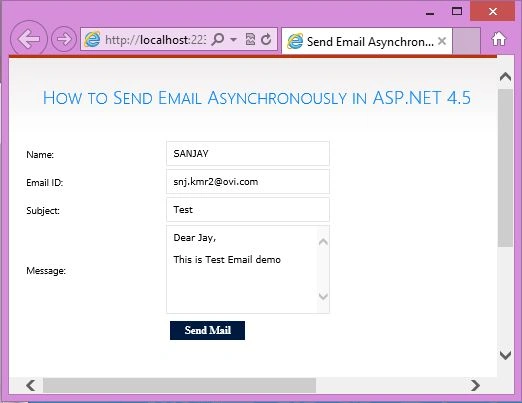
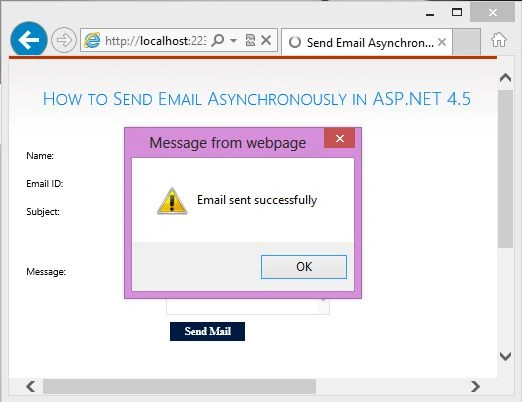
Aanchal SinghPosted Jun 16, 2020, 2:10 AM
How to implement this code in the class. this working fine for the single page. but when im implementing in the class getting error (BC30451: Name 'this' is not declared.). Please suggest
anand sutarPosted Dec 15, 2014, 5:24 AM
Uncomplit Source Code....resolved Properly System.net.Mail.SmtpClient doesn't contains the defination of SendMailAsync
anand sutarPosted Dec 15, 2014, 5:19 AM
Hello Sir, System.net.Mail.SmtpClient doesn't contains the defination of SendMailAsync
Raja ShekarPosted Aug 19, 2014, 12:19 PM
thank u
Raja ShekarPosted Aug 11, 2014, 11:50 AM
smtp.SendMailAsync(message); here am getting missing reference error please help me