

This article explains how to send an email with attachments using SmtpClient.SendAsync. My previous article explained sending Asynchronous Emails in ASP.NET 4.5 I will now explain how to implement send asynchronous mail with an attachment in ASP.NET 4.5.
Creating an Asynchronous Page
Create a new project using "File" -> "New" -> "Project..." then select web "ASP .Net Web Forms Application". Name it " SendMailAsyncAttachment ".

Next, create the code-behind as follows: The first step to building an asynchronous page is setting the Async attribute in the Page directive to true, as shown here:

<%@ Page Language="C#" Async="true" %>
Now, in the code behind file SendMailAttach.aspx use the following code.
SendMailAttach.aspx
- <%@ Page Title="Sendmailasync with attachment" Async="true" Language="C#"
- MasterPageFile="~/Site.Master" AutoEventWireup="true" CodeBehind="SendMailAttach.aspx.cs"
- Inherits="SendMailAsyncAttachment.SendMailAttach" %
- <asp:Content ID="Content1" ContentPlaceHolderID="titleContent" runat="server">Sendmailasync with
- attachment
- </asp:Content>
- <asp:Content ID="Content2" ContentPlaceHolderID="head" runat="server">
- <script type="text/javascript">
- function validationCheck() {
- var summary = "";
- summary += isvalidName();
- summary += isvalidEmail();
- summary += isvalidSubject();
- summary += isvalidMessage();
- if (summary != "") {
- alert(summary);
- return false;
- }
- else {
- return true;
- }
- }
- function isvalidName() {
- var id;
- var temp = document.getElementById("<%=txtName.ClientID %>");
- id = temp.value;
- if (id == "") {
- return ("Please enter Name" + "\n");
- }
- else {
- return "";
- }
- }
- function isvalidEmail() {
- var id;
- var temp = document.getElementById("<%=txtEmail.ClientID %>");
- id = temp.value;
- var re = /\w+([-+.']\w+)*@\w+([-.]\w+)*\.\w+([-.]\w+)*/;
- if (id == "") {
- return ("Please Enter Email" + "\n");
- }
- else if (re.test(id)) {
- return "";
- }
- else {
- return ("Email should be in the form [email protected]" + "\n");
- }
- }
- function isvalidSubject() {
- var id;
- var temp = document.getElementById("<%=txtSubject.ClientID %>");
- id = temp.value;
- if (id == "") {
- return ("Please enter Subject" + "\n");
- }
- else {
- return "";
- }
- }
- function isvalidMessage() {
- var id;
- var temp = document.getElementById("<%=txtMessage.ClientID %>");
- id = temp.value;
- if (id == "") {
- return ("Please enter Message" + "\n");
- }
- else {
- return "";
- }
- }
- </script>
- </asp:Content>
- <asp:Content ID="Content3" ContentPlaceHolderID="MainContent" runat="server">
- <table style="width: 100%;">
- <tr>
- <td>Name:</td>
- <td>
- <asp:TextBox ID="txtName" runat="server" CssClass="txt"></asp:TextBox></td>
- <td> </td>
- </tr>
- <tr>
- <td>Email ID:</td>
- <td>
- <asp:TextBox ID="txtEmail" runat="server" CssClass="txt"></asp:TextBox></td>
- <td> </td>
- </tr>
- <tr>
- <td>Subject:</td>
- <td>
- <asp:TextBox ID="txtSubject" runat="server" CssClass="txt"></asp:TextBox></td>
- <td> </td>
- </tr>
- <tr>
- <td>Attach a file:</td>
- <td>
- <asp:FileUpload ID="FileUpload1" runat="server" AllowMultiple="true" />
- </td>
- <td></td>
- </tr>
- <tr>
- <td>Message:</td>
- <td>
- <asp:TextBox ID="txtMessage" runat="server" Height="100px" Width="200px"
- CssClass="textarea" TextMode="MultiLine"></asp:TextBox>
- </td>
- <td> </td>
- </tr>
- <tr>
- <td></td>
- <td>
- <asp:Button ID="btnSendMail" runat="server" Text="Send Mail" CssClass="button"
- OnClick="btnSendMail_Click" /></td>
- </tr>
- </table>
- </asp:Content>
Now, in the code behind file “SendMailAttach.aspx.cs “ use the following code.
SendMailAttach.aspx.cs
- using System;
- using System.Collections.Generic;
- using System.Linq;
- using System.Web;
- using System.Web.UI;
- using System.Web.UI.WebControls;
- using System.IO;
- using System.Net;
- using System.Net.Mail;
- using System.Net.Mime;
- using System.Threading;
- using System.ComponentModel;
- using System.Text;
- using System.Web.Util;
- namespace SendMailAsyncAttachment
- {
- public partial class SendMailAttach : System.Web.UI.Page
- {
- protected void Page_Load(object sender, EventArgs e)
- {
- Try
- {
- if (!Page.IsPostBack)
- {
- btnSendMail.Attributes.Add("onclick", "javascript:return validationCheck()");
- }
- }
- catch (Exception ex)
- {
- ShowMessage(ex.Message);
- }
- }
- #region show message
- /// <summary>
- /// This function is used for show message.
- /// </summary>
- /// <param name="msg"></param>
- void ShowMessage(string msg)
- {
- ClientScript.RegisterStartupScript(Page.GetType(), "validation", "<script
- language='javascript'>alert('" + msg + "');</script>");
- }
- #endregion
- #region SendAsyncCancel
- /// <summary>
- /// this code used to SmtpClient.SendAsyncCancel Method
- /// </summary>
- // static bool mailSent = false;
- void SendCompletedCallback(object sender, AsyncCompletedEventArgs e)
- {
- if (e.Cancelled)
- {
- ShowMessage("Send canceled.");
- }
- if (e.Error != null)
- {
- ShowMessage(e.Error.ToString());
- }
- else
- {
- ShowMessage("Email sent successfully");
- }
- }
- #endregion
- #region SendMailAsync
- /// <summary>
- /// this code used to SmtpClient.SendCompleted Event and attaching the file
- /// </summary>
- /// <param name="sender"></param>
- /// <param name="e"></param>
- protected void btnSendMail_Click(object sender, EventArgs e)
- {
- Try
- {
- MailMessage message = new MailMessage();
- message.To.Add(txtEmail.Text.Trim());
- message.From = new MailAddress("[email protected]","Sendmailasync Test");
- message.Subject = txtSubject.Text.Trim();
- message.Body = txtMessage.Text.Trim();
- message.IsBodyHtml = true;
- if (FileUpload1.HasFile)
- {
- message.Attachments.Add(new Attachment(FileUpload1.PostedFile.InputStream,
- FileUpload1.FileName));
- }
- SmtpClient smtp = new SmtpClient();
- smtp.Host = "smtp.gmail.com";
- smtp.Credentials = new System.Net.NetworkCredential("[email protected]", "YouPassword");
- smtp.SendCompleted += new SendCompletedEventHandler(SendCompletedCallback);
- smtp.EnableSsl = true;
- smtp.SendMailAsync(message);
- }
- catch (Exception ex)
- {
- ShowMessage(ex.Message);
- }
- clear();
- }
- #endregion
- #region
- /// <summary>
- /// This Function is used TextBox Empty.
- /// </summary>
- void clear()
- {
- txtName.Text = string.Empty; txtEmail.Text = string.Empty; txtSubject.Text = string.Empty;
- txtMessage.Text = string.Empty;
- txtName.Focus();
- }
- #endregion
- }
- }
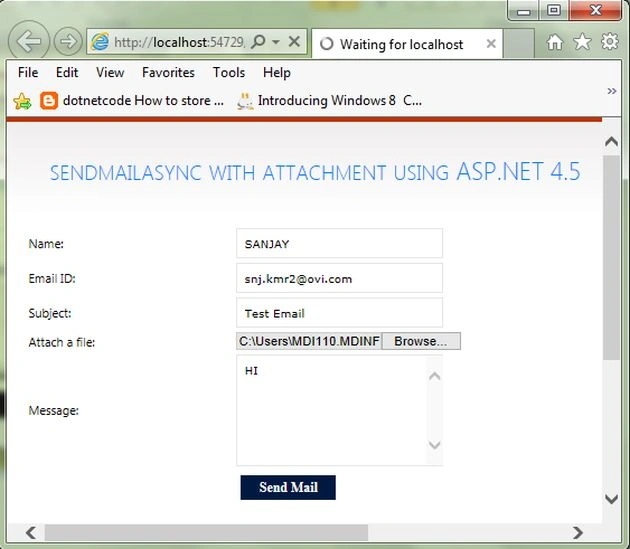
Now run the page, it will look like this:
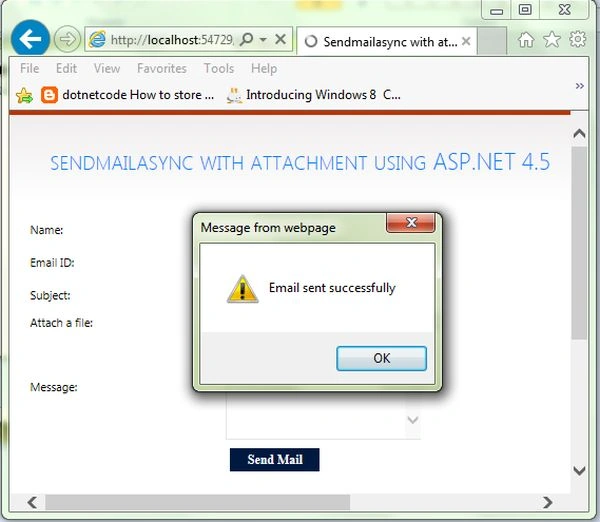
Now, show in the Message box “Email sent successfully”.
Now, see the following screen: SendMailAsync with Attachment.

I hope this article is useful. If you have any other questions then please provide your comments in the following.
Join the conversation! Your thoughts help the community grow.