

In my previous article, I explained how to iterate the list item and send a consolidated email to respective recipients using SharePoint designer workflow. Now, I am going to do the same process using PnP PowerShell module.
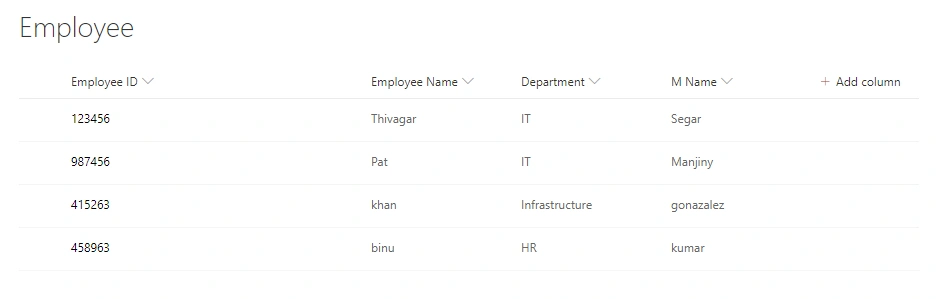
- Connect SharePoint Online site collection using the PnP module.
- Get the list of manager names and put in a foreach loop.
- Then, get the list items using the CAML Query with the respective manager name and copy the information in datatable.
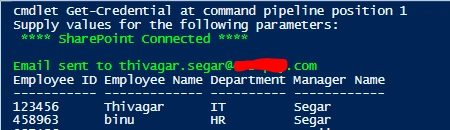
- Finally, send an email to the respective managers with their reportee person's information
So as my first step, I connect SharePoint Online using PnP module. You can use multiple ways to connect the PnP Online. Here, I am getting the credentials using Get-Credential cmdlets.
- Connect-PnPOnline -Url https://tenant.sharepoint.com -Credentials(Get-Credential)
Then, collect the Manager Names using Get-PnPListitem. Here, one more thing I have noticed while doing the test that PnP module is not recognizing the space between column names. For example, if I put a column name as Manager Name, then it’s not giving the result whereas if I use ManagerName, then it's showing the result for me.
- $Manager = (Get-PnPListItem -List "Employee" -Fields "MName").FieldValues
Then, I put a foreach loop to repeat the action for all manager names. So, as the next step, I put Get-PnPListIem with CAML Query and I added the respective manager name in the CAML Query. Then only it will filter the list item based on the query.
- $Manager = (Get-PnPListItem -List "Employee" -Fields "MName").FieldValues
- foreach($name in $Manager)
- {
- $managername = $name["MName"]
- # remaining code will be added
- }
Now, I am iterating the list item using Get-PnPlistitem cmdlets with CAML Query and put CAML query like ManagerName column="ManagerName", then only it will filter the respective manager items.
- <view><Query><Where><Eq><FieldRef Name='MName' /><Value Type='Text'>managername</Value></Eq></Where></Query></view>
- $listitem = Get-PnPListItem -List "Employee" -Query "<view><Query><Where><Eq><FieldRef Name='MName' /><Value Type='Text'>$managername</Value></Eq></Where></Query></view>"
- $data = $listitem.FieldValues
- #Create DataTable Column Header
- $database = New-Object System.Data.DataTable("listitems")
- $Column = @("Employee ID","Employee Name","Department","Manager Name")
- #Adding column
- foreach($header in $Column)
- {
- $database.columns.Add($header) | Out-Null
- }
- #Adding Row
- foreach($item in $data)
- {
- $value = $database.NewRow()
- # foreach($header in $Column)
- # {
- $value["Employee ID"] = $item.Title
- $value["Employee Name"] =$item.Employee_x0020_Name
- $value["Department"] =$item.Department
- $value["Manager Name"] =$item.Manger_x0020_Name
- # }
- $database.Rows.Add($value) | Out-Null
- $listid = @($item.ID)
- }
- $report = New-Object System.Data.DataView($database)
- Function sendemail($requestor,$listid)
- {
- try
- {
- $body = "<Table border=1><tr><th>Employee ID</th><th>Employee Name</th><th>Department</th><th>Manager Name</th></tr>"
- foreach($content in $report)
- {
- $body += "<tr><td>" + $content[0] +"</td><td>" + $content[1] + "</td><td>" + $content[2] +"</td><td>" + $content[3] +"</td></tr>"
- }
- $body += "</table><br>"
- $emailto = $requestor
- $emailsubject ="Your Employee List"
- $emailbody = $body
- $emailsign = " Thanks <br> Thivagar Segar"
- $emaicontent = $emailbody+$emailsign
- $emailusername ="sender emailID"
- $emailpassword ="Sender Password"
- Send-PnPMail -to $requestor -From $emailusername -Subject $emailsubject -Body $emaicontent -Password $emailpassword
- Write-Host "Email sent to $requestor" -ForegroundColor Green
- }
- catch
- {
- Write-Host "Email Failed due to:"$_.Exception.Message.ToString()
- }
- }
- Clear-Host
- try
- {
- #Connect SharePoint
- Connect-PnPOnline -Url https://tenant.sharepoint.com -Credentials(Get-Credential)
- Write-Host " **** SharePoint Connected ****" -ForegroundColor Green
- }
- catch
- {
- Write-Host "Failed to connect sharepoint" -ForegroundColor Red
- }
- #Send Email
- Function sendemail($requestor,$listid)
- {
- try
- {
- $body = "<Table border=1><tr><th>Employee ID</th><th>Employee Name</th><th>Department</th><th>Manager Name</th></tr>"
- foreach($content in $report)
- {
- $body += "<tr><td>" + $content[0] +"</td><td>" + $content[1] + "</td><td>" + $content[2] +"</td><td>" + $content[3] +"</td></tr>"
- }
- $body += "</table><br>"
- $emailto = $requestor
- $emailsubject ="Your Employee List"
- $emailbody = $body
- $emailsign = " Thanks <br> Thivagar Segar"
- $emaicontent = $emailbody+$emailsign
- $emailusername ="sender emailID"
- $emailpassword ="Sender Password"
- Send-PnPMail -to $requestor -From $emailusername -Subject $emailsubject -Body $emaicontent -Password $emailpassword
- Write-Host "Email sent to $requestor" -ForegroundColor Green
- }
- catch
- {
- Write-Host "Email Failed due to:"$_.Exception.Message.ToString()
- }
- }
- #Get Managers name
- $Manager = (Get-PnPListItem -List "Employee" -Fields "MName").FieldValues
- foreach($name in $Manager)
- {
- $managername = $name["MName"]
- #Iterate List item based on the Manager Namme
- $listitem = Get-PnPListItem -List "Employee" -Query "<view><Query><Where><Eq><FieldRef Name='MName' /><Value Type='Text'>$managername</Value></Eq></Where></Query></view>"
- $data = $listitem.FieldValues
- #Create DataTable Column Header
- $database = New-Object System.Data.DataTable("listitems")
- $Column = @("Employee ID","Employee Name","Department","Manager Name")
- #Adding column
- foreach($header in $Column)
- {
- $database.columns.Add($header) | Out-Null
- }
- #Adding Row
- foreach($item in $data)
- {
- $value = $database.NewRow()
- $value["Employee ID"] = $item.Title
- $value["Employee Name"] =$item.Employee_x0020_Name
- $value["Department"] =$item.Department
- $value["Manager Name"] =$item.Manger_x0020_Name
- $database.Rows.Add($value) | Out-Null
- $listid = @($item.ID)
- }
- $report = New-Object System.Data.DataView($database)
- if($report.Count -gt 0)
- {
- $report
- sendemail("Enter Manager email ID Here")
- $database.Clear()
- }
- else
- {
- Write-Host "No Data Found" -ForegroundColor Red
- Write-Host "Exit" -ForegroundColor Yellow
- }
- }

Join the conversation! Your thoughts help the community grow.