


Windows PowerShell cmdlets have the capability of sending emails. We can craft an email and its various components, such as recipients, email body, email attachments, etc. using PS code. This feature removes manual effort and human intervention of composing and sending emails. This opens various avenues to make your programs more dynamic as well as appealing business-wise.
Use Cases
A few use cases where this capability is instrumental are,
- Send email to target audience at the end of a script, with the result files as attachments
- Send email as a part of monitoring scripts. For instance, a PS script sending out mailers when a SharePoint subsite exceeds a size limit set by administrator
- Send email to administrator when a .NET site is not used frequently, based on site visits thresholds set by administrators
The Script
- $runDateTime = Get-Date
- $smtp = "mailservice.redduck.com"
- $to = "[email protected]"
- $cc = "[email protected]"
- $from = "[email protected]"
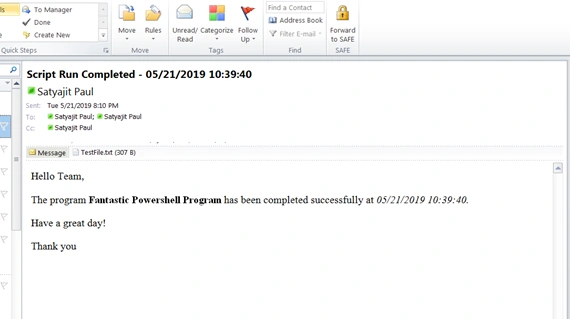
- $subject = "Script Run Completed - $runDateTime"
- $attachmentLocation = "C:\Users\Jarvis\Desktop\TestFile.txt"
- $body = "Hello Team, <br><br>"
- $body += "The program <b>Fantastic Powershell Program</b> has been completed successfully at <i>$runDateTime.</i><br><br>"
- $body += "Have a great day!<br><br>"
- $body += "Thank you"
- Send-MailMessage -SmtpServer $smtp -To $to -Cc $cc -From $from -Subject $subject -Body $body -BodyAsHtml -Attachments $attachmentLocation
- Write-Host "====== Email sent! ======"
Explanation
The primary cmdlet responsible for sending the email is Send-MailMessage. It accepts various parameters. Below is a description of the parameters that are primarily used.
Join the conversation! Your thoughts help the community grow.