Recently, I came up with a requirement to send an email with attachment in Office 365 (SharePoint Online). This needs to be a custom functionality wherein for each line item in a jQuery Data table (as shown in below image), a user needs to send an email with an attachment to a specific email address.
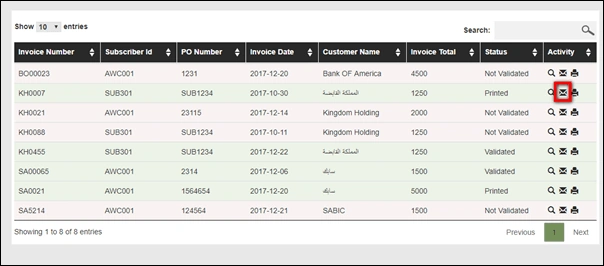
As shown in above image, every line item has an email icon, on click of which a pop needs to be opened with To, Subject, Add Attachment fields needs to be there. However, after searching on the internet, it was explored that we cannot send an email with attachment using REST API in SharePoint Online.
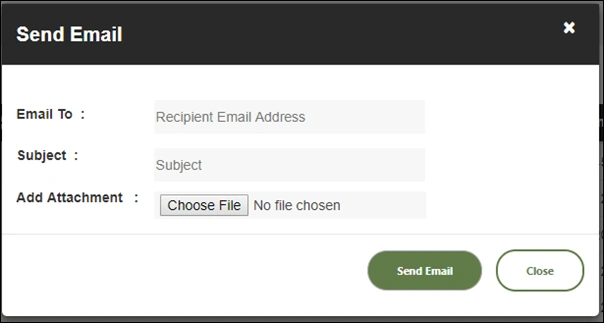
Fig: Email Pop-Up
Below code snippet shows the REST API implementation to send an email,
- $.ajax({
- contentType: 'application/json',
- url: urlTemplate,
- type: "POST",
- data: JSON.stringify({
- 'properties': {
- '__metadata': {
- 'type': 'SP.Utilities.EmailProperties'
- },
- 'From': from,
- 'To': {
- 'results': [to]
- },
- 'Body': body,
- 'Subject': subject
- }
- }),
- headers: {
- "Accept": "application/json;odata=verbose",
- "content-type": "application/json;odata=verbose",
- "X-RequestDigest": $("#__REQUESTDIGEST").val()
- },
- success: function(data) {
- alert('Email Sent Successfully');
- },
- error: function(err) {
- alert('Error in sending Email: ' + JSON.stringify(err));
- }
- });
In the above code, “'SP.Utilities.EmailProperties'” is the main API (object) which sends the email, however only below mentioned properties are exposed by this object. So, it is found that sending email with attachment is not possible.
Fig: Only the following properties have been exposed by this object are to be used within REST call.
Solution Implemented
So, what I did to achieve this functionality is, I developed a SharePoint Designer Workflow and when the user adds an attachment on the email pop up screen (shown above), I added the document in a SharePoint Document Library and then workflow triggers.
The “To” and “Subject” fields also got updated (as metadata) in the document library.
So, when the user sends an email, we made an entry in the document library with the document. However, in this solution, while in the email, we can only send the document link to the user. Below is the sample email sent to a user,
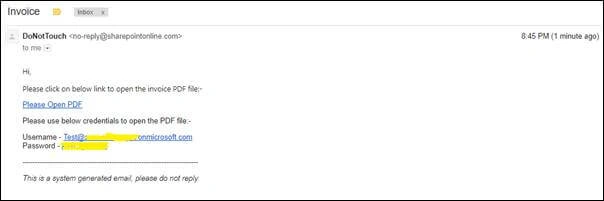
Fig: Email Body sent to customer
Key Points found during this implementation
- You cannot send email to an external email address using REST API code. External emails are not supported. You will get an error if you will try to send email to the external user stating that – “A recipient must be specified”.
- You can only send email to users of that Office 365 tenant from which you are triggering the email.
- The email gets triggered from a specific email address in SharePoint Online i.e. “From” field remains same and the email address is – [email protected]
- Below are the IMAP server settings to be used for outgoing email in Office 365,
| Setting | IMAP (Incoming) | SMTP (Outgoing) |
| Server Name | Outlook.office365.com | smtp.office365.com |
| Port Number | 993 | 587 |
| Encryption Method | SSL | TLS |
- There are third party solutions using Workflows which allows sending emails with attachments in SharePoint Designer.
Summary
In this article, I explained an alternative that how can we send an email with attachment (document link) in SharePoint Online (Office 365).


Oskar FinchPosted Apr 12, 2022, 9:19 PM
For sharepoint on premises try this activitydeploy.com
Paul GeorgePosted Jul 16, 2019, 2:24 AM
Are you using OOB document library new form for send email popup? If not, I assume you are using REST API to upload the document. In that case, you can directly send the mail without using workflow but by using Email properties since you will get the document link from the REST response. Was there any reason you avoided that approach?
Monika JainPosted Sep 28, 2018, 9:34 AM
How to send the email to distribution list using rest api in the sp online.
Monika JainPosted Sep 28, 2018, 9:32 AM
Hello vipul
Sumit DeshmukhPosted Jun 5, 2018, 2:50 AM
Well explained...Thanks a lot for Sharing :-)