
Introduction
- String number = mobileno.getText().toString();
- String message = message.getText().toString();
- Intent i = new Intent(getApplicationContext(), MainActivity.class);
- PendingIntent pIntent = PendingIntent.getActivity(getApplicationContext(), 0, i, 0);
- SmsManager sms = SmsManager.getDefault();
- sms.sendTextMessage(no, null, msg, pIntent, null);
What is an Intent?
An Intent is message ed among the components, such as Activities, BroadcastRecceiver, Services, ContentProviders and so on to perform an action in Android. Using it you can start an activity, receive a broadcast message, start a service and so on.
Intents are of two types
- Implicit Intent
- Explicit intent
- <uses-permission android:name="android.permission.SEND_SMS"></uses-permission>
- <uses-permission android:name="android.permission.RECEIVE_SMS"></uses-permission>
Step 1
Create a project as in the following:
Go to "File" -> "New project".
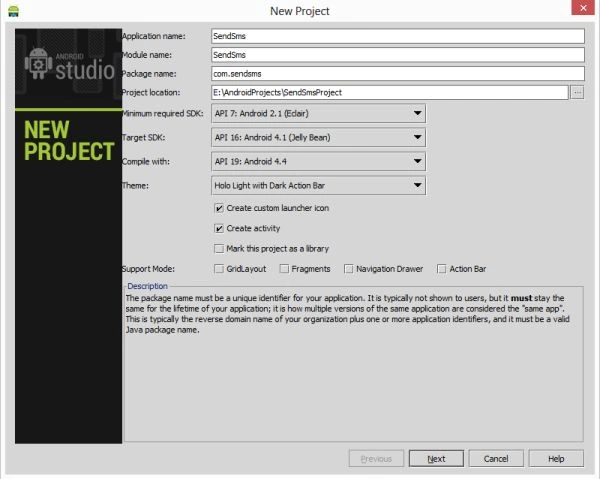 Step 2
Create an XML file with the following:
Step 2
Create an XML file with the following:
- <RelativeLayout xmlns:android="http://schemas.android.com/apk/res/android"
- xmlns:tools="http://schemas.android.com/tools"
- android:layout_width="match_parent"
- android:layout_height="match_parent"
- android:paddingLeft="@dimen/activity_horizontal_margin"
- android:paddingRight="@dimen/activity_horizontal_margin"
- android:paddingTop="@dimen/activity_vertical_margin"
- android:paddingBottom="@dimen/activity_vertical_margin"
- tools:context=".MainActivity"
- android:background="#abcdef">
- <TextView
- android:id="@+id/textView1"
- android:textStyle="bold"
- android:layout_width="wrap_content"
- android:layout_height="wrap_content"
- android:text="Mobile No:" />
- <EditText
- android:id="@+id/editText1"
- android:layout_width="wrap_content"
- android:layout_height="wrap_content"
- android:layout_alignParentRight="true"
- android:layout_alignParentTop="true"
- android:layout_marginRight="20dp"
- android:ems="10" />
- <TextView
- android:textStyle="bold"
- android:id="@+id/textView2"
- android:layout_width="wrap_content"
- android:layout_height="wrap_content"
- android:layout_marginTop="60dp"
- android:text="Message:" />
- <EditText
- android:id="@+id/editText2"
- android:layout_width="wrap_content"
- android:layout_height="wrap_content"
- android:layout_alignLeft="@+id/editText1"
- android:layout_below="@+id/editText1"
- android:layout_marginTop="26dp"
- android:ems="10"
- android:inputType="textMultiLine" />
- <Button
- android:layout_width="wrap_content"
- android:layout_height="wrap_content"
- android:text="Send Sms"
- android:id="@+id/btn_send"
- android:layout_centerInParent="true"></Button>
- </RelativeLayout>
Join the conversation! Your thoughts help the community grow.