

Introduction
This article explains how to send an email using JSP in Java. The NetBeans IDE is used to create this app.
Sending an Email in JSP
In other words, the JavaMail API. This API is created in various ways, but in this article I'll show you a simple format by which you can easily develop your own mail API.
Our Mail API is based on the two protocols SMTP and MIME.
Let's start creating this app
We need to follow several steps in the NetBeans IDE.
Step 1
Open the NetBeans IDE.
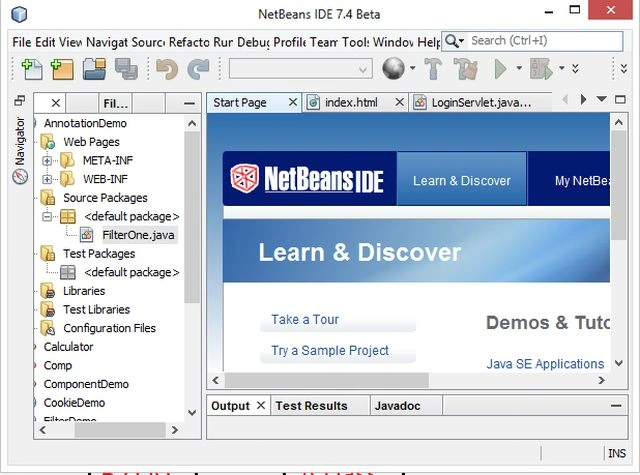
Step 2
Choose "Java web" -> "Web application" as in the following.
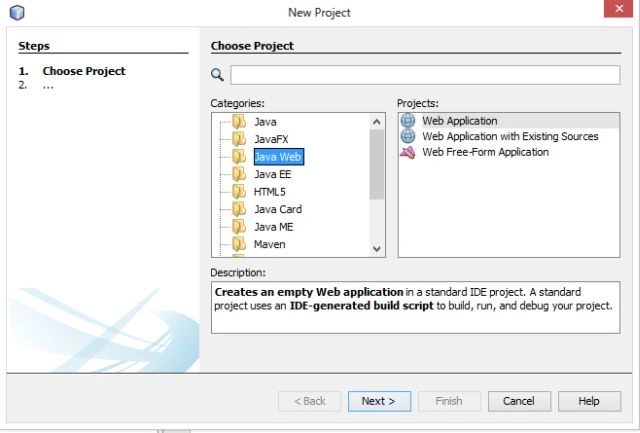
Step 3
Specify "JSPMailApp" as the project name as in the following.
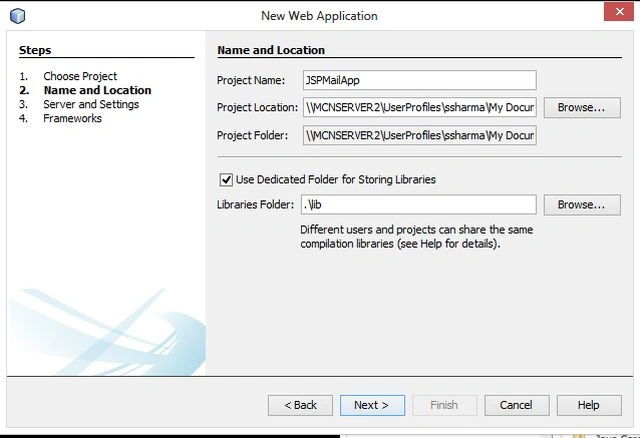
Step 4
Select the Server and version wizard as in the following.
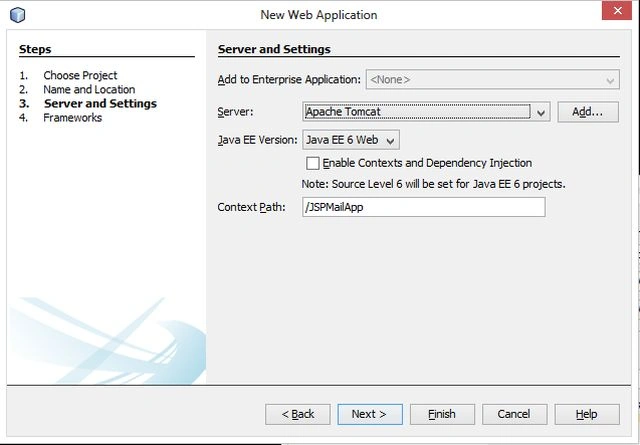
Step 5
Now delete the default "index.jsp" file and create a new "index.html" file with the following code.
This page is created to receive the values from the user, like mail-id, subject and message content that they want to send. Then we send these details to the "mailJSP.jsp" page to respond depending on them.
index.html
<!DOCTYPE html>
<html>
<head>
<title>Sending Mail Through JSP</title>
<meta http-equiv="Content-Type" content="text/html; charset=UTF-8">
<meta name="viewport" content="width=device-width">
</head>
<body bgcolor="khaki">
<form action="mailJSP.jsp">
<table>
<tr><td><b><font color="red">To:
</td>
<td><b><b><input type="text" name="mail" value="Enter sender mail-id"/><br/>
</td>
</tr>
<tr>
<td>
<b><font color="red">Subject:
</td>
<td>
<input type="text" name="sub" value="Enter Subject Line"><br/>
</td>
</tr>
<tr>
<td>
<b><font color="red">Message Text:
</td>
<td>
<textarea rows="12" cols="80" name="mess"></textarea><br/>
</td>
</tr>
<tr>
<td>
<input type="submit" value="Send">
</td>
<td>
<input type="reset" value="Reset">
</td>
</tr>
</table>
</form>
</body>
</html>
Step 6
Now create a new JSP page "mailJSP.jsp" and write the following code for it. In the comment line I'll provide you a short description of the use of each attribute.
mailJSP.jsp
<%@ page import="java.util.*,javax.mail.*"%>
<%@ page import="javax.mail.internet.*" %>
<%
//Creating a result for getting status that messsage is delivered or not!
String result;
// Get recipient's email-ID, message & subject-line from index.html page
final String to = request.getParameter("mail");
final String subject = request.getParameter("sub");
final String messg = request.getParameter("mess");
// Sender's email ID and password needs to be mentioned
final String from = "enter your gmail-id";
final String pass = "enter your gmail-password";
// Defining the gmail host
String host = "smtp.gmail.com";
// Creating Properties object
Properties props = new Properties();
// Defining properties
props.put("mail.smtp.host", host);
props.put("mail.transport.protocol", "smtp");
props.put("mail.smtp.auth", "true");
props.put("mail.smtp.starttls.enable", "true");
props.put("mail.user", from);
props.put("mail.password", pass);
props.put("mail.port", "465");
// Authorized the Session object.
Session mailSession = Session.getInstance(props, new javax.mail.Authenticator() {
@Override
protected PasswordAuthentication getPasswordAuthentication() {
return new PasswordAuthentication(from, pass);
}
});
try {
// Create a default MimeMessage object.
MimeMessage message = new MimeMessage(mailSession);
// Set From: header field of the header.
message.setFrom(new InternetAddress(from));
// Set To: header field of the header.
message.addRecipient(Message.RecipientType.TO,
new InternetAddress(to));
// Set Subject: header field
message.setSubject(subject);
// Now set the actual message
message.setText(messg);
// Send message
Transport.send(message);
result = "Your mail sent successfully....";
} catch (MessagingException mex) {
mex.printStackTrace();
result = "Error: unable to send mail....";
}
%>
<title>Sending Mail in JSP</title>
<h1><center><font color="blue">Sending Mail Using JSP</font></h1>
<b><center><font color="red"><% out.println(result);%></b>
Note: You need to add two JAR files, named "mail.jar" and "activation.jar" to run this app. You can directly download this JAR file from the Oracle website.
Step 7
Now our project is ready to run.
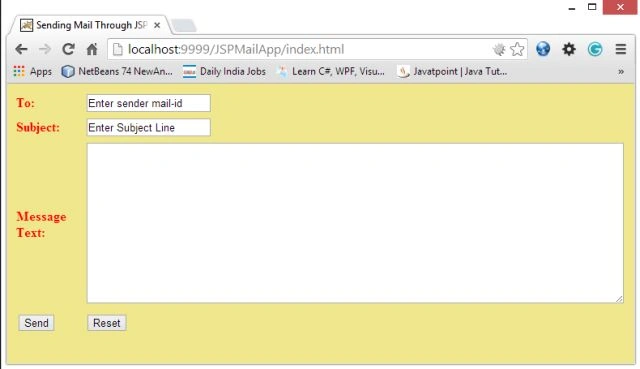
Right-click on the "index.html" file and select "Run". The following interface will be generated.
Step 8
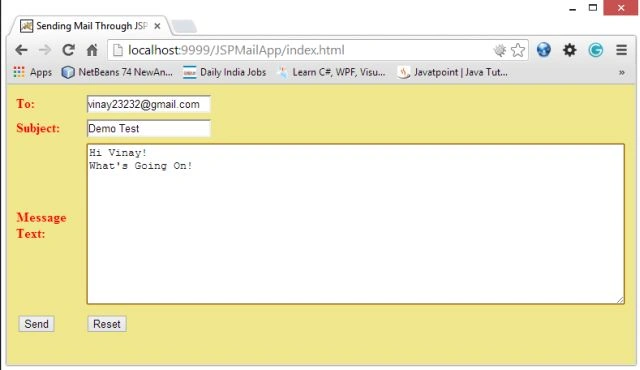
Now provide the detail there as "mail-id", "subject-line" and "message-content" as in the following that I provided.
Step 9
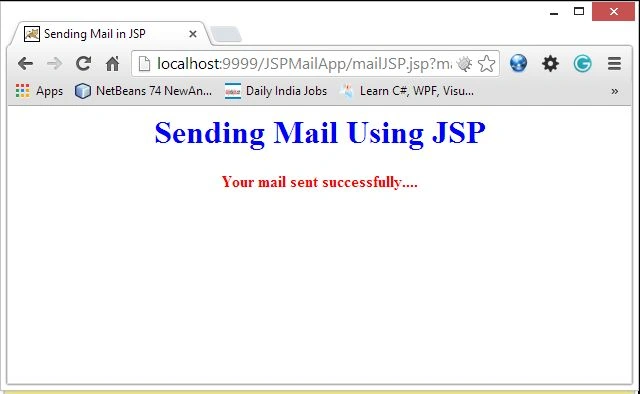
Click on the "send" button. The following message will be generated. If it's showing an error, in other words something is missing, then recheck your JSP code and try again else you will get the same message as in the following.
Step 10
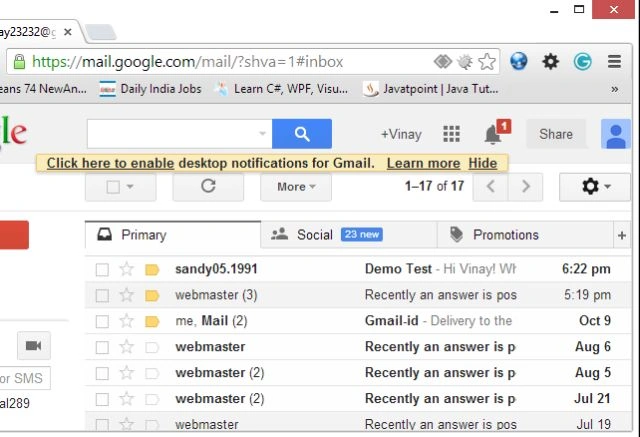
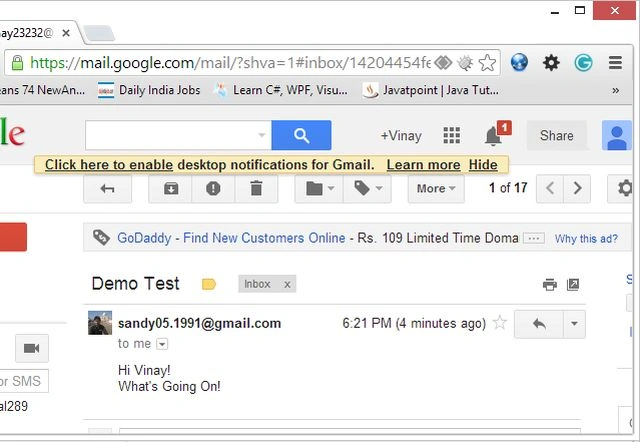
For confirmation of the mail go to the receive mail inbox (those mail-ids that you provide in the sending page) or go to your mail-id and check the sent mail items. As in the following.
Summary
I have already written an article on JavaMailAPI using a servlet in Java, but when I create the same in JSP I encounter many problem and when I find a solution in Google I don't find a proper answer so with the help of my seniors and friends I created this app successfully. So since I encountered so many problems, I don't want you to suffer the same, so you can use this code and create your own Mail API in JSP. Thanks for reading.
Jimmy KhPosted May 30, 2020, 4:55 AM
Javax.mail.MessagingException: Could not connect to SMTP host: smtp.gmail.com, port: 25; nested exception is: . i got this error please tell me how to fix it
dhaval PATELPosted Feb 6, 2020, 7:05 AM
Mail was not sent when using your code..
sweety raiPosted Jul 7, 2019, 12:00 AM
Error -500 occured ,how to solve it?
Narayana BeheraPosted May 24, 2019, 9:34 AM
Respected sir, I am happy to you that ,You are my hero because i followed every websites and tried send a mail system creation but every one's idea failed.But you are the one whose code will work 100%.just little bit change .Thanks a lot sir.My computer is shut down but i am search your file still 1hr and found again this page.So ,request you sir please upload more and more for students.Thanks a lot sir for you solution.
Shubham KansalPosted May 3, 2018, 10:43 AM
Unable to send mail!!
Abinaya KSPosted Mar 12, 2018, 12:25 PM
I too get the exception i.e., javax.mail.messagingexception could not connect to smtp host port 465
Ferry LopezPosted Nov 3, 2017, 4:16 AM
Its not working i've tried many times but it shows javax.mail.MessagingException: Could not connect to SMTP host: smtp.gmail.com, port: 25; nested exception is: java.net.ConnectException: Connection timed out: connect
Suresh ShahPosted Oct 2, 2016, 1:46 PM
I solve this error by replacing ecj-4.4.2.jar with older ecj jar ,now it works fine....
Suresh ShahPosted Oct 2, 2016, 12:18 PM
I get this error while running using tomcat: org.apache.jasper.JasperException: Unable to compile class for JSP: An error occurred at line: 22 in the jsp file: /mailJSP.jsp The type java.util.Map$Entry cannot be resolved. It is indirectly referenced from required .class files 19: Properties props = new Properties(); 20: 21: // Defining properties 22: props.put("mail.smtp.host", host); 23: props.put("mail.transport.protocol", "smtp"); 24: props.put("mail.smtp.auth", "true"); 25: props.put("mail.smtp.starttls.enable", "true");
Suresh ShahPosted Oct 2, 2016, 12:15 PM
How to run this in tomcat 7.0.16,without using netbeans?what directory structure we have to follow?
prasanna kumarPosted May 24, 2016, 2:46 PM
Thank you for documenting your success.
Hanumant MulePosted Dec 13, 2014, 3:10 AM
teri maa ka ....... rpl fast de na
Hanumant MulePosted Dec 13, 2014, 1:54 AM
where should i copy the jar files
sanketh jainPosted May 3, 2014, 1:29 PM
Error: unable to send mail... and the error is:class javax.mail.MessagingException: 530 5.7.0 Must issue a STARTTLS command first. lr3sm23569879pab.4 - gsmtp
anjana sureshPosted Mar 19, 2014, 9:47 AM
Error: unable to send mail....
Gayatri PatelPosted Mar 17, 2014, 5:59 AM
Hi,I need to send mail...which version of mail.jar and activation.jar need to download While am using the above steps "Error: unable to send mail...." message will.
pradeepa meiyappanPosted Mar 7, 2014, 6:31 AM
Thanks for u code,I got the result ......I hope this help to others too....
pradeepa meiyappanPosted Mar 6, 2014, 3:55 AM
Hi,I need to send mail...which version of mail.jar and activation.jar need to download While am using the above steps "Error: unable to send mail...." message will.
Sam HobbsPosted Nov 4, 2013, 1:19 PM
Thank you for documenting your success. I also hope this helps others.