

Introduction
Sending email is a very common task in any web application for many purposes. In daily development we need to add some mail functionality to our project, in this article I will show you, how you can do this.
Using the code
For sending mail from ASP.NET we use the "System.Net.Mail" namespace. Let's see how to do this.
- Open Visual Studio
- "File" -> "New" -> "Project..."
- Choose "Visual C#" - "Web" then select "ASP.NET Empty Web Application"
- Add a new aspx page
The following is the code for the design of the page.
Sendmail.aspx
<html xmlns="http://www.w3.org/1999/xhtml">
<head runat="server">
    <title></title>
    <style type="text/css">
        .auto-style1 {
            width: 169px;
        }
    </style>
</head>
<body>
    <form id="form1" runat="server">
        <div>
            <table border="0" cellpadding="0" cellspacing="0" style="width: 464px">
                <tr>
                    <td class="auto-style1">To:
                    </td>
                    <td>
                        <asp:TextBox ID="txtTo" runat="server" Width="204px"></asp:TextBox>
                    </td>
                </tr>

                <tr>
                    <td class="auto-style1">Subject:
                    </td>
                    <td>
                        <asp:TextBox ID="txtSubject" runat="server" Width="201px"></asp:TextBox>
                    </td>
                </tr>

                <tr>
                    <td class="auto-style1">Attachment:
                    </td>
                    <td>
                        <asp:FileUpload ID="fileUploader" runat="server" />
                    </td>
                </tr>
                <tr>
                    <td valign="top" class="auto-style1">Body:
                    </td>
                    <td>
                        <asp:TextBox ID="txtMessage" runat="server" TextMode="MultiLine" Height="150" Width="200"></asp:TextBox>
                    </td>
                </tr>
                <tr>
                    <td class="auto-style1">
                    </td>
                </tr>

                <tr>
                    <td class="auto-style1"></td>
                    <td>
                        <asp:Button ID="bttn_Send" Text="Send Mail" runat="server" OnClick="bttn_Send_Click" />
                    </td>
                </tr>
            </table>
        </div>
    </form>
</body>
</html>
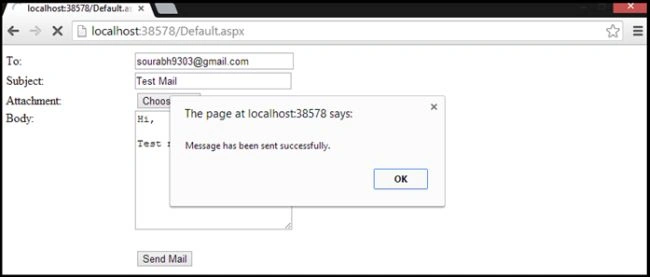
In the code above we have the following 3 fields:
- To
- Subject
- Attachment
- Message
When the user clicks the "Send" button, the mail will be sent to the specified mail address that you provide in the "txtTo" TextBox. So add the following code for the Button_Click:
SendMail.aspx.cs
mks sPosted Dec 6, 2017, 7:58 AM
Thanks for saving my time
Srinivas GPosted Jun 2, 2016, 6:03 AM
go to security setting of gmail account and enable less security apps So that you will be able to login from all apps.
Srinivas GPosted Jun 2, 2016, 6:01 AM
Solution: 1. Please make sure you have set SMTP authentication correctly in your script, for sample code 2. If there is no problem with your SMTP script, but you still got the message message mentioned above,then the error might occur due to the following cases: case 1: when the password is wrong case 2: when you try to login from some App case 3: when you try to login from the domain other than your time zone/domain/computer (This is the case in most of scenarios when sending mail from code)There is a solution for each solution for case 1: Enter the correct password.
Divya RPosted Nov 5, 2015, 2:18 AM
The SMTP server requires a secure connection or the client was not authenticated. The server response was: 5.5.1 Authentication Required. Showing this error how to clear this one send reply for my mail [email protected]