

Nowadays, web masters prefer to receive information from their users or customers through a contact or feedback form placed on the website. ASP.NET 2.0 provides a simplified approach to achieve the task as compared to ASP.NET 1.1. In this part of the series, we will examine how to send e-mails in plain text and HTML formats using C#.
Let us start our discussion by creating a simple user interface as shown below
Figure 1
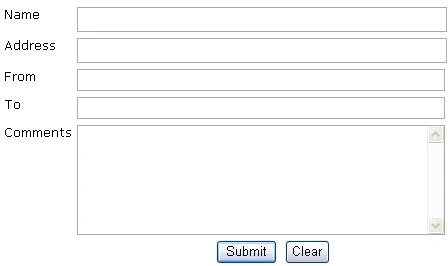
The code to create the above WebForm is given below.
<form id="Form1" runat="server">
<div align="left">
<table border="0" width="544">
<tr>
<td valign="top"><font face="Verdana" size="2">Name</font></td>
<td height="24" valign="top"> <asp:TextBox runat="server" Height="25px" Width="370px" ID="txtName"></asp:TextBox>
<asp:RequiredFieldValidator ID = "reqName" ControlToValidate = "txtName" Runat = "server" ErrorMessage = "*"></asp:RequiredFieldValidator></td>
</tr>
<tr>
<td valign="top"><font size="2" face="Verdana">Address</font></td>
<td height="24" valign="top">
<asp:TextBox runat="server" Height="25px" Width="370px" ID="txtAddress"></asp:TextBox> </td>
</tr>
<tr>
<td valign="top"><font face="Verdana" size="2">From</font></td>
<td height="24" valign="top"> <asp:TextBox runat="server" Height="22px" Width="368px" ID="txtFrom"></asp:TextBox>
<asp:RequiredFieldValidator ID = "reqFrom1" ControlToValidate = "txtFrom" runat = "server" ErrorMessage = "*" ></asp:RequiredFieldValidator>
<asp:RegularExpressionValidator ID = "regFrom2" ControlToValidate = "txtFrom" runat = "server" ErrorMessage = "Invalid Email" ValidationExpression="\w+([-+.]\w+)*@\w+([-.]\w+)*\.\w+([-.]\w+)*"></asp:RegularExpressionValidator>
<br></td>
</tr>
<tr>
<td valign="top"><font face="Verdana" size="2">To</font></td>
<td height="24" valign="top">
<asp:TextBox runat="server" Height="22px" Width="368px" ID="txtTo"></asp:TextBox>
<asp:RequiredFieldValidator ID = "reqTo1" ControlToValidate = "txtTo" runat = "server" ErrorMessage = "*" ></asp:RequiredFieldValidator>
<asp:RegularExpressionValidator ID = "reqTo2" ControlToValidate = "txtTo" runat = "server" ErrorMessage = "Invalid Email" ValidationExpression="\w+([-+.]\w+)*@\w+([-.]\w+)*\.\w+([-.]\w+)*"></asp:RegularExpressionValidator>
</td>
</tr>
<tr>
<td valign="top"><font face="Verdana" size="2">Comments</font></td>
<td height="112" valign="top"><asp:TextBox runat="server" Height="110px" TextMode="MultiLine" Width="368px" ID="txtComments"></asp:TextBox>
<asp:RequiredFieldValidator ID = "reqComments" ControlToValidate = "txtComments" Runat = "server" ErrorMessage = "*"></asp:RequiredFieldValidator> </td>
</tr>
<tr>
<td colspan="2" valign="top" height="30">
<p align="center">
<asp:Button Runat = server ID = btnSubmit OnClick = btnSubmit_Click Text = "Submit"></asp:Button>
<input id="Reset1" type = "reset" runat = "server" value = "Clear"></td>
</tr>
</table>
</div>
<p> </p>
<p><br>
<!-- Insert content here -->
</p>
</form>
As you can see we have applied validation controls to prevent input errors. The next process is to provide the required code for sending e-mails upon submission of the form. We will analyze each process in a series of steps for better understanding.
Step 1: Importing Namespace
<%@ Page Language="C#" %>
<%@ Import Namespace="System.Net.Mail" %>
Step 2: Creating objects of SmtpClient and MailMessage classes
SmtpClient smtpClient = new SmtpClient();
MailMessage objMail = new MailMessage();
Step 3: Creating and Specifying From, To Addresses
//From Address will be assigned from the e-mail specified in the From TextField
MailAddress objMail_fromaddress = new MailAddress(txtFrom.Text);
You can also give the code given below.
MailAddress objMail_fromaddress = new MailAddress(txtFrom.Text, "Learnxpress Support");
The above code inserts the text Learnxpress Support instead of the From e-mail address.
//To Address will be assigned from the e-mail specified in the To TextField
MailAddress objMail_toaddress = new MailAddress(txtTo.Text);
//Assigning From address to the MailMessage class
objMail.From = objMail_fromaddress;
//Assigning To address to the MailMessage class as a collection
objMail.To.Add(objMail_toaddress);
Step 4: Creating the Subject and Message Body Text Format
objMail.Subject = "E-mail Example - CSharp - Text";
objMail.Body = "Name: " +txtName.Text + "\r\n" +"Address: " + txtAddress.Text + "\r\n" + "Comments: " + txtComments.Text;
objMail.IsBodyHtml = true;
Step 6: Creating the Subject and Message Body HTML Format
objMail.Subject = "E-mail Example - CSharp - HTML";
objMail.Body = "<html><head><title>Sending E-mails with ASP.NET 2.0 using CSharp</title></head><body>" +"<p>Name : " +txtName.Text + "</p>" +"<p>Address : " +txtAddress.Text + "</p>" +"<p>Comments : " +txtComments.Text + "</p>" +"</body></html>";
Step 7: Specifying Mail Priority
objMail.Priority = MailPriority.High;
Step 8: Enabling SMTP Authentication
Sometimes, you will need to provide the code for SMTP authentication to send e-mails. The required code snippet is given below.
smtpClient.Host = "mail.domain.com";
smtpClient.Credentials = new System.Net.NetworkCredential("[email protected]","Password");
Note: domain should be substituted with your real domain name such as c-sharpcorner, learnxpress.
Step 9: Handling Exceptions and Delivering E-mail
try
{
smtpClient.Send(objMail);
Response.Redirect("http://www.c-sharpcorner.com");
}
catch (Exception exc)
{
Response.Write("Send failure: " + exc.ToString());
}
In the above code, we have specified that the page should be redirected to c-sharpcorner website after the successful submission of the form. You can also create a separate page called thankyou.aspx and redirect users to the page so that users will know that the mail has been successfully delivered. Once you understood the basics of System.Net.Mail namespace then it is very easy to write the code. Moreover, we now have a simplified coding mechanism as compared to ASP.NET 1.1.
You can download the complete source code of this sample application and customize it as per your requirements.
muna saifPosted Aug 7, 2010, 3:04 PM
<title>Sending E-mails with ASP.NET 2.0 using CSharp</title>Send failure: System.Net.Mail.SmtpException: Failure sending mail. ---> System.Net.WebException: Unable to connect to the remote server ---> System.Net.Sockets.SocketException: A socket operation was attempted to an unreachable network 65.54.245.40:25 at System.Net.Sockets.Socket.DoConnect(EndPoint endPointSnapshot, SocketAddress socketAddress) at System.Net.Sockets.Socket.InternalConnect(EndPoint remoteEP) at System.Net.ServicePoint.ConnectSocketInternal(Boolean connectFailure, Socket s4, Socket s6, Socket& socket, IPAddress& address, ConnectSocketState state, IAsyncResult asyncResult, Int32 timeout, Exception& exception) --- End of inner exception stack trace --- at System.Net.ServicePoint.GetConnection(PooledStream PooledStream, Object owner, Boolean async, IPAddress& address, Socket& abortSocket, Socket& abortSocket6, Int32 timeout) at System.Net.PooledStream.Activate(Object owningObject, Boolean async, Int32 timeout, GeneralAsyncDelegate asyncCallback) at System.Net.PooledStream.Activate(Object owningObject, GeneralAsyncDelegate asyncCallback) at System.Net.ConnectionPool.GetConnection(Object owningObject, GeneralAsyncDelegate asyncCallback, Int32 creationTimeout) at System.Net.Mail.SmtpConnection.GetConnection(String host, Int32 port) at System.Net.Mail.SmtpTransport.GetConnection(String host, Int32 port) at System.Net.Mail.SmtpClient.GetConnection() at System.Net.Mail.SmtpClient.Send(MailMessage message) --- End of inner exception stack trace --- at System.Net.Mail.SmtpClient.Send(MailMessage message) at ASP.default2_aspx.btnSubmit_Click(Object sender, EventArgs e) in c:\Users\Mona\Documents\Visual Studio 2008\WebSites\EmailApplication\Default2.aspx:line 35
Pravara PatilPosted Aug 21, 2009, 9:55 AM
Hi, can anybody tell me how to send mails from windows application? i have written following code but it is not working. it throws an exception of relying. MailMessage mailmessage = new MailMessage(); SmtpClient smtp; mailmessage.From = new MailAddress("[email protected]"); mailmessage.To.Add(new MailAddress("[email protected]")); mailmessage.Subject = "Test mail"; mailmessage.Body = "Hi, this is a test mail"; mailmessage.IsBodyHtml = true; mailmessage.BodyEncoding = System.Text.Encoding.UTF8; //smtp settings smtp = new SmtpClient("servername",25); NetworkCredential objNet = new NetworkCredential("username", "password"); smtp.Credentials = objNet; smtp.UseDefaultCredentials = false; try { smtp.Send(mailmessage); MessageBox.Show("Message sent successfully !!!"); } catch (SmtpException ex) { MessageBox.Show("Message sending failure"); MessageBox.Show(ex.Message); } }
santhakumarPosted Mar 26, 2009, 5:39 AM
how to send email from my asp.net page using C#.net
thariqPosted Mar 5, 2008, 5:37 AM
In the try catch block if there is an error while sending it it will give a message but if the sent Email address is a wrong one how will that be handled. how will we know that it was a wrong email address
mandeepkaur kaurPosted Mar 2, 2008, 1:28 PM
Hi all I use the above code to send the email from remote login, but time and again I get the following error A connection attempt failed because the connected party did not properly respond after a period of time, or established connection failed because connected host has failed to respond Kindly solve my problem
dilip gandhamPosted Dec 23, 2007, 3:35 AM
explain advantages of 3-tier architecture in .net
Emre YaymanPosted Oct 25, 2007, 11:02 AM
when I use the script I have an error on line 9. Can you tell me what is the problem? Thanks :) The error is The specified string is not in the form required for an e-mail address. Description: An unhandled exception occurred during the execution of the current web request. Please review the stack trace for more information about the error and where it originated in the code. Exception Details: System.FormatException: The specified string is not in the form required for an e-mail address. Source Error: Line 7: Line 8: SmtpClient smtpClient = new SmtpClient(); Line 9: MailMessage objMail = new MailMessage(); Line 10: MailAddress objMail_fromaddress = new MailAddress(txtFrom.Text); Line 11: MailAddress objMail_toaddress = new MailAddress(txtTo.Text);
ramamoorthy jagadeesanPosted Jul 30, 2007, 1:45 AM
Send failure: System.Net.Mail.SmtpFailedRecipientException: Mailbox unavailable. The server response was: 5.7.1 Unable to relay for [email protected] at System.Net.Mail.SmtpTransport.SendMail(MailAddress sender, MailAddressCollection recipients, String deliveryNotify, SmtpFailedRecipientException& exception) at System.Net.Mail.SmtpClient.Send(MailMessage message) at email.Page_Load(Object sender, EventArgs e) in c:\Documents and Settings\ramamoorthy\My Documents\Visual Studio 2005\WebSites\mail\email.aspx.cs:line 34
Maralynn RochatPosted Jul 25, 2007, 10:22 AM
wondering how i can modify this code to eliminate the input box "txtTo" and instead have the form automatically sent to my email address. Can anyone help?