
Let answer first the above questions and then we will code how to send mails with attachments.
Question : Do we need our own domain to send mails?
Answer : No we do not necessarily need our own domain to send mails.
Gmail provides us free pop service and yahoo, hotmail and other mail engines charge for the service. Rather if we have our own domain that would be a benefit.
Question : Can we send files as an attachment?
Answer : Yes we can and even any extension of file can be send as attachment if server allows that as Gmail do not allow to send exe files rest you can send pdf, html, doc etc. any.
Question : Some times our code is perfectly fine still we are not able to send mails ether we get error failed to send or could not connect to the server what may be the reasons?
Answer : The reasons is very simple that we have some firewalls or the antivirus installed on the system which prevents us to do so Specially Mac Fee prevents us sending the mails by blocking the port. The remedies is just off the antivirus for some time and then try sending the mail.
Requirements:
Development Machine Requirements
- Dotnet installed on the system VS2005 or above the downloadable version comes for VS2008
- Files to attach with the mails
- Anti-Virus off while debugging the application
- Dotnet Framework 2.0 or above in which the application is made
- Browser to run the Application
- Anti-Virus off while executing the application
- Create a web application with the name "SendMailWithAttachment". You can even use any name of your choice I am using this for my example.
- Add the following code in the body tag of the Default.aspx page to generate an interface for the application.
<%@ Page Language="C#" AutoEventWireup="true" Codebehind="Default.aspx.cs" Inherits="SendMailWithAttachment._Default" %>
<!DOCTYPE html PUBLIC "-//W3C//DTD XHTML 1.0 Transitional//EN" "http://www.w3.org/TR/xhtml1/DTD/xhtml1-transitional.dtd">
<html xmlns="http://www.w3.org/1999/xhtml">
<head id="Head1" runat="server">
<title>Send Mail Using Gmail Account With Attachments</title>
</head>
<body>
<form id="Form1" method="post" runat="server">
<table bordercolor="#339933" cellspacing="0" cellpadding="4" width="55%" align="center"
border="1">
<tr>
<td>
<table cellpadding="4" width="70%" align="center" border="0">
<tr bgcolor="#339933">
<td align="center" colspan="2">
<asp:Label ID="lblHeader" runat="server" Font-Bold="True">Gmail Account Details for Sending Mails</asp:Label></td>
</tr>
<tr>
<td valign="middle" align="right" width="40%">
Username:</td>
<td valign="middle" width="60%">
<asp:TextBox ID="txtUserName" runat="server" Font-Names="Verdana" Font-Size="X-Small"
Width="350px"></asp:TextBox>
</td>
</tr>
<tr>
<td valign="middle" align="right" width="40%">
Password</td>
<td valign="middle" width="60%">
<asp:TextBox ID="txtPassword" Font-Names="Verdana" Font-Size="X-Small" Width="350px"
runat="server" TextMode="Password"></asp:TextBox>
</td>
</tr>
<tr bgcolor="#339933">
<td align="center" colspan="2">
<asp:Label ID="Label1" runat="server" Font-Bold="True">SMTP Mail with Attachment</asp:Label></td>
</tr>
<tr>
<td valign="middle" align="right" width="40%">
From :</td>
<td valign="middle" width="60%">
<asp:TextBox ID="txtSender" TabIndex="1" runat="server" Font-Names="Verdana" Font-Size="X-Small"
Width="350px"></asp:TextBox></td>
</tr>
<tr>
<td valign="middle" align="right">
To :</td>
<td>
<asp:TextBox ID="txtReceiver" TabIndex="1" runat="server" Font-Names="Verdana" Font-Size="X-Small"
Width="350px"></asp:TextBox></td>
</tr>
<tr>
<td valign="middle" align="right">
Cc :</td>
<td>
<asp:TextBox ID="txtCc" TabIndex="1" runat="server" Font-Names="Verdana" Font-Size="X-Small"
Width="350px"></asp:TextBox></td>
</tr>
<tr>
<td valign="middle" align="right">
Bcc :</td>
<td>
<asp:TextBox ID="txtBcc" TabIndex="1" runat="server" Font-Names="Verdana" Font-Size="X-Small"
Width="350px"></asp:TextBox></td>
</tr>
<tr>
<td valign="middle" align="right">
Subject :</td>
<td>
<asp:TextBox ID="txtSubject" TabIndex="2" runat="server" Font-Names="Verdana" Font-Size="X-Small"
Width="350px"></asp:TextBox></td>
</tr>
<tr>
<td valign="middle" align="right">
Format :</td>
<td>
<asp:RadioButtonList ID="rblMailFormat" TabIndex="3" runat="server" RepeatColumns="2"
RepeatDirection="Horizontal">
<asp:ListItem Value="Text" Selected="True">Text</asp:ListItem>
<asp:ListItem Value="HTML">HTML</asp:ListItem>
</asp:RadioButtonList></td>
</tr>
<tr>
<td valign="middle" align="right">
Message :</td>
<td height="84">
<p>
<asp:TextBox ID="txtBody" TabIndex="4" runat="server" Font-Names="Verdana" Font-Size="X-Small"
Columns="40" Rows="5" TextMode="MultiLine" Width="350px"></asp:TextBox></p>
</td>
</tr>
<tr>
<td valign="middle" align="right">
Attachment :</td>
<td>
<input id="inpAttachment1" tabindex="5" type="file" size="53" name="filMyFile" runat="server"></td>
</tr>
<tr>
<td valign="middle" align="right">
Attachment :</td>
<td>
<input id="inpAttachment2" tabindex="6" type="file" size="53" name="filMyFile" runat="server"></td>
</tr>
<tr>
<td valign="middle" align="right">
Attachment :</td>
<td>
<input id="inpAttachment3" tabindex="7" type="file" size="53" name="filMyFile" runat="server"></td>
</tr>
<tr>
<td align="center" colspan="2">
<asp:Button ID="btnSend" TabIndex="9" runat="server" Width="100px" Text="Send" OnClick="btnSend_Click">
</asp:Button></td>
</tr>
<tr>
<td align="center" colspan="2">
<asp:Label ID="lblMessage" runat="server"></asp:Label>
</td>
</tr>
</table>
</td>
</tr>
</table>
</form>
</body>
</html>
The Default.aspx will now look like: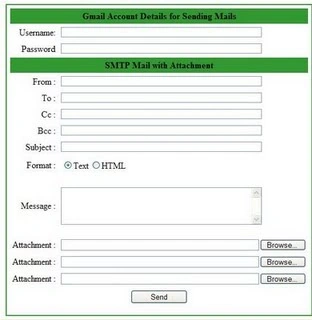
using System.Net.Mail;
using System.IO;
using System.Drawing;
using System;
using System.Drawing;
using System.IO;
using System.Net.Mail;
using System.Web;
namespace SendMailWithAttachment
{
public partial class _Default : System.Web.UI.Page
{
protected void Page_Load(object sender, EventArgs e)
{
}
protected void btnSend_Click(object sender, EventArgs e)
{
try
{
/* Create a new blank MailMessage with the from and to adreesses*/
MailMessage mailMessage = new MailMessage(txtSender.Text, txtReceiver.Text);
/*Checking the condition that the cc is empty or not if not then
* include them
*/
if (txtCc.Text != null && txtCc.Text != string.Empty)
{
mailMessage.CC.Add(txtCc.Text);
}
/*Checking the condition that the Bcc is empty or not if not then
* include them
*/
if (txtBcc.Text != null && txtBcc.Text != string.Empty)
{
mailMessage.Bcc.Add(txtBcc.Text);
}
//Ading Subject to the Mail
mailMessage.Subject = txtSubject.Text;
//Adding the Mail Body
mailMessage.Body = txtBody.Text;
/* Set the properties of the MailMessage to the
values on the form as per the mail is HTML formatted or plain text */
if (rblMailFormat.SelectedItem.Text == "Text")
mailMessage.IsBodyHtml = false;
else
mailMessage.IsBodyHtml = true;
/* We use the following variables to keep track of
attachments and after we can delete them */
string attach1 = null;
string attach2 = null;
string attach3 = null;
/*strFileName has a attachment file name for
attachment process. */
string strFileName = null;
/* Bigining of Attachment1 process &
Check the first open file dialog for a attachment */
if (inpAttachment1.PostedFile != null)
{
/* Get a reference to PostedFile object */
HttpPostedFile attFile = inpAttachment1.PostedFile;
/* Get size of the file */
int attachFileLength = attFile.ContentLength;
/* Make sure the size of the file is > 0 */
if (attachFileLength > 0)
{
/* Get the file name */
strFileName = Path.GetFileName(inpAttachment1.PostedFile.FileName);
/* Save the file on the server */
inpAttachment1.PostedFile.SaveAs(Server.MapPath(strFileName));
/* Create the email attachment with the uploaded file */
Attachment attach = new Attachment(Server.MapPath(strFileName));
/* Attach the newly created email attachment */
mailMessage.Attachments.Add(attach);
/* Store the attach filename so we can delete it later */
attach1 = strFileName;
}
}
/* Attachment-2 Repeat previous step defiend above*/
if (inpAttachment2.PostedFile != null)
{
HttpPostedFile attFile = inpAttachment2.PostedFile;
int attachFileLength = attFile.ContentLength;
if (attachFileLength > 0)
{
strFileName = Path.GetFileName(inpAttachment2.PostedFile.FileName);
inpAttachment2.PostedFile.SaveAs(Server.MapPath(strFileName));
Attachment attach = new Attachment(Server.MapPath(strFileName));
mailMessage.Attachments.Add(attach);
attach2 = strFileName;
}
}
/* Attachment-3 Repeat previous steps step defiend above*/
if (inpAttachment3.PostedFile != null)
{
HttpPostedFile attFile = inpAttachment3.PostedFile;
int attachFileLength = attFile.ContentLength;
if (attachFileLength > 0)
{
strFileName = Path.GetFileName(inpAttachment3.PostedFile.FileName);
inpAttachment3.PostedFile.SaveAs(Server.MapPath(strFileName));
Attachment attach = new Attachment(Server.MapPath(strFileName));
mailMessage.Attachments.Add(attach);
attach3 = strFileName;
}
}
/* Set the SMTP server and send the email with attachment */
SmtpClient smtpClient = new SmtpClient();
// smtpClient.Host = emailServerInfo.MailServerIP;
//this will be the host in case of gamil and it varies from the service provider
smtpClient.Host = "smtp.gmail.com";
//smtpClient.Port = Convert.ToInt32(emailServerInfo.MailServerPortNumber);
//this will be the port in case of gamil for dotnet and it varies from the service provider
smtpClient.Port = 587;
smtpClient.UseDefaultCredentials = true;
//smtpClient.Credentials = new System.Net.NetworkCredential(emailServerInfo.MailServerUserName, emailServerInfo.MailServerPassword);
smtpClient.Credentials = new System.Net.NetworkCredential(txtUserName.Text, txtPassword.Text);
//this will be the true in case of gamil and it varies from the service provider
smtpClient.EnableSsl = true;
smtpClient.Send(mailMessage);
/* Delete the attachements if any */
if (attach1 != null)
File.Delete(Server.MapPath(attach1));
if (attach2 != null)
File.Delete(Server.MapPath(attach2));
if (attach3 != null)
File.Delete(Server.MapPath(attach3));
/* clear the controls */
txtSender.Text = string.Empty;
txtReceiver.Text = string.Empty;
txtCc.Text = string.Empty;
txtBcc.Text = string.Empty;
txtSubject.Text = string.Empty;
txtBody.Text = string.Empty;
txtUserName.Text = string.Empty;
/* Dispaly a confirmation message to the user. */
lblMessage.Visible = true;
lblMessage.ForeColor = Color.Black;
lblMessage.Text = "Message sent.";
}
catch (Exception ex)
{
/* Print a message informing the
user about the exception that was risen */
lblMessage.Visible = true;
lblMessage.ForeColor = Color.Red;
lblMessage.Text = ex.ToString();
}
}
}
}
Now you can debug the application; use F5 to launch the application fill the details like username of Gmail account and Password. The mail address to send the mails, the subject , the mail body and attach the files if necessary. Click on send button and the mail will be sent.
Neeraj GuptaPosted Dec 11, 2010, 5:54 AM
Hello mam , I send mail sucessfully but when i send a mail with aatachment then it genrate a error .it cant delte the attach file from server . plz help
Abhimanyu K VatsaPosted May 30, 2010, 10:35 AM
hello sir, it is really nice and useful article but I am facing 4 errors as given below: ****************************************** Error 1 'ASP.default_aspx.GetTypeHashCode()': no suitable method found to override c:\WINDOWS\Microsoft.NET\Framework\v2.0.50727\Temporary ASP.NET Files\sendemailattachementsfromanyemailid\d7fe77ef\6cfcb158\App_Web_pi98-vh7.0.cs 1472 Error 2 'ASP.default_aspx.ProcessRequest(System.Web.HttpContext)': no suitable method found to override c:\WINDOWS\Microsoft.NET\Framework\v2.0.50727\Temporary ASP.NET Files\sendemailattachementsfromanyemailid\d7fe77ef\6cfcb158\App_Web_pi98-vh7.0.cs 1476 Error 3 'ASP.default_aspx' does not implement interface member 'System.Web.IHttpHandler.IsReusable' c:\WINDOWS\Microsoft.NET\Framework\v2.0.50727\Temporary ASP.NET Files\sendemailattachementsfromanyemailid\d7fe77ef\6cfcb158\App_Web_pi98-vh7.0.cs 241 Error 4 Make sure that the class defined in this code file matches the 'inherits' attribute, and that it extends the correct base class (e.g. Page or UserControl). C:\Documents and Settings\Administrator\Desktop\SendEmailAttachementsFROManyEmailID\Default.aspx.cs 25 33 C:\...\SendEmailAttachementsFROManyEmailID\ Help me sir
irfanPosted May 17, 2010, 9:21 AM
nice yaar
Apurba sahaPosted Nov 30, 2009, 12:59 AM
Hi I wamnt to send thousand of mail automatically.I have written the below code but it's throwing exception " Operation Timed Out".I am able to send mail from my outlook configured with gmail Account. MY code as below. try { System.Net.Mail.MailMessage mail = new System.Net.Mail.MailMessage(); System.Net.NetworkCredential cred = new System.Net.NetworkCredential(UserEmailTxt.Text, EmailPwdTxt.Text); mail.To.Add(To.Trim());//"[email protected]" mail.Subject = Sub.Trim();//"Test Subject"; mail.From = new System.Net.Mail.MailAddress(UserEmailTxt.Text); mail.IsBodyHtml = true; mail.Body = Body.Trim();//"This is a sample text message"; System.Net.Mail.SmtpClient smtp = new System.Net.Mail.SmtpClient(SMTPSrvTxt.Text.Trim()); smtp.UseDefaultCredentials = true; smtp.EnableSsl = true; smtp.Credentials = cred; smtp.Port = Int32.Parse(SMTPPortTxt.Text.Trim()); //587; smtp.Send(mail); MessageBox.Show("mail sent Successfully"); LogScreenMessage("Mail has been sent to::" + To); return true; } catch (Exception ex) { this.LogScreenMessage("Mail Sent failed::"+ex.Message); return false; } Please suggest me.. Regards Apurba
Nikhil KumarPosted Sep 14, 2009, 7:10 AM
Very nice article Meetu ...
satya narayanaeditedPosted Aug 26, 2009, 12:12 PMEdited Aug 26, 2009, 12:13 PM
It is really great !
nazir kPosted Aug 17, 2009, 2:55 AM
nice article!!! keep writing.